
Smart irrigation for Raspberry Pi — an app built for Orbit OS.



Sprinqua turns a Raspberry Pi and a relay board into a self-hosted irrigation controller. Schedule your zones, let it skip watering when it rains, and connect it to Home Assistant — all from a web page on your local network. No cloud account, no subscription, no data leaving your home.
It runs on Orbit OS, the platform for embedded Linux devices, and installs in one click from the Orbit OS Store.
- Zone control — turn zones on and off, run a short pulse on demand, with a safety auto-off per zone
- Watering programs — one start time, zones running one after the other, each with its own duration and an optional soak pause in between
- Smart Watering — powered by Open-Meteo, free and with no API key:
- Skip protection — skip a run when rain or frost is forecast above your threshold
- Rain delay — pause all programs for a number of days after significant rain, with a one-tap override
- Duration adjustment — a fixed percentage, a monthly curve, the Zimmerman method, or a FAO-56 reference ETo baseline calculated from 12 months of local weather
- Winter Mode — pause the whole system for the off-season without touching your schedules
- Home Assistant — MQTT auto-discovery: every zone appears as a switch; choose Standalone or Home Assistant Managed mode
- History — every run logged, including skipped ones, with a 24-hour timeline
- Backup and restore of the full configuration
- Six languages — English, Portuguese, Spanish, French, German, Italian
- Exclusive zone mode — optionally only one zone runs at a time
| Board | Model | Channels |
|---|---|---|
| SB Components | 14088 | 2 |
| Waveshare | 11638 | 3 |
| Seengreat | 250509 | 3 |
| Keyestudio | KS0212 | 4 |
| Seengreat | 220741 | 4 |
| BC Robotics | RAS-193 | 4 |
| Waveshare RPi Zero | 20863 | 6 |
| Waveshare | 15423 | 8 |
| Seengreat | 260115 | 8 |
Don't see your board? Ask for it and we'll look into adding it.
You need a Raspberry Pi 3, 4, 5 or Zero 2 W running Orbit OS, and one of the relay boards above.
From the Orbit OS Store (recommended): install Sprinqua on your device in one click.

The step-by-step walkthrough, from a fresh Raspberry Pi to a working controller, is in the install guide.
- Open Sprinqua from the Orbit OS Launcher on your device (
http://<DEVICE_IP>). - Follow the setup wizard: pick your relay board, name your zones, and test each relay.
- Create a watering program, turn on Smart Watering, and you're done.
To connect Home Assistant, enable MQTT in Settings and point it at your broker. The zones show up in Home Assistant on their own.
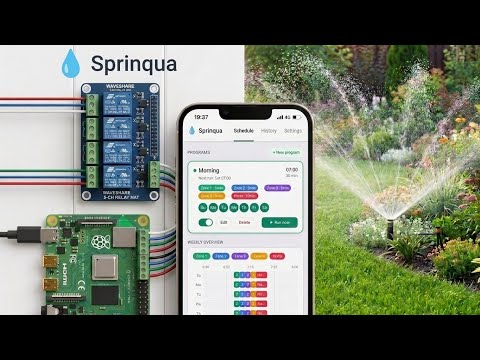
Sprinqua is an Orbit OS app. Orbit OS runs on the Raspberry Pi, on top of its Linux, and provides what Sprinqua needs around the application itself:
- Installation and updates from the Orbit OS Store, in one click
- Access to the relay boards through the Orbit OS API
- A place on the device — Sprinqua opens from the Orbit OS Launcher
That is why there is no Docker image to pull and no service to set up by hand.
Recommended: Orbit Studio (VS Code).
You need VS Code with the Orbit Studio extension and Go 1.25 or newer installed (go on your PATH).
- Clone the repository and open the folder in VS Code with the Orbit Studio extension:
git clone https://github.com/Sprinqua/sprinqua
code sprinqua
- In the Orbit sidebar, run Add / Update SDK and set your device's IP.
- Use Run to try it live against a device in Developer Mode, then Build + Deploy to install the signed
.orb.
| Path | What |
|---|---|
cmd/sprinqua/ |
entry point, metadata.json (manifest & permissions), launcher icon |
internal/board/ |
relay board definitions |
internal/zone/, internal/scheduler/ |
zone control and watering programs |
internal/weather/, internal/adjustment/ |
weather data and Smart Watering calculations |
internal/mqtt/ |
MQTT and Home Assistant discovery |
internal/history/, internal/config/ |
run history and configuration |
internal/web/, internal/i18n/ |
web UI and translations |
web/ |
the sprinqua.com website |
The UI is rendered on the device with Go templates, HTMX and Tailwind CSS; there is no front-end build step.
Contributions are welcome: add your relay board, translate the UI to a new language, or fix a bug.
- Questions, ideas and board requests: Discussions
- Bugs: Issues
Sprinqua is growing and we want more people building it with us. If you'd like to contribute regularly and become part of the team, we'd love to hear from you.
Useful experience: Go, web interfaces (HTML, HTMX), MQTT and Home Assistant, or hands-on work with Raspberry Pi and relay hardware. You don't need all of it; knowing irrigation or gardening well counts too.
How to reach us: start a thread in Discussions or use the contact form on the website. Tell us what you'd like to work on.
Website · Install guide · Orbit OS Store · Orbit OS · Demo video
GPL-3.0 — see LICENSE.