
Sprinqua turns a Raspberry Pi and a relay board into a self-hosted irrigation controller.
Schedule your zones, skip watering when it rains, and connect to Home Assistant — all from a web page on your local network.




- Zone control — turn zones on and off, run a short pulse, with a safety auto-off per zone
- Scheduling — multi-zone watering programs by day of the week, with soak pauses between zones
- Smart Watering — skips a run when rain or frost is forecast, and adjusts the duration to the weather (fixed percentage, monthly curve, Zimmerman or FAO-56 reference ETo), using free Open-Meteo data with no API key
- Home Assistant — every zone appears automatically as a switch over MQTT; choose Standalone or Home Assistant Managed mode
- History — a log of every run (manual, scheduled, MQTT or skipped) with a 24-hour timeline
- Six languages — English, Portuguese, Spanish, French, German and Italian
- No cloud — no account, no subscription, no data leaving your home
Sprinqua is an app for Orbit OS, the platform for embedded Linux devices. Orbit OS runs on the Raspberry Pi, on top of its Linux, and gives Sprinqua what a product needs beyond the app itself:
- Installation in one click from the Orbit OS Store, and updates the same way
- Access to the hardware — the relay boards, over GPIO and I²C — through the Orbit OS API
- A place on the device — Sprinqua opens from the Orbit OS Launcher, behind the device login
That is why there is no Docker image to pull and no service to configure by hand: install Orbit OS on the Pi, then install Sprinqua from the Store.
| 1 · Install Orbit OS | 2 · Install Sprinqua | 3 · Run the wizard |
|---|---|---|
| On a Raspberry Pi 3, 4, 5 or Zero 2 W — guide | From the Orbit OS Store, in one click | Pick your relay board, name the zones, test each relay |
The full walkthrough is in the install guide.
| Board | Model | Channels |
|---|---|---|
| SB Components | 14088 | 2 |
| Waveshare | 11638 | 3 |
| Seengreat | 250509 | 3 |
| Keyestudio | KS0212 | 4 |
| Seengreat | 220741 | 4 |
| BC Robotics | RAS-193 | 4 |
| 52Pi (I²C, stackable) | EP-0099 | 4 / 8 / 12 / 16 |
| Waveshare RPi Zero | 20863 | 6 |
| Waveshare | 15423 | 8 |
| Seengreat | 260115 | 8 |
Don't see your board? Tell us and we'll look into adding it.
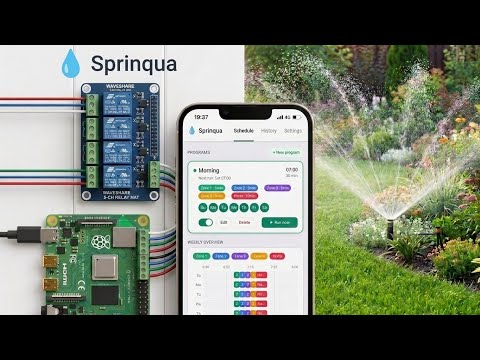
Sprinqua is free and open source under the GPL-3.0 license. Fork it, add your board, translate it to a new language.
- Source code: Sprinqua/sprinqua
- Report a problem or ask for a board: open an issue
Sprinqua is growing and we want more people building it with us. If you'd like to contribute regularly and become part of the team, we'd love to hear from you.
Useful experience: Go, web interfaces (HTML, HTMX), MQTT and Home Assistant, or hands-on work with Raspberry Pi and relay hardware. You don't need all of it; knowing irrigation or gardening well counts too.
How to reach us: start a thread in Discussions or use the contact form on the website. Tell us what you'd like to work on.
Website · Install guide · Orbit OS Store · Orbit OS · Demo video