


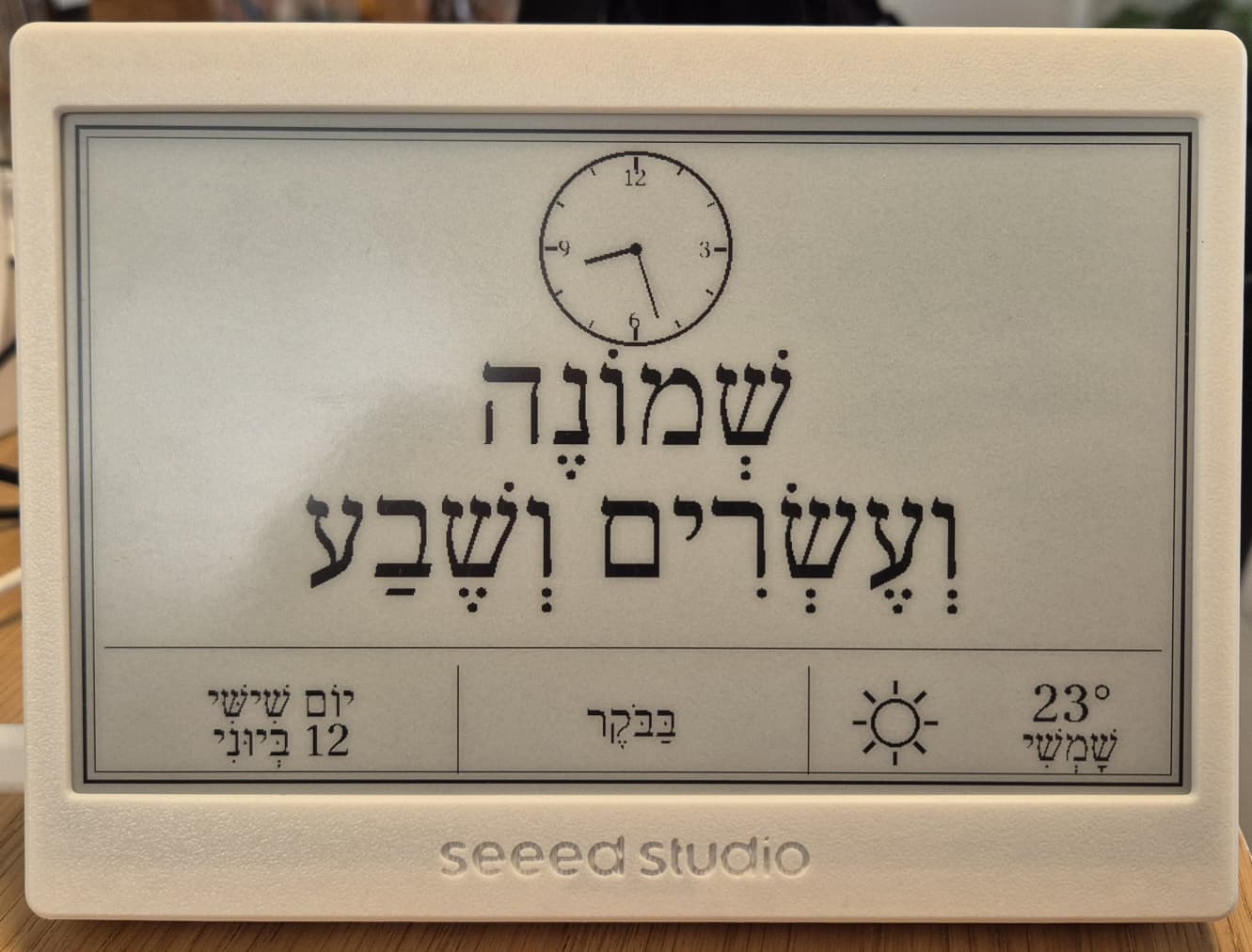
A Hebrew word-clock server that generates 800×480 black-and-white PNG images for e-paper displays. The server expresses the current Israel time in natural written Hebrew, together with an analog clock face, the day and date (Gregorian or Jewish calendar), and a live weather icon. A companion Arduino sketch drives the image onto a Waveshare 7.5" V2 e-paper panel via a Seeed XIAO ESP32C3.
The server is a small FastAPI application (run it with Docker, or on Cloudflare Workers using the TypeScript port in worker/) that also ships a browser preview page, so you can pick a font, location and calendar and see the result live. The device itself only needs the base URL https://<host>/clock.png; font, location and calendar are set in its own config UI.
- Features
- How It Works
- Display Modes
- Web Preview Page
- API
- Available Fonts
- Running with Docker
- Configuration
- Running Locally
- Deploying to Render
- Deploying to Cloudflare Workers
- ESP32 Firmware
- Security Notes
- Troubleshooting
- Development
- Credits
- Contributing
- License
- Natural Hebrew time: every minute of the day is written out in vocalized Hebrew (with niqqud), e.g. שֶׁבַע וָרֶבַע plus a time-of-day word such as בָּעֶרֶב.
- Analog clock face drawn above the text.
- Day and date: Gregorian (day name + day + Hebrew month name) or Jewish calendar (Hebrew day, month and year from hebcal.com).
- Live weather: temperature, a Hebrew condition word and a drawn icon (sun, sun + cloud, cloud, rain, snow, thunder) from wttr.in, no API key required.
- Five selectable Hebrew font names, four of which currently have working font files (see Available Fonts).
- Night image (
sleeptime=1) and a built-in morning quiet screen (06:00–07:30). - E-paper-ready output: 800×480, 1-bit PNG, thresholded without dithering.
- Browser preview page with a copyable device URL, plus
robots.txt,sitemap.xmland Open Graph tags. - ESP32-C3 firmware (
sketch/hebclk.ino) with a captive-portal Wi-Fi setup, an on-device configuration page, a sleep schedule and optional DS3231 RTC support. - Multi-arch Docker image (
linux/amd64,linux/arm64) on Docker Hub, and arender.yamlblueprint for Render. - Two deployment targets from one repository: the Python/Docker server, and a TypeScript Cloudflare Worker (
worker/) that serves the same routes and the same preview page.
- The ESP32 fetches a PNG from the server at a configurable interval.
- The server renders the current Israel time as written Hebrew words (e.g. שֶׁבַע וָרֶבַע בָּעֶרֶב, "quarter past seven in the evening"), draws an analog clock and a weather icon, and returns a 1-bit PNG sized exactly 800×480.
- The ESP decodes the PNG in RAM and writes it to the e-paper display using a partial refresh.
flowchart LR
ESP["XIAO ESP32C3<br/>+ Waveshare 7.5" V2"] -- "GET /clock.png?font=…&location=…&calendar=…&sleeptime=…" --> S["hebrew-clock<br/>(FastAPI + Pillow)"]
S -- "800×480 1-bit PNG" --> ESP
S -- "current weather (cached 30 min)" --> W["wttr.in"]
S -- "Hebrew date (calendar=jewish, cached 24 h)" --> H["hebcal.com"]
B["Browser"] -- "GET / (preview page)" --> S
- Hours are written on a 12-hour clock (אַחַת … שְׁתֵּים עֶשְׂרֵה), followed by the minutes (וְדַקָּה אַחַת, וָרֶבַע for :15, וּשְׁלוֹשִׁים for :30, and so on). On the full hour only the hour is shown.
- Long phrases are split onto two lines automatically, and each line is shrunk to fit the display width.
- The time-of-day word is shown in the centre cell of the bottom bar:
| Israel time | Word |
|---|---|
| 06:00–11:59 | בַּבֹּקֶר |
| 12:00–15:59 | בַּצָּהֳרַיִם |
| 16:00–17:59 | אַחַר הַצָּהֳרַיִם |
| 18:00–20:59 | בָּעֶרֶב |
| 21:00–02:59 | בַּלַּיְלָה |
| 03:00–05:59 | לִפְנוֹת בֹּקֶר |
The server adds DISPLAY_LAG seconds (default 8) to the current time before rendering, so the minute shown matches the moment the e-paper refresh finishes.
The main view shows:
- Analog clock at the top centre
- Hebrew time in large text (hour + minute phrase)
- Day name and date in the bottom-left cell
- Time-of-day period (בַּבֹּקֶר, בָּעֶרֶב, …) in the centre cell
- Weather (icon + temperature + condition) in the bottom-right cell; the cell stays empty if no weather data could be fetched yet
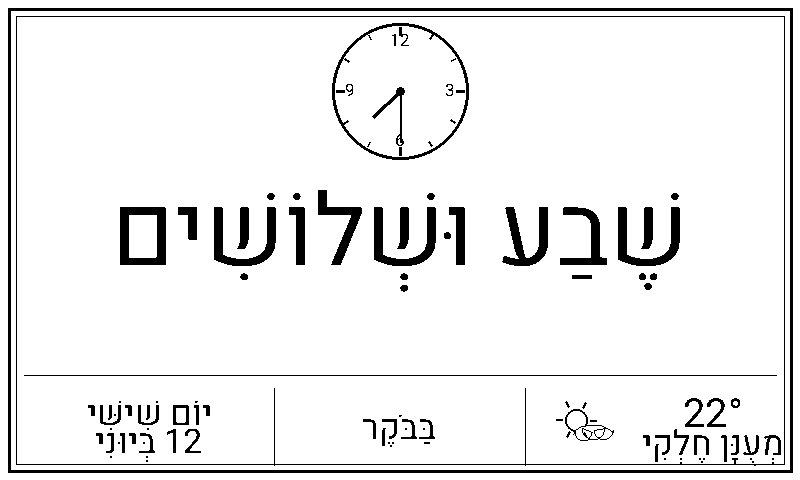 Heebo-Bold font — Raanana, 22°C partly cloudy
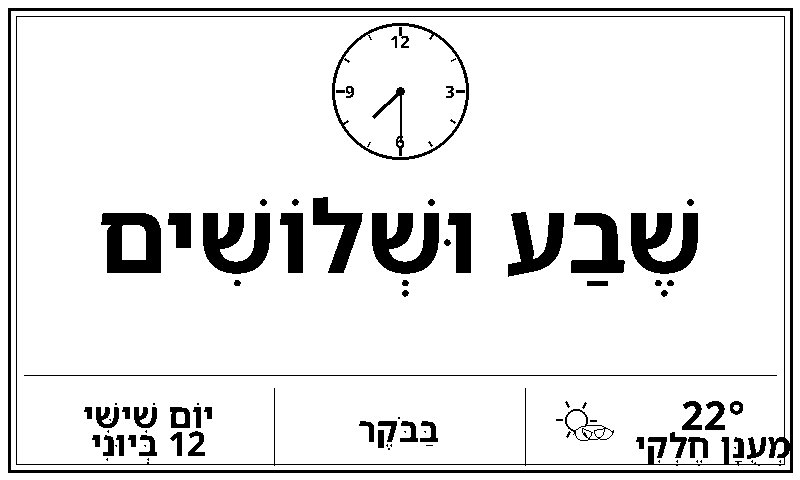 NotoSansHebrew-Bold font — Tel Aviv
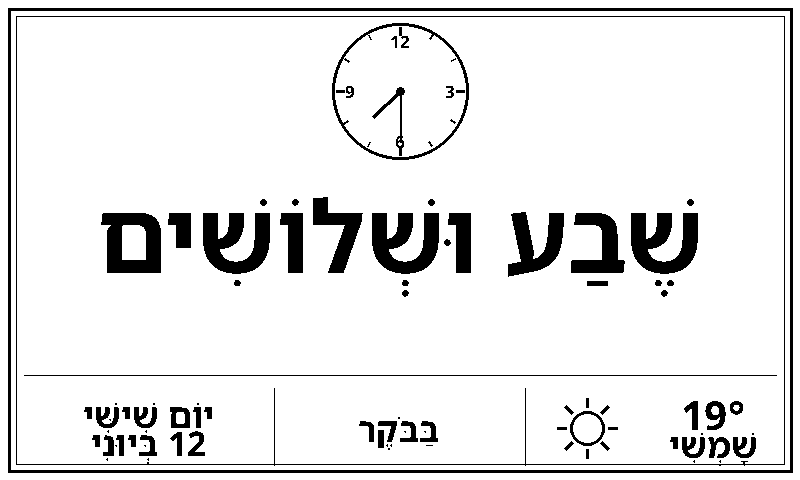 Requested with
font=FrankRuhlLibre-Bold (Jerusalem, 19°C sunny); rendered in NotoSansHebrew-Bold because the bundled FrankRuhlLibre-Bold.ttf is broken
Between 06:00 and 07:30 Israel time the server returns a minimal "do not disturb" screen (לֹא לְהָעִיר אַף אֶחָד!) instead of the clock, so early risers are not bothered by the refresh flicker. The window is fixed in the server code and applies whenever sleeptime is not 1.
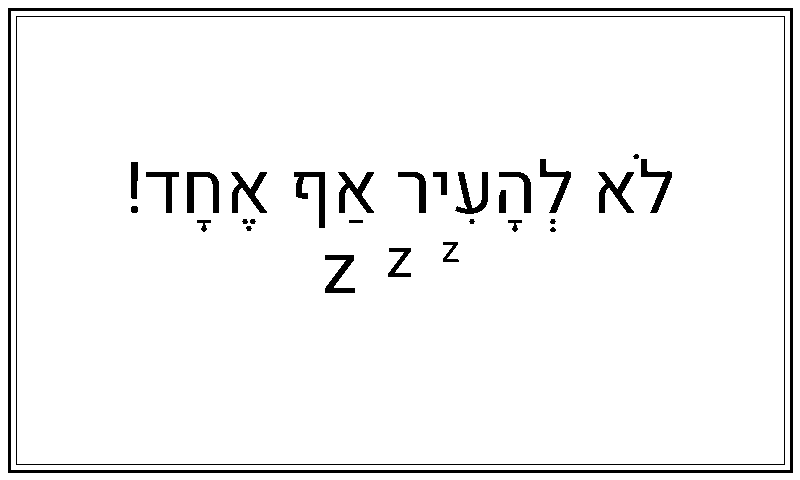 Heebo-Bold font
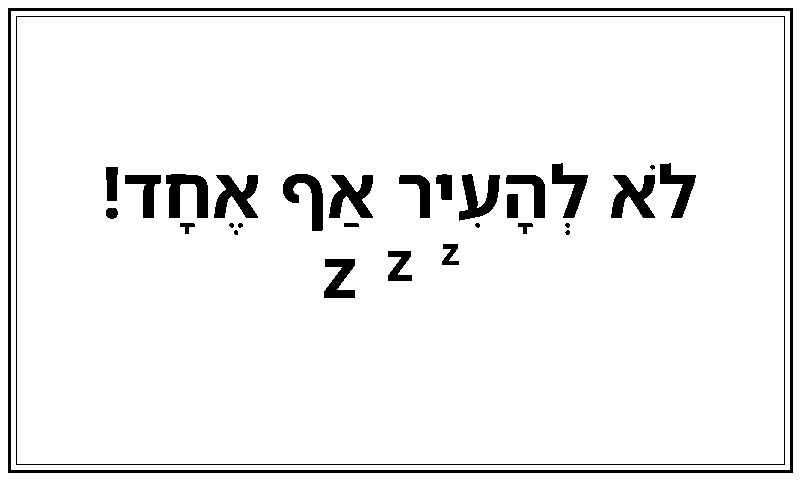 NotoSansHebrew-Bold font
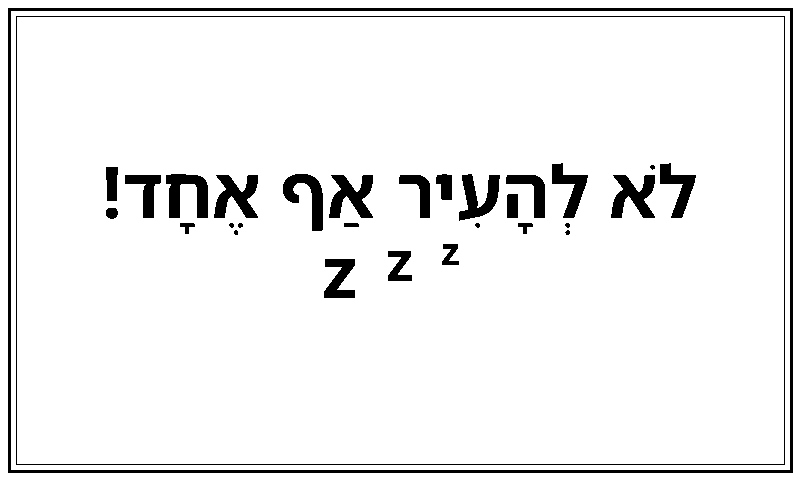 Requested with
font=FrankRuhlLibre-Bold; rendered in NotoSansHebrew-Bold (fallback)
When calendar=jewish is passed, the bottom-left cell shows the full Hebrew date (day numeral, month name and Hebrew year), fetched from the hebcal.com converter API and cached for 24 hours. If hebcal.com cannot be reached, the Gregorian date is shown instead.
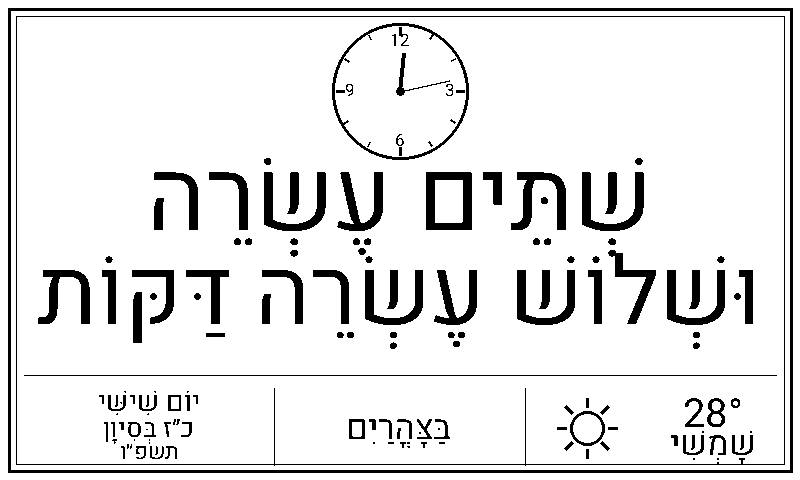 Hebrew date: כ״ז בְּסִיוָן תשפ״ו
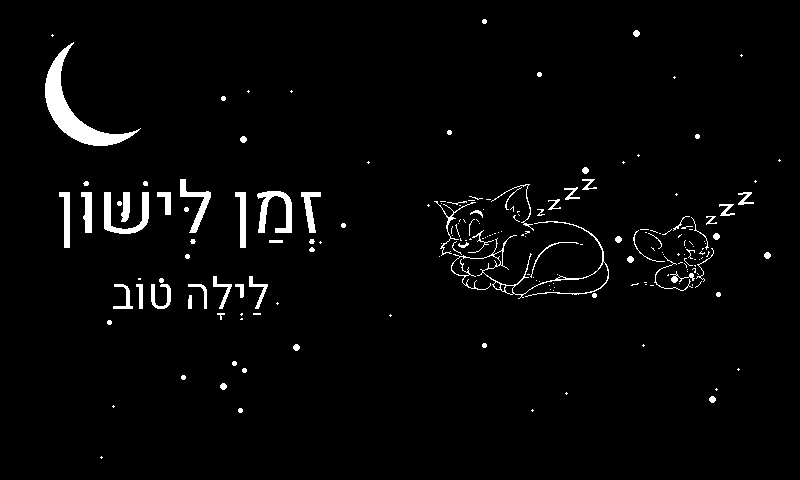
When sleeptime=1 is sent by the ESP (during its configured sleep window), the server returns a dark star-field image with a moon, the sleeping.png illustration and the Hebrew message זְמַן לִישׁוֹן / לַיְלָה טוֹב. If sleeping.png is missing from FONT_DIR, the image is rendered without the illustration.
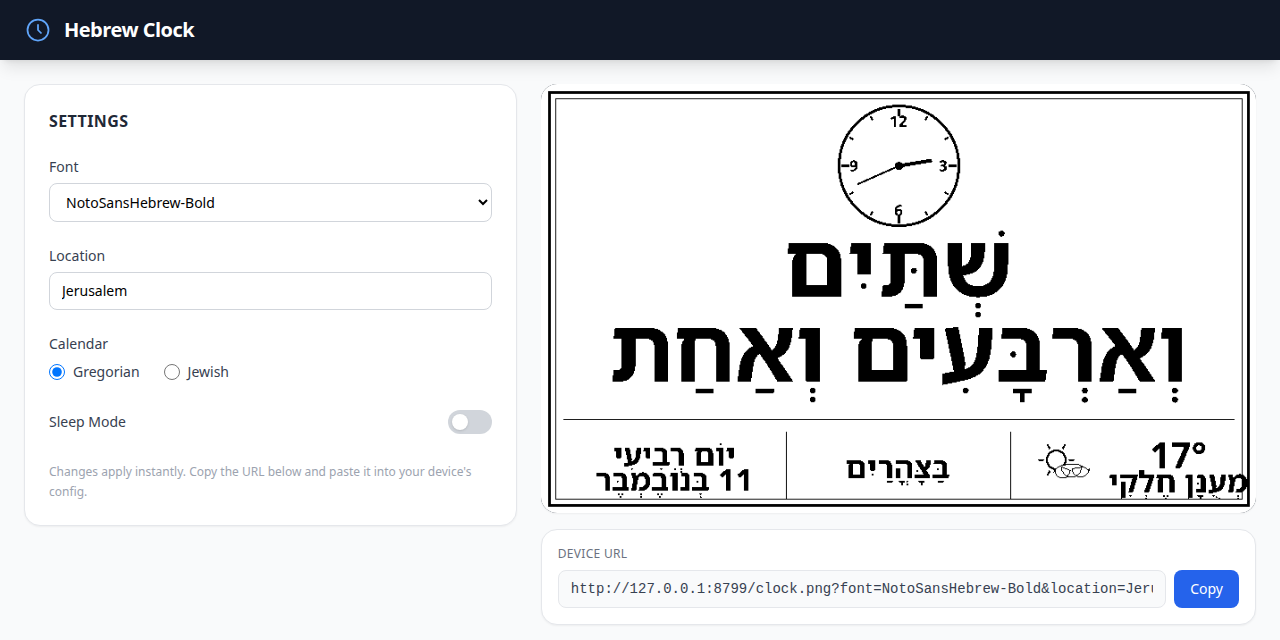
Open http://<host>:8765/ in a browser to get a settings panel (font, location, calendar, sleep-mode toggle) with a live preview of the rendered image and a Device URL box with a Copy button.
For the device, only the base URL matters: set the Image URL in the ESP32 configuration UI to https://<host>/clock.png. The sketch always appends its own font, sleeptime, location and calendar parameters (and the last value of a repeated parameter wins), so choose those in the device config UI rather than in the URL.
The page accepts the same font, location and calendar query parameters to pre-fill the form, e.g. /?font=Heebo-Bold&location=Jerusalem&calendar=jewish.
| Method | Path | Description |
|---|---|---|
GET |
/clock.png, /clock |
The clock image (see parameters below). |
GET |
/ |
HTML preview page (not an image). |
GET |
/health |
Health check, returns plain-text OK. |
GET |
/robots.txt |
Robots file pointing to the sitemap. |
GET |
/sitemap.xml |
Sitemap of preview-page URLs for every font × city × calendar. |
GET |
/api/docs |
Interactive Swagger UI (OpenAPI schema at /openapi.json). |
GET /clock.png?font=<name>&sleeptime=<0|1>&location=<city>&calendar=<gregorian|jewish>
| Parameter | Default | Description |
|---|---|---|
font |
NotoSansHebrew-Bold |
Hebrew font. See Available Fonts. Unknown names fall back to the default. |
sleeptime |
0 |
Set to 1 to render the night image. Any other value renders the clock. |
location |
Tel Aviv |
City passed to the weather service. |
calendar |
gregorian |
gregorian for day + Gregorian month; jewish for Hebrew date + year (fetched from hebcal.com). Any other value is treated as gregorian. |
Response: image/png, 800×480, 1-bit, Cache-Control: no-cache.
# clock.example.com is a placeholder; replace it with your own server

# Heebo-Bold, Raanana, normal mode
https://clock.example.com/clock.png?font=Heebo-Bold&sleeptime=0&location=Raanana

# Jewish calendar
https://clock.example.com/clock.png?font=Heebo-Bold&sleeptime=0&location=Raanana&calendar=jewish

# Night/sleep image
https://clock.example.com/clock.png?font=Heebo-Bold&sleeptime=1

# Self-hosted
curl -o clock.png "http://localhost:8765/clock.png?font=FrankRuhlLibre&location=Jerusalem"
| Font name | Style |
|---|---|
NotoSansHebrew-Bold |
Clean modern sans-serif (default) |
Heebo-Bold |
Contemporary sans-serif (the bundled file is the Heebo variable font, which renders at its default Regular weight) |
FrankRuhlLibre-Bold |
Currently renders as NotoSansHebrew-Bold: the bundled FrankRuhlLibre-Bold.ttf is a broken 14-byte file (404: Not Found), so the server falls back |
FrankRuhlLibre |
Classic serif, regular weight |
DavidLibre-Bold |
Traditional Hebrew typeface |
Font files (.ttf) are loaded from the directory set by the FONT_DIR environment variable (default: the project root). Four working font files are included; FrankRuhlLibre-Bold.ttf is broken (see above). If the requested font file is missing or cannot be loaded, the server silently falls back to NotoSansHebrew-Bold, then FrankRuhlLibre, then Pillow's built-in font, which has no Hebrew glyphs. The fonts found are logged at startup.
A multi-arch image (linux/amd64, linux/arm64) is published on Docker Hub as techblog/hebrew-clock, with latest and date-based YYYY.M.PATCH tags.
docker run -d --name hebrew-clock -p 8765:8765 \
  -e DISPLAY_LAG=8 \
  --restart unless-stopped \
techblog/hebrew-clock:latest# docker-compose.yml (already included in the repo)
services:
hebclk:
build: .
ports:
- "8765:8765"
environment:
PORT: 8765
DISPLAY_LAG: 8 # seconds added to displayed time (compensates for refresh delay)
LOG_LEVEL: info
restart: unless-stoppeddocker compose up -dTo use the published image instead of building, replace build: . with image: techblog/hebrew-clock:latest.
The image runs as a non-root user, listens on port 8765, and has a HEALTHCHECK on /health. The Dockerfile copies the *.ttf fonts and sleeping.png from the project root into /app/ (the default FONT_DIR), and installs Pillow with libraqm, which is required to shape right-to-left Hebrew text correctly.
Settings are read from environment variables (or a .env file in the working directory for the settings marked below).
| Variable | Default | .env |
Description |
|---|---|---|---|
DISPLAY_LAG |
8 |
yes | Seconds added to Israel time before rendering (accounts for e-paper refresh time). |
FONT_DIR |
project root | yes | Directory containing the .ttf files and sleeping.png. |
GTAG_ID |
(unset) | yes | Google Analytics measurement ID; when set, the preview page includes the gtag script. |
FORWARDED_ALLOW_IPS |
* |
yes | Comma-separated IP addresses (or *) of reverse proxies trusted for X-Forwarded-* headers. * suits PaaS hosts such as Render; restrict it when self-hosting behind a known proxy. The pinned uvicorn 0.30.6 matches exact IPs only, not CIDR ranges. |
WTTR_URL |
https://wttr.in |
no | Base URL of the wttr.in-compatible weather service (for example a self-hosted instance). |
PORT |
8765 |
yes | Listening port, used only when starting with python -m app.main. The Docker image always listens on 8765, and with uvicorn you pass --port yourself. |
LOG_LEVELappears indocker-compose.ymlandrender.yaml, but the application does not currently read it; Loguru logs at its default level.
Timezone: the server does not use the host's timezone. It converts UTC to Israel time itself, so the container needs no TZ setting. The conversion is approximate: it uses UTC+3 for the whole of March through October and UTC+2 otherwise, so the server can be an hour off in March (before DST starts) and in late October (after DST ends). The ESP32 sketch uses the correct Israel DST rule for its own sleep schedule.
Caching: weather is cached per location for 30 minutes; after a failed request the server waits 10 minutes before retrying and keeps serving the last good value. The Hebrew date is cached per day for 24 hours.
The variables above apply to the Docker/Python server. On Cloudflare Workers only
DISPLAY_LAG,WTTR_URLandGTAG_IDexist, set as[vars]inworker/wrangler.toml(see Deploying to Cloudflare Workers).
Requires Python 3.12 (the version used by the Docker image) and a Pillow build with libraqm for correct Hebrew shaping (on Debian/Ubuntu: apt install libraqm0).
pip install -r requirements.txt
uvicorn app.main:app --host 0.0.0.0 --port 8765
# or: python -m app.main   (uses PORT, default 8765)
Then open http://localhost:8765/ for the preview page or http://localhost:8765/clock.png for the raw image.
Render is a managed cloud platform that can run the server for free with zero infrastructure setup.
Render deploys directly from the repository, so the Hebrew font .ttf files and sleeping.png must be in the repo root. They are already included in this repository. If you remove some, keep NotoSansHebrew-Bold.ttf (or at least FrankRuhlLibre.ttf): these are the fallback fonts, and without them the server uses Pillow's default font, which has no Hebrew glyphs.
NotoSansHebrew-Bold.ttf   ← recommended minimum
Heebo-Bold.ttf
FrankRuhlLibre-Bold.ttf   ← currently a broken file
FrankRuhlLibre.ttf
DavidLibre-Bold.ttf
sleeping.png
The repo includes a render.yaml blueprint. Click the button below, connect your GitHub account, and Render will pre-fill all settings:


-
Log in to render.com and click New → Web Service.
-
Connect your GitHub account and select the
hebrew-clockrepository. -
Fill in the service settings:
Field Value Name hebrew-clock(or any name you like)Runtime Python 3Build Command pip install -r requirements.txtStart Command uvicorn app.main:app --host 0.0.0.0 --port $PORT -
Under Environment Variables, add:
Key Value Notes FONT_DIR.Repo root, where the .ttffiles liveDISPLAY_LAG8Seconds ahead to render (adjust to match your display's refresh time) -
Set the Health Check Path to
/health. -
Click Create Web Service. Render will build and deploy; the service URL appears in the dashboard.
The native Python runtime may not provide libraqm. If the Hebrew text comes out in the wrong order, deploy the Docker image instead (Render also supports Docker-based services).
Once the service is live, copy its URL from the Render dashboard (e.g. https://hebrew-clock.onrender.com), append /clock.png, and paste https://hebrew-clock.onrender.com/clock.png into the Image URL field in the e-paper config UI. Set the font, location and calendar in the device config UI; the sketch appends those parameters itself.
Free-tier note: Render's free plan spins down a service after 15 minutes of inactivity. Because the ESP32 fetches an image every 60 seconds by default, the service stays warm during normal use.
The worker/ directory is a TypeScript Cloudflare Worker that serves the same routes as the Docker server (/, /clock, /clock.png, /robots.txt, /sitemap.xml, /health). The Docker image is unchanged and both targets live side by side.
Pillow and libraqm are C extensions and cannot run on Workers, so the Worker draws the image differently: it builds an SVG, rasterizes it with @resvg/resvg-wasm (built on resvg, which shapes Hebrew and niqqud) and writes a 1-bit PNG itself. Everything else is shared with the Python app:
- the web page is the same
app/templates/index.html, and/static/*is served fromapp/static/; - the fonts are the same
.ttffiles in the repository root; - the Hebrew tables are exported from the Python modules into
worker/src/tables.jsonbyscripts/export_tables.py(Python stays the source of truth; the deploy workflow fails if the file is stale); - the Israel time rule (UTC+3 for March through October, UTC+2 otherwise) and the display lag are ported as is, so both targets show the same time.
| Docker (Python) | Cloudflare Worker | |
|---|---|---|
| Rendering | Pillow + libraqm | resvg-wasm |
| Output | 800×480, 1-bit PNG | 800×480, 1-bit PNG (visually the same, not byte-identical) |
| Caching | in-process, per container | Workers Cache API |
/api/docs (Swagger) |
yes | no |
| Settings | environment variables / .env |
[vars] in worker/wrangler.toml |
The Worker's output is compared in its tests against images rendered by the Python app. A typical render differs from the Pillow image in 1-2% of pixels, because anti-aliasing and glyph hinting differ.
- A Cloudflare account and Node.js 22.12 or newer (the repository's CI uses Node 24).
- The Workers Paid plan is recommended. In local testing one image takes about 17 ms in total, which may exceed the 10 ms CPU limit of the Free plan. The bundle is about 2.9 MiB (1.2 MiB gzipped).
- Use a custom domain or route. Cloudflare's Cache API only stores responses on custom domains, not on
*.workers.dev, so onworkers.devevery request calls wttr.in.
cd worker
npm ci
npx wrangler login
npx wrangler deploy
Then open the Worker URL; the device URL is https://<your-worker>/clock.png.
Edit [vars] in worker/wrangler.toml (or set them in the Cloudflare dashboard):
| Variable | Default | Description |
|---|---|---|
DISPLAY_LAG |
8 |
Seconds added to Israel time before rendering. |
WTTR_URL |
https://wttr.in |
Base URL of the wttr.in-compatible weather service. |
GTAG_ID |
(empty) | Google Analytics measurement ID; when set, the preview page includes the gtag script. |
PORT, FONT_DIR and FORWARDED_ALLOW_IPS do not apply on Workers. A location longer than 100 characters, made only of dots, or containing control characters is rejected with HTTP 400.
cd worker
npm ci
npm run dev        # wrangler dev, serves http://127.0.0.1:8787 (use --port to change)
npm run typecheck
npm test           # runs in the Workers runtime
To refresh the data shared with the Python app after changing it:
python3 scripts/export_tables.py             # Hebrew tables -> worker/src/tables.json
python3 scripts/export_tables.py --check     # CI: fail if tables.json is stale
python3 scripts/bake_sleeping.py             # sleeping.png -> worker/assets/sleeping-night.png (needs Pillow)
python scripts/gen_golden.py # re-render the Python golden images used by the tests (needs the app dependencies)The manual Deploy Cloudflare Worker workflow (.github/workflows/deploy-worker.yml) checks the tables, type-checks, runs the tests and runs wrangler deploy. It needs two repository secrets: CLOUDFLARE_API_TOKEN (permission Workers Scripts: Edit) and CLOUDFLARE_ACCOUNT_ID.
The client firmware is sketch/hebclk.ino, an Arduino sketch for a Seeed XIAO ESP32C3 driving a Waveshare 7.5" V2 (800×480, black/white) panel through GxEPD2 (GxEPD2_750_T7).
| XIAO pin | e-paper pin |
|---|---|
| D2 | CS |
| D3 | DC |
| D0 | RST |
| D1 | BUSY |
| 3V3 | VCC |
| GND | GND |
| SCK | CLK |
| MOSI | DIN |
Libraries: GxEPD2, WiFiManager (tzapu), PNGdec, Adafruit GFX and RTClib (Adafruit).
In short: on boot the device opens the EPaper-Setup Wi-Fi access point for credentials and the image URL, then syncs time over NTP (Israel timezone with DST), serves a configuration page on port 80 (http://<device-ip>/) and fetches <Image URL>?font=…&sleeptime=…&location=…&calendar=… every N seconds (default 60, fixed at 300 s inside the sleep window). Settings are stored in flash (Preferences).
HTTPS required: the sketch always fetches through
WiFiClientSecure, so a plainhttp://Image URL will most likely fail. When self-hosting, put the server behind a TLS reverse proxy and use anhttps://URL.
See epaper.md for full instructions on:
- Adding the ESP32 board to Arduino IDE
- Installing required libraries
- First-boot Wi-Fi setup
- Web configuration UI reference
- Optional DS3231 RTC module (keeps the sleep schedule working without NTP)
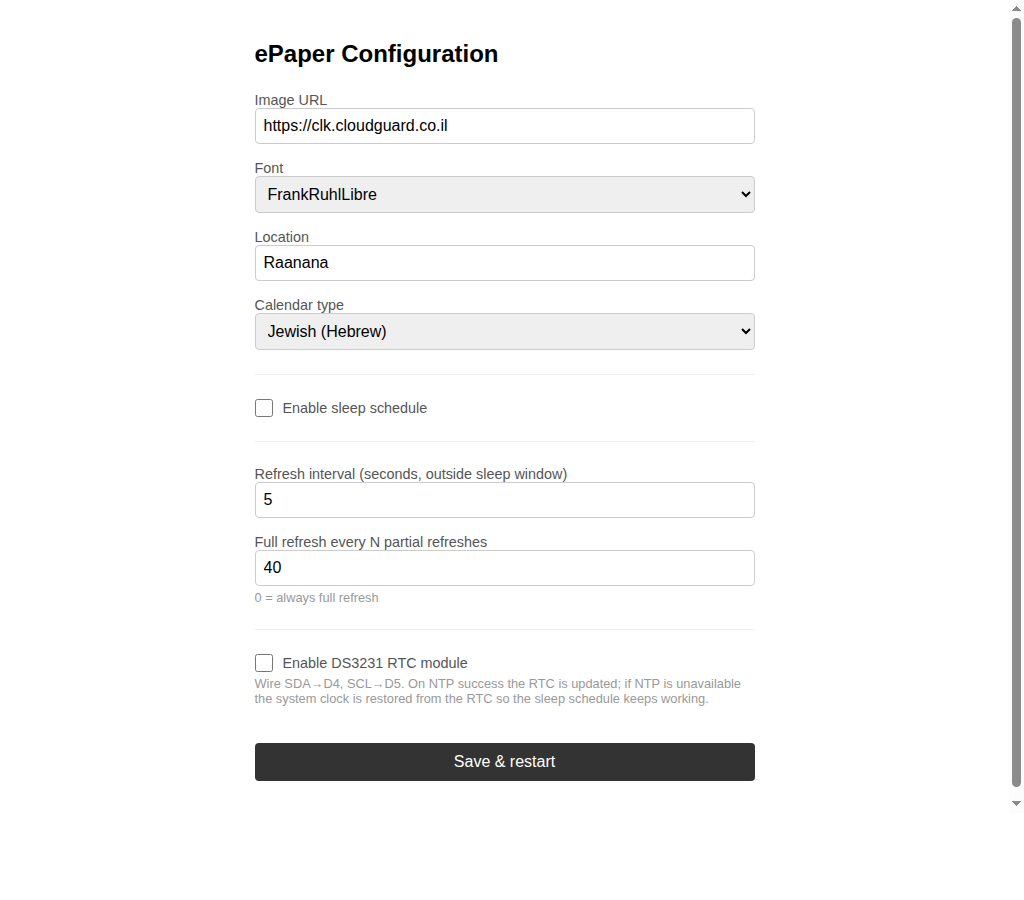 Configuration UI: Calendar type dropdown (Gregorian / Jewish) and DS3231 RTC option
This firmware is also listed as the hebrew-clock product in heb-clock-flasher, a self-hosted browser-based flasher (Web Serial + esptool-js) for the Hebrew e-paper clocks, if you prefer not to install the Arduino IDE.
- The server has no authentication. Every endpoint, including
/api/docs, is public; put it behind a reverse proxy or firewall if you do not want it exposed. FORWARDED_ALLOW_IPSdefaults to*, which trustsX-Forwarded-*headers from any client. Set it to your proxy's address when self-hosting.- The
locationparameter is forwarded (URL-encoded) to wttr.in, and the current date to hebcal.com; no other data leaves the server. - The ESP32 sketch uses
WiFiClientSecure::setInsecure(), so HTTPS image fetches are encrypted but the server certificate is not verified. - The device configuration page (port 80) has no password; anyone on the same network can change its settings.
- The Docker image runs as an unprivileged user (UID 10001).
| Symptom | Cause / fix |
|---|---|
Device Serial shows PNG open error |
The Image URL points at the server root (https://host/), which now serves the HTML preview page. Use https://host/clock.png. |
Device Serial shows Wrong dimensions |
The URL does not return an 800×480 image from this server. |
| Image is cut off or fails to decode | The sketch buffers at most 30,000 bytes of PNG; responses larger than that are truncated. |
| Hebrew letters appear in reverse order | Pillow was installed without libraqm. Use the Docker image or install libraqm0 and reinstall Pillow. |
Log warning no Hebrew font files found |
FONT_DIR does not contain the .ttf files; the image falls back to Pillow's default font. |
| Weather cell is empty | wttr.in could not be reached or did not recognize the location. Check the weather error log line; the server retries after 10 minutes. |
EPaper-Setup portal appears after every reboot |
The sketch calls wm.resetSettings() in setup(), which clears the saved Wi-Fi credentials on each boot. |
| Image URL or refresh interval is blank after the portal | Saving the portal overwrites the stored Image URL and interval with the portal's fields, even when they are left empty. Enter the URL in the portal, or set it afterwards on the device config page (http://<device-ip>/). |
Device fetch fails with an HTTP error on an http:// URL |
The sketch always uses WiFiClientSecure; serve the image over HTTPS (TLS reverse proxy). |
| Clock is an hour off in March or late October | The server's Israel-time conversion switches DST by whole months (March to October). Nothing to configure; this is a known limitation of the server code. |
font=FrankRuhlLibre-Bold looks like Noto Sans Hebrew |
The bundled FrankRuhlLibre-Bold.ttf is a broken 14-byte file, so the server falls back to NotoSansHebrew-Bold. |
| Night image never appears | sleeptime=1 is sent only when the device's sleep schedule is enabled and its clock is set (NTP or DS3231). |
pip install -r requirements.txt -r requirements-dev.txt
pytest          # tests in tests/
ruff check .    # lint (currently reports 12 existing errors)
Releases are built by the manual Docker Build GitHub Actions workflow (.github/workflows/docker-image.yml), which computes a YYYY.M.PATCH version with scripts/next-version.sh, tags the commit and pushes the multi-arch image to Docker Hub. A second manual workflow, publish-ghcr.yml, can push the image to ghcr.io/t0mer/hebrew-clock. The Worker has its own manual workflow, deploy-worker.yml.
app/
  main.py              # FastAPI app, lifespan, /health, static files
  api/v1/router.py     # /, /clock, /clock.png, /robots.txt, /sitemap.xml
  core/config.py       # Settings (pydantic-settings)
  services/
    clock.py           # Image generation (Pillow, Hebrew word-clock logic)
    weather.py         # wttr.in weather cache
    jewish_cal.py      # hebcal.com Hebrew date fetch + cache
    seo.py             # robots.txt and sitemap.xml generation
  templates/index.html # Web preview page
  static/              # Tailwind CSS
sketch/
  hebclk.ino           # ESP32 Arduino sketch
tests/                 # pytest suite
scripts/
  next-version.sh      # YYYY.M.PATCH version for releases
  export_tables.py     # Hebrew tables -> worker/src/tables.json
  bake_sleeping.py     # night illustration for the Worker
  gen_golden.py        # Python reference images for the Worker tests
worker/                # Cloudflare Worker (TypeScript)
  src/                 # routes, time logic, resvg renderer, weather/hebcal
  test/                # vitest, incl. comparison with Python renders
  wrangler.toml
assets/screenshots/    # README images
*.ttf, sleeping.png    # Fonts and night-mode illustration
epaper.md              # Device setup guide
Dockerfile
docker-compose.yml
render.yaml
requirements.txt
requirements-dev.txt
- Weather data: wttr.in.
- Hebrew calendar conversion: hebcal.com.
- Fonts, all licensed under the SIL Open Font License 1.1:
- Noto Sans Hebrew, The Noto Project Authors
- Heebo, Oded Ezer
- Frank Ruhl Libre, Yanek Iontef
- David Libre, The David Libre Project Authors (Meir Sadan et al.)
- Open Sans and Playpen Sans Hebrew are also bundled in the repository but are not currently selectable.
Issues and pull requests are welcome. Please run pytest (and ruff check ., which currently reports 12 pre-existing errors) before opening a PR.
This project is licensed under the Apache License 2.0. The bundled fonts keep their own SIL Open Font License.