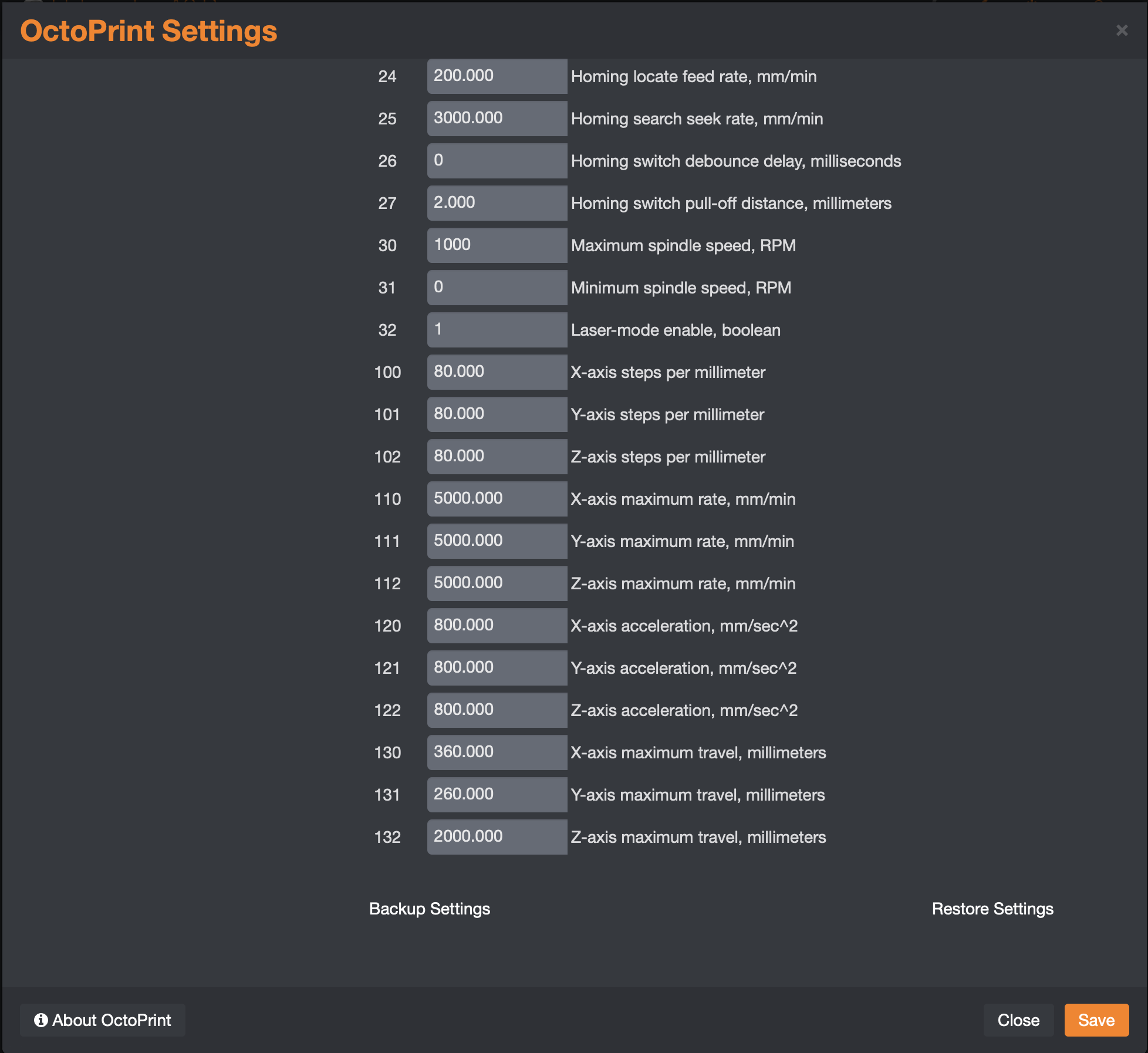
This plugin was inspired by mic159's Grbl Support plugin (https://plugins.octoprint.org/plugins/octoprint-grbl-plugin/). His plugin gets you 90% of the way there for adding Grbl support to Octoprint but had a couple limitations and lacked some bells and whistles from a UI and configuration perspective.
Better Grbl Support originally utilized mic159's gcode receiver parser but at this point I've moved well beyond his reference implementation.
Here are some of bgs's capabilities (as of v2.0.0):
- Fully supports Laser and CNC operations / workflows
- Provides for 10 axes of movement / jogging
- Machine and Work Positioning Homing / Origin setup
- Allows for full management of All Grbl settings ($$)
- Provides rich details for all Grbl settings, messages, alarms, and errors
- Supports Z-Probing and customization of Z-Probe settings
- 9 Point Framing and auto generation of Framing dimensions
- Detects and automatically supports Grbl 1.1 Jogging
- Fully integrates with Octoprint Start/Pause/Resume/Cancel operations
- Pause stops a laser at once; for a spindle it finishes the buffered moves and lifts Z (default), parks the tool with the controller's own safety-door parking (opt-in, when the controller has it), or stops at once without lifting; see docs/pause-resume.md
- All global configuration changes to Octoprint are reverted on uninstall
- All conversions of typical marlin/repetier/etc commands to Grbl are preset
- Disables Octoprint functions which interfere with Grbl
- Draws Grbl files in the built-in GCode Viewer the way Grbl moves them (see GCode Viewer); hiding the viewer tab is optional
- Disables the built-in Temperature tab
- Disables the built-in Control tab (It can be re-enabled via Settings)
- Supports compressed/shorthand Grbl generated by numerous post processors
The built-in OctoPrint GCode Viewer stays enabled. It assumes absolute moves, reads G91.1 as G91, and ignores arcs in every plane but XY, so on its own it misdraws Grbl jobs that use those. For jobs on a Better Grbl Support printer profile that are stored in OctoPrint's local storage, the plugin fixes that without touching the stored file:
- Normalised copy. The viewer is pointed at a copy in which the plugin has replayed the file the way Grbl 1.1h would run it and written the result as absolute
G0/G1moves in millimetres. Cutting moves carry an extrusion value, which is what the viewer draws: withM3/M4in the file, a feed or arc move counts as a cut while the spindle is on with a speed above zero; a file with noM3/M4treats every feed or arc move as a cut. The copy is built once per file, modification time, size, normaliser version and placement shift, and kept in the plugin'sviewer-cachedata folder (the 20 most recent copies, within 200 MB). If a copy would pass 64 MB (a file with a very large number of arcs), the viewer is served the original file instead. - Origin placement. The job is placed on the bed from the frame origin, width and length the plugin stores for each file (
bgs_origin,bgs_width,bgs_length); if a stored file has none yet, the plugin scans the file for them when the viewer first asks for it. A job whose origin is its top-right corner, which runs in negative X and Y, is moved right by its width and up by its length so it lands on the bed. - Bed grows to fit. The drawn bed is never smaller than the printer profile's, and grows in steps of 10 mm so there is at least 10 mm, or 10 percent of the job's extent if that is more, of margin around the job. A circular bed is left as it is.
- Layer controls. The layer slider and the previous/next layer buttons are hidden for a job that has one cutting height or none. A job with several keeps them.
- Progress. OctoPrint reports print progress as a percentage of the stored file's bytes; the plugin translates it to the matching place in the normalised copy so the progress line follows the real job.
Two settings (Settings, Better Grbl Support, User Interface) control it:
| Setting | Default | Effect |
|---|---|---|
viewerNormalize ("Draw Grbl files in the GCode Viewer as Grbl moves them") |
on | Off gives the stock viewer, drawing the stored file as it is. |
hideGCodeTab ("Hide the Octoprint GCode Viewer tab") |
off | On disables OctoPrint's gcodeviewer plugin and its tab; the change needs an OctoPrint restart. |
Settings version 9 made the viewer Grbl-aware, and its migration turns hideGCodeTab off once for installs coming from an older settings version, so a viewer hidden by an earlier release comes back. Hide it again in the settings if you want it gone.
User-visible changes in this release (the version in pyproject.toml):
- Pause lift follows Invert Z. The 5 mm lift on pause (and the matching plunge on resume) goes away from the work, the direction of the Control tab's "up":
Z+normally,Z-with Invert Z on. Before, the pause script always wroteG91 G0 Z5, so with Invert Z on the lift drove the tool down into the work. - Pause "Finish moves, lift Z" is the default for Grbl 1.1 and FluidNC spindle jobs. Pause lets the moves already in the controller's buffer run out, stops the spindle and lifts Z 5 mm; resume restores the spindle, speed, feed rate and units, waits for spin-up and lowers Z. Before, the pause script sent
!right behind the lift, so the lift only ran after the resume. A laser job ($32/Grbl/LaserModeon) still stops at once with!alone, and pre-1.1 Grbl always uses "Finish moves, lift Z". The alternative "Stop at once, no lift" is a setting; see docs/pause-resume.md. - Firmware parking is opt-in. "Pause with the controller's parking (safety door)" is off by default. When it is on and the controller really can park (Grbl built with parking and
$22homing on, or FluidNC withparking: enableand a homing cycle), pause uses the controller's own retract and resume waits for it; otherwise the setting below it applies and the log says why. - Grbl-aware GCode Viewer. The built-in viewer stays enabled and draws Grbl files the way Grbl moves them (see GCode Viewer). The "Hide the Octoprint GCode Viewer tab" setting now defaults to off, and the settings migration to version 9 turns it off once for installs coming from an older version, so a viewer an earlier release hid comes back.
- Feed and power overrides are applied once. Changing the Control tab's feed or power override now sends the job's own programmed feed or power, so the override is applied exactly once. Before, the override was applied to a value that already carried it (or, for an inch job, to the controller's status-report feed, which is always in mm/min), so a 150 percent override could run an inch job 25 times too fast, and a later change compounded again. A pause and resume restores the programmed feed and power, not the overridden ones; when a job sets no power of its own, the resume uses the last known power with the override taken back out. A job's feed and power are forgotten when it ends, so the next job never resumes or overrides with them. Setting an override back to 100 percent now takes effect at once instead of at the job's next F or S word.
- A probe hands the units back. A single point, multipoint or X/Y probe runs in millimetres and relative mode; one that was interrupted (no contact, alarm, error, cancel) or that finished used to leave an inch (
G20) job's parser inG21. Every probe path now restores the distance mode, the units and the motion mode it found, and the multipoint probe, which never recorded them, does too. - Resume can no longer deadlock, and reaches Printing at once. A held pause (laser, "Stop at once", parking) now sends its cycle start
~as a realtime byte the moment OctoPrint starts resuming, instead of as a script line. Before, a line queued ahead of it (for example an event subscription'sM8on PrintResumed) waited for anokthe held controller never sends, so the job never moved again; or the resume waited behind the planner and OctoPrint stayed in "Resuming". - Realtime commands are sent as bytes, not lines. The feed and spindle overrides, spindle stop, safety door, jog cancel and the status request go straight to the controller and no longer wait in OctoPrint's queue. The latin-1 serial encoding is no longer needed for them, and the
oks a realtime line left behind no longer let OctoPrint run ahead of the controller's buffer. - Laser cancel turns the laser off on every firmware. After the reset, laser mode sends
M3 S0thenM5. Some firmware (a LaserUpgrades Grbl 1.1f fork) relights the laser coming out of a reset from a hold while reportingM5 S0;M3 S0is the explicit form that clears it. - Coolant (air assist) across a pause. A coolant change sent while paused (
M8/M9, for example from an event subscription) is applied at once with the realtime coolant toggle instead of waiting for the resume. The resume puts the job's coolant back before moving. A new setting, "A pause switches coolant (air assist) off" (default off), switches it off for the pause. A cancel never switches coolant on. - Status-request terminal filter also hides
Send: ? [realtime].
Visit the Better Grbl Support Wiki for general instructions and workflows. DeepWiki is another good source.