
A visual parametric modeling node editor built specifically for IngeTrazo.
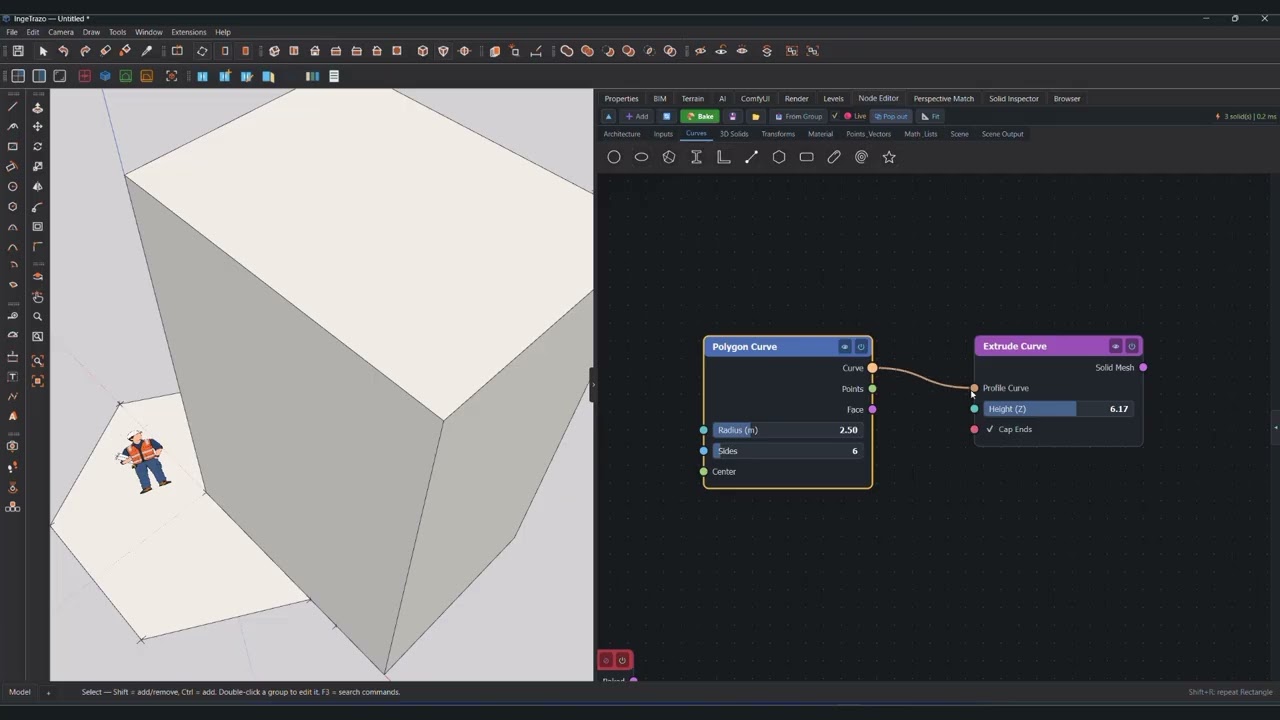
- Visual Programming: Connect parametric nodes with Bezier wires, multi-wire connections (
Shift + drag), wire cutting (Ctrl + drag), and live canvas evaluation. - Ribbon Shelf & Themed Icons: Categorized tabbed shelf with invertable light/dark mode vector icons, hover tooltips, and collapsible toggle.
- Node Properties Inspector: Live floating inspector panel to edit node titles, nicknames, and slider parameters (
min,max,step,decimals) with instant canvas updates. - Curve & Surface Points Extraction: Extract sampled points, boundary loops, and vertices from 3D curves and NURBS/mesh surface boundaries.
- Architectural Grid Axes: Generate 2D/3D structural gridlines with axis curves, circular bubble markers (1, 2, 3... and A, B, C...), and column intersection points directly driven by lists of spacings from Panels or numeric sliders.
- Pipe Solid & Sweep: Extrude watertight cylindrical pipes and hollow tubes along 3D curves with radius, wall thickness, radial segments, and capping.
- Watertight Solid Geometry: Solids, slabs, columns, beams, walls, parametric roofs, and monolithic stairs with automated vertex welding and hermetic volume calculation.
- Two-Tier Viewport Bridge:
- Live 60 FPS Sync: Streams preview geometry via a 16 ms debounce timer into transient
_ingetrazo_node_previewgroups without polluting the undo stack. - Undo-Safe Baking: Commits native IngeTrazo Groups, attaches BIM tags (
IfcWall,IfcColumn,IfcSlab,IfcStair, etc.), embeds the node graph ingroup.ext["node_graph"], and wraps the action inSnapshotImport(Ctrl+Zsupport).
- Live 60 FPS Sync: Streams preview geometry via a 16 ms debounce timer into transient
- Drop-In Node Discovery: Any
.pyfile placed innodes/using@register_nodeandBaseNodeis automatically discovered, rendered with inline UI widgets, and vectorized with Grasshopper-style list broadcasting. - Zero Extra Dependencies: Strictly built on Python 3.11+ standard library and
PySide6(Qt 6).
node_editor/
├── __init__.py              # IngeTrazo ExtensionApp entry point & Scene/Mesh bridge
├── core_types.py            # Socket types, Vec3, CurveData, watertight MeshData kernel
├── node_base.py             # BaseNode class, @register_node decorator, auto-broadcasting
├── engine.py                # DAG topological sort, dirty-cache evaluator, JSON serializer
├── ui_canvas.py             # Ribbon shelf, Node Properties inspector, QGraphics canvas
├── icons/                   # Theme icon assets
│   ├── dark/                # Dark theme node icons
│   └── light/               # Light theme inverted node icons
├── nodes/
│   ├── __init__.py          # Dynamic auto-loader & hot-reloader for all node modules
│   ├── builtin_nodes.py     # Math, vectors, logic, panels, value lists, BIM Output
│   ├── arch_nodes.py        # Walls, slabs, architectural grid axes, parametric arch elements
│   ├── curve_nodes.py       # Lines, arcs, circles, splines, curve points extraction
│   ├── roof_node.py         # Parametric hip, gable, and shed roofs
│   ├── stair_node.py        # Monolithic concrete stairs and landings
│   ├── transform_nodes.py   # Move, rotate, scale, pipe solid, sweep solid, arrays
│   ├── image_nodes.py       # Heightmaps, displacement meshes, image samplers
│   ├── material_nodes.py    # Colors, shaders, and visual preview materials
│   ├── scene_nodes.py       # Scene reference, object picking, and bake conduits
│   └── _node_template.py    # Copy-paste template & AI system prompt
└── tests/
    └── test_nodes.py        # Automated test suite (geometry, DAG, broadcast, UI)
You can launch the Node Editor standalone for development:
python __init__.pypython -m unittest tests/test_nodes.pyCopy the repository contents into your IngeTrazo plugins folder:
- Windows:
%APPDATA%\ingetrazo\plugins\ingetrazo_nodes\(ornode_editor) - Linux:
~/.local/share/ingetrazo/plugins/ingetrazo_nodes/ - macOS:
~/Library/Application Support/ingetrazo/plugins/ingetrazo_nodes/
Open IngeTrazo and press Ctrl+Shift+N or go to Extensions ▸ Parametric Node Editor....