
A Python HTTP server that receives and processes HTTP Post alarm events from Viewtron IP cameras and NVRs.
Viewtron IP cameras and NVRs include an HTTP API for software developers to create custom applications, business automation, and home automation. The AI software is embedded in Viewtron AI security cameras — all AI inference takes place on the camera itself, with no cloud service or external server required for detection. When an AI event occurs, the camera or NVR sends an HTTP Post with an XML payload to your server's webhook endpoint. This server parses the XML, extracts event data and images, logs events to CSV, and saves snapshot images to disk.
The server supports both IP Camera direct (v1.x) and NVR forwarded (v2.0) alarm formats. Version detection is automatic.
Full documentation portal: https://videos.cctvcamerapros.com/developer/
The Docusaurus-powered documentation site includes application guides, API reference, Python SDK docs, and Home Assistant integration setup. All pages are also available as Markdown in the docs/ directory.
Single-file reference: https://github.com/mikehaldas/IP-Camera-API/blob/main/docs/viewtron-api-guide.md
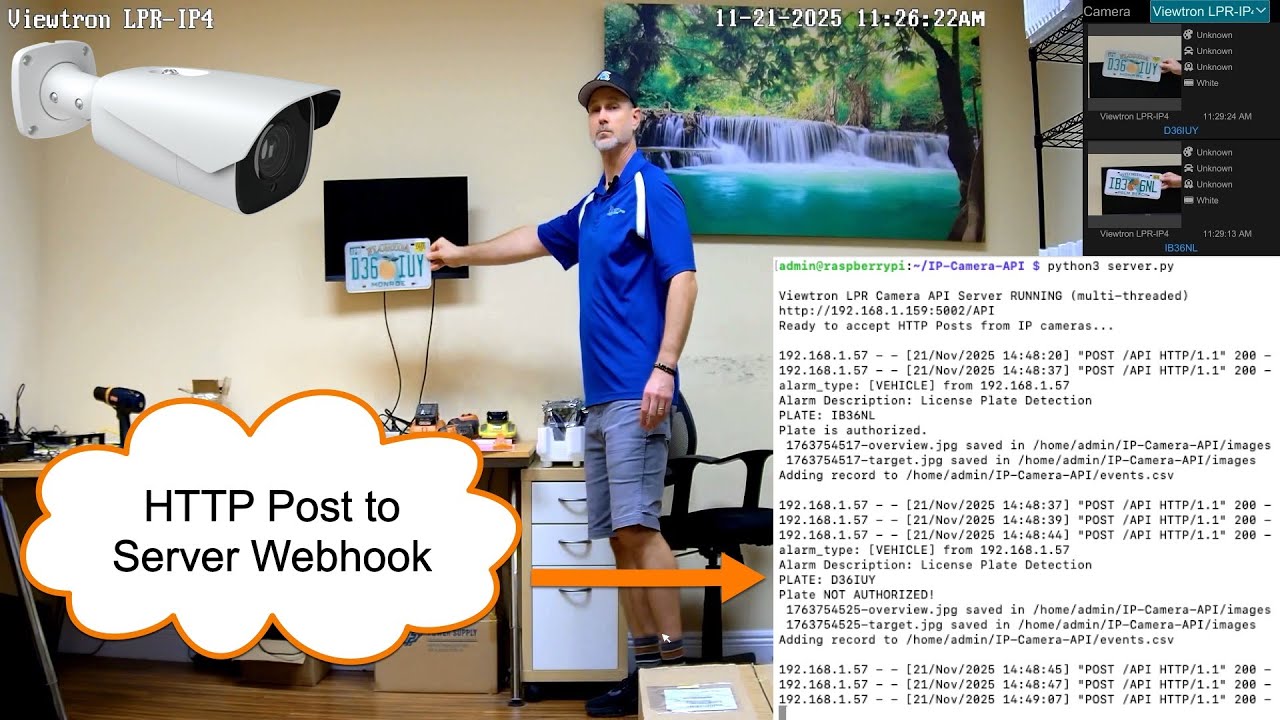
Viewtron LPR cameras detect and read license plates in real time. The server receives plate number, plate image, and overview snapshot for each detection. The v1.x IPC format includes whitelist/blacklist authorization status. The v2.0 NVR format includes vehicle attribute recognition: plate color, vehicle type, color, brand, and model.
| Source | smartType | Data |
|---|---|---|
| IPC v1.x | VEHICE / VEHICLE |
Plate number, plate image, overview, whitelist/blacklist |
| NVR v2.0 | vehicle |
Plate number, plate color, vehicle type/color/brand/model, plate crop, overview |
Watch Viewtron LPR camera videos here: https://videos.cctvcamerapros.com/tag/alpr-lpr-camera
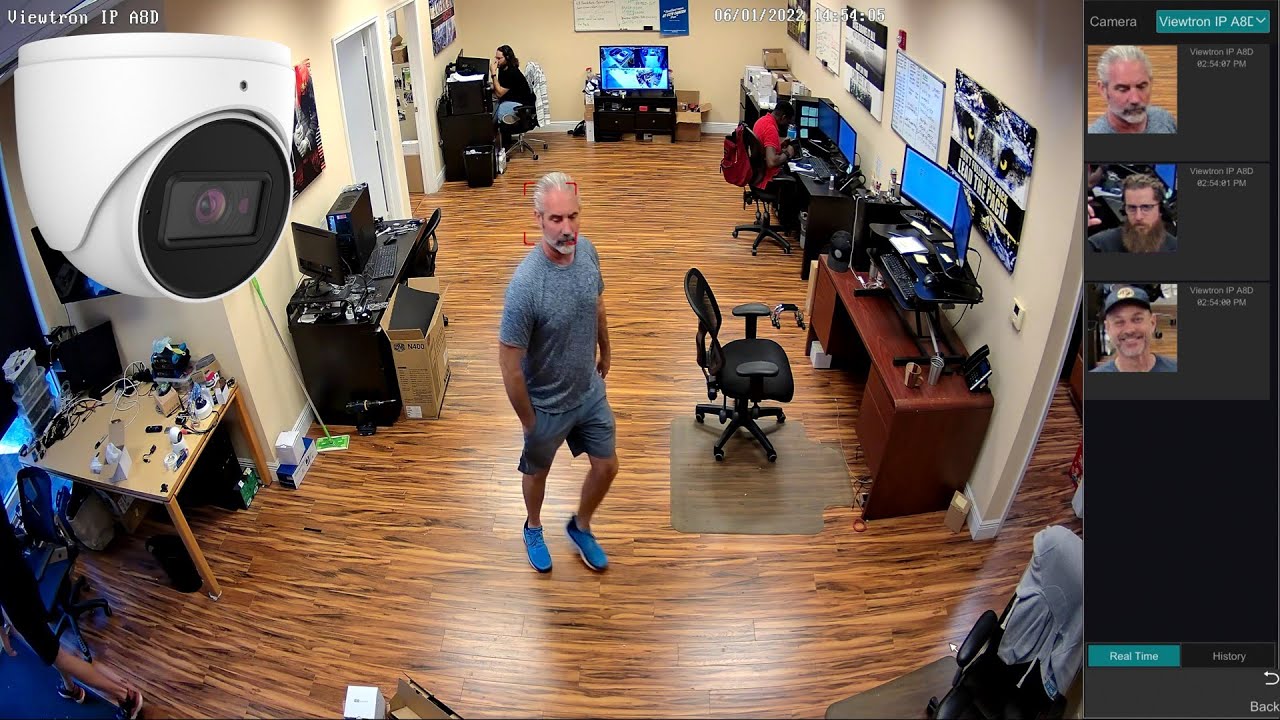
Viewtron face detection cameras capture facial images and analyze face attributes. The server receives a face crop image and overview snapshot for each detection. The v2.0 NVR format includes face attribute analysis: age, sex, glasses, and mask detection.
| Source | smartType | Data |
|---|---|---|
| IPC v1.x | VFD |
Face crop, overview |
| NVR v2.0 | videoFaceDetect |
Face crop, overview, age, sex, glasses, mask |
Note: Face recognition (matching against a face database) is not forwarded via NVR HTTP Post. The NVR only sends face detection events. Face match (VFD_MATCH) may only be available via direct IP camera connection.
Watch additional face detection / facial recognition camera videos: https://videos.cctvcamerapros.com/tag/face-recognition-camera
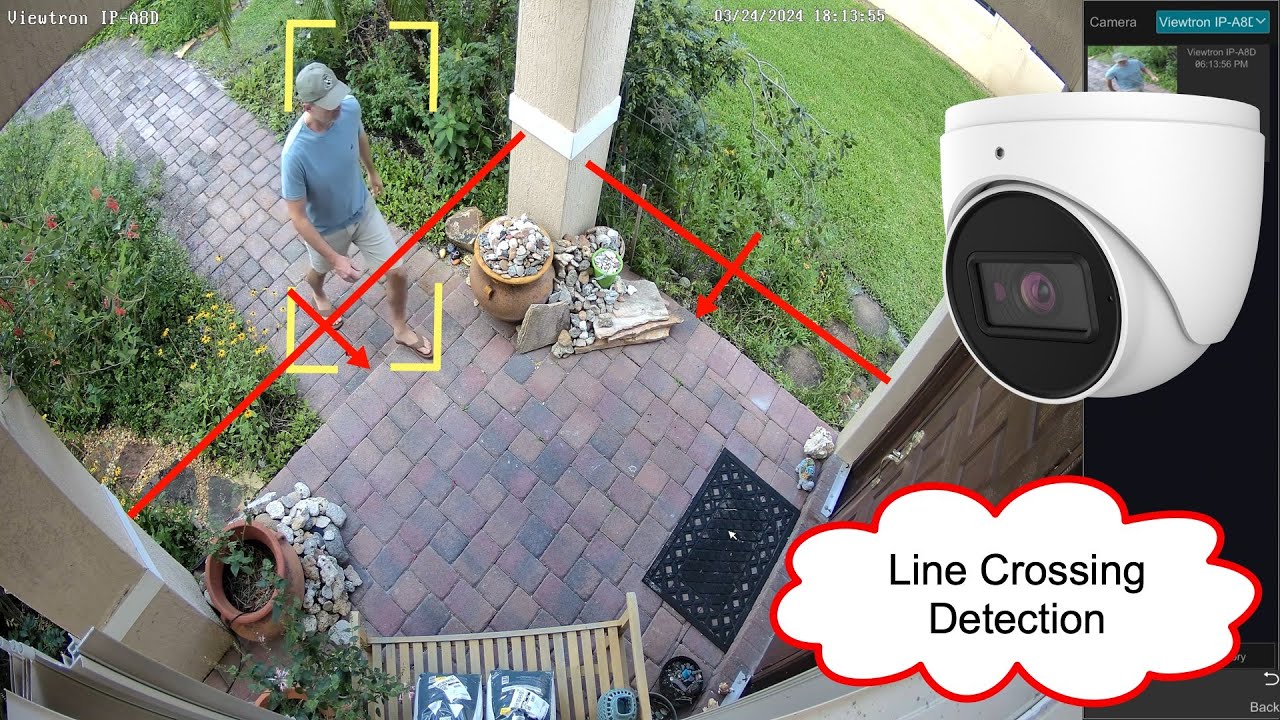
All Viewtron AI cameras support perimeter intrusion detection and line crossing (tripwire) detection. Human detection and car / vehicle detection objects can both trigger intrusion and line crossing alrams. The server receives an overview snapshot and a cropped image of the detected person or vehicle. The NVR format includes the intrusion zone polygon coordinates and target bounding box.
| Source | smartType | Description |
|---|---|---|
| IPC v1.x | PEA |
Perimeter intrusion and line crossing (differentiated by XML structure) |
| NVR v2.0 | regionIntrusion |
Person or vehicle enters a defined zone |
| NVR v2.0 | lineCrossing |
Person or vehicle crosses a tripwire line |
Zone entry and zone exit detection are also supported via IPC direct connection.
| Source | smartType | Description |
|---|---|---|
| IPC v1.x | AOIENTRY |
Object enters a defined zone |
| IPC v1.x | AOILEAVE |
Object exits a defined zone |
Watch Viewtron human detecion AI videos here: https://videos.cctvcamerapros.com/tag/human-detection-ai
Watch Viewtron vehicle / car detection AI videos here: https://videos.cctvcamerapros.com/tag/car-detection-ai
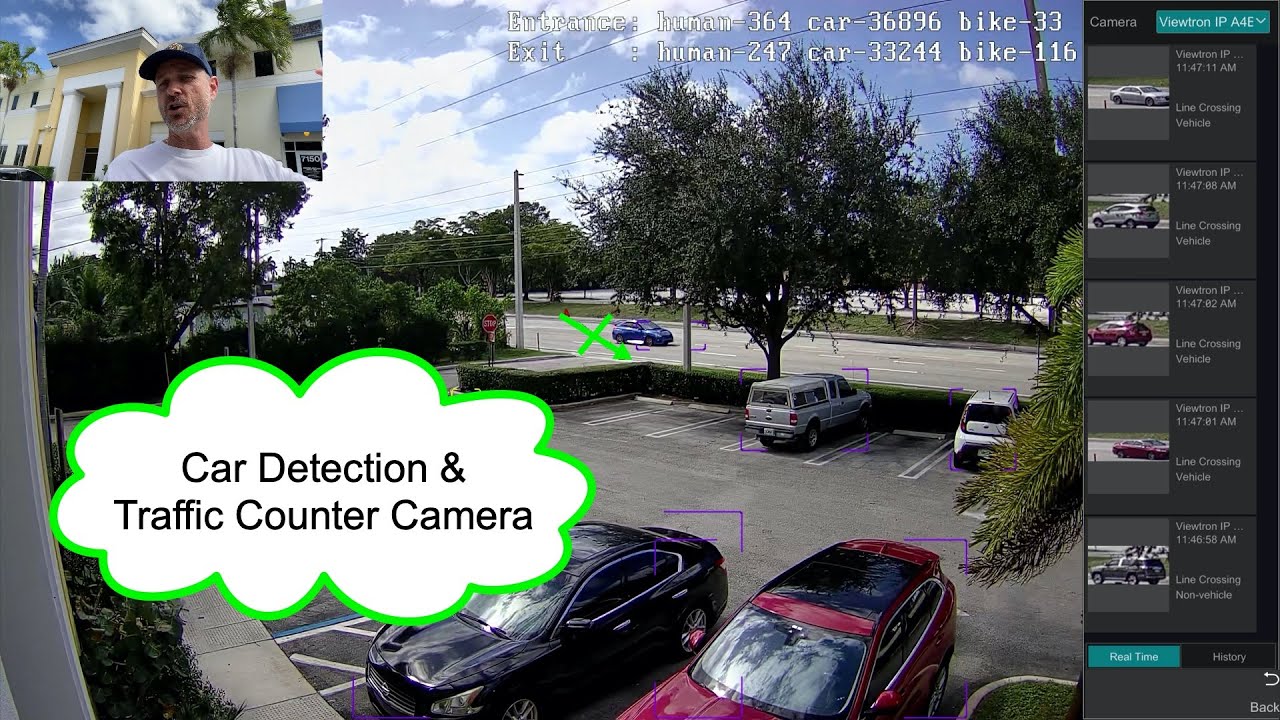
Viewtron AI cameras can count people and vehicles crossing a line or entering an area. The server receives an overview snapshot and a cropped image of each counted object. Line counting uses a tripwire; area counting uses a polygon zone.
| Source | smartType | Description |
|---|---|---|
| NVR v2.0 | targetCountingByLine |
Count objects crossing a defined line |
| NVR v2.0 | targetCountingByArea |
Count objects within a defined zone |
Viewtron AI cameras can perform continuous object detection and tracking across the entire camera frame. Unlike alarm-based detection types, video metadata detects and classifies all people and vehicles in the scene continuously. The server receives an overview snapshot and a cropped image of each detected target.
| Source | smartType | Description |
|---|---|---|
| IPC v1.x | VSD |
Full-frame object detection and tracking |
| NVR v2.0 | videoMetadata |
Full-frame object detection and tracking |
Viewtron AI cameras support a continuous tracking mode called traject (smart track data) through the httpPostV2 system. Unlike alarm-based detection types that send one post per event, traject sends continuous HTTP Posts at ~7-12 per second for the entire duration a target is being tracked in the detection zone — with zero gaps.
Each post includes the target's bounding box coordinates, target type (person/car/motor), and a unique target ID that remains consistent across all posts for the same target. Posts start immediately when tracking begins and stop within one second of the target leaving the zone.
| Source | Data Type | Description |
|---|---|---|
| IP Camera only | traject |
Continuous bounding box, target ID, target type, velocity, direction |
Important: Traject is an IP camera-only feature. It must be configured directly on the IP camera's firmware — NVRs do not support or forward traject data. However, the camera sends traject directly to your server even when connected through an NVR's PoE port, so you can use both: NVR for recording and alarm events, IP camera for real-time tracking.
When to use traject:
- Relay / automation control — Activate lights, gates, or alarms based on continuous human presence, not just an alarm trigger. Traject provides a real-time presence signal with no gaps, unlike alarm-based polling which has 5-20 second gaps while the target is still present.
- Dwell time analysis — Measure exactly how long a person or vehicle remains in a zone, with sub-second accuracy.
- Real-time position tracking — Track a target's movement through the frame using bounding box coordinates (normalized 0-10000 range).
- Custom alarm logic — Build rules based on where a target is, how long it stays, or how it moves — not just whether it triggered a zone.
For Home Assistant integration with MQTT auto-discovery, Docker support, and example automations, see the dedicated repo:
viewtron-home-assistant — camera events delivered as native HA sensors. Garage/gate automation, plate recognition alerts, driveway lights, and more.
- Configure your IP camera or NVR to send HTTP Posts to this server's IP and port
- The server receives XML alarm data and auto-detects the format version (v1.x or v2.0)
- Events are parsed, images are decoded and saved, and a CSV log entry is created
- All raw XML posts are saved to
raw_posts/for debugging and analysis
Output:
events.csv— Event log with alarm type, timestamp, plate number (LPR), image pathsimages/— Saved JPEG snapshots (overview and target crops)raw_posts/— Raw XML posts for debugging
The examples/ folder contains sample XML payloads for every supported alarm type in both IPC v1.x and NVR v2.0 formats. Base64 image data has been replaced with descriptive placeholders so the files are small and readable.
Use these to understand the XML structure, test your parser, or build your own server without needing a physical camera.
# POST an example directly to the server for testing
curl -X POST http://localhost:5002/API \
  -H "Content-Type: application/xml" \
  -d @examples/nvr-v2/vehicle-lpr.xml
See examples/README.md for the full index, key format differences, and coordinate system documentation.
IP Camera direct: Configure the HTTP Post endpoint in the camera's web interface under Alarm Server settings. Setup guide: https://videos.cctvcamerapros.com/support/topic/ip-camera-api-webbooks
NVR: Configure the HTTP Post endpoint in the NVR's Alarm Server settings. All cameras connected to the NVR's PoE ports will have their AI events forwarded automatically. Setup guide: https://videos.cctvcamerapros.com/support/topic/setup-nvr-api-webhooks
Server installation: See INSTALL.md. Tested on Ubuntu Linux and Raspberry Pi.
| Resource | Description |
|---|---|
| API Developer Portal | Full documentation with application guides and API reference |
| Python SDK | pip install viewtron — event parsing and camera control |
| Home Assistant Integration | Camera AI events as native HA sensors via MQTT |
| LPR Application Guide | Plate recognition webhook formats and code examples |
| XML Examples | Sample XML payloads for all alarm types with format documentation |
| IP Camera Setup Guide | Configure IP camera HTTP Post webhooks |
| NVR Setup Guide | Configure NVR HTTP Post webhooks |
- All Viewtron Products: https://www.Viewtron.com
- AI Security Cameras: https://www.cctvcamerapros.com/AI-security-cameras-s/1512.htm
- LPR Cameras: https://www.cctvcamerapros.com/License-Plate-Recognition-Systems-s/1518.htm
- Face Recognition Cameras: https://www.cctvcamerapros.com/face-recognition-cameras-s/1761.htm
- IP Camera NVRs: https://www.cctvcamerapros.com/IP-Camera-NVRs-s/1472.htm
Every pull request runs .github/workflows/privacy-scan.yml for all branches. The job runs .github/scripts/privacy_scan.py with the Python 3 standard library, then runs tests/test_privacy_scan.py. This repository has no project test runner, so that pytest step lives in the workflow only.
The scan reads added lines from git diff base...head, the pull request title and body from the GitHub event payload, and commit messages from git log. A failure lists file:line and the rule name. A confidential-term hit is shown as [confidential term]; the matched text is not logged.
-
Confidential terms. The
PRIVACY_SCAN_TERMSsecret is one SHA-256 hex digest per line, the hash of a lowercase term. The scanner hashes lowercase word n-grams of one to three words, including the form with spaces, hyphens, and underscores removed. Do not commit plaintext terms. If the secret is unset, as on a fork pull request, the check warns and skips only this rule. Build the secret locally withscripts/hash_terms.py, which reads one term per line on stdin and prints digests:python scripts/hash_terms.py < terms.txt -
Private addresses. Dotted addresses in 10/8, 172.16/12, 192.168/16, and 169.254/16. Documented examples listed in
.github/privacy-scan-allow.txtare ignored. That file starts with no entries. -
License plates. A hit is a digest from
PRIVACY_SCAN_PLATES, a value in a plate field, or a quoted token of 4 to 8 uppercase letters and digits that contains a letter and a digit on a line that mentions plate, lpr, anpr, or the phrase license plate. Plate fields are XML tags such as plateNumber, plate, carPlate, and licensePlateNumber, and JSON or Python keys or keyword arguments named plate, plate_number, plateNumber, or license_plate. Common tech tokens, model names with an ip-, lpr-, or nvr- prefix, and hex or uuid-like strings are ignored.PRIVACY_SCAN_PLATESuses the same digest format; a missing secret skips only that digest check. Entries in.github/privacy-scan-plates-approved.txtpass. Mike must approve each entry. The fake test plate IB36NL was approved by Mike on 2026-10-14.
Written by Mike Haldas, co-founder of CCTV Camera Pros. mike@cctvcamerapros.net