

SCADA-style heat pump dashboard for Home Assistant – modern, animated, configurable. The name: COP = Coefficient of Performance – your heat pump's co-pilot for efficiency. Built first for Buderus/Bosch heat pumps read via an EMS-ESP gateway (BBQKees E32 V2), designed to support other data sources later.
Status: v0.3 (preview) – early test version, not yet verified on a real plant. Not affiliated with Bosch, Buderus or BBQKees.
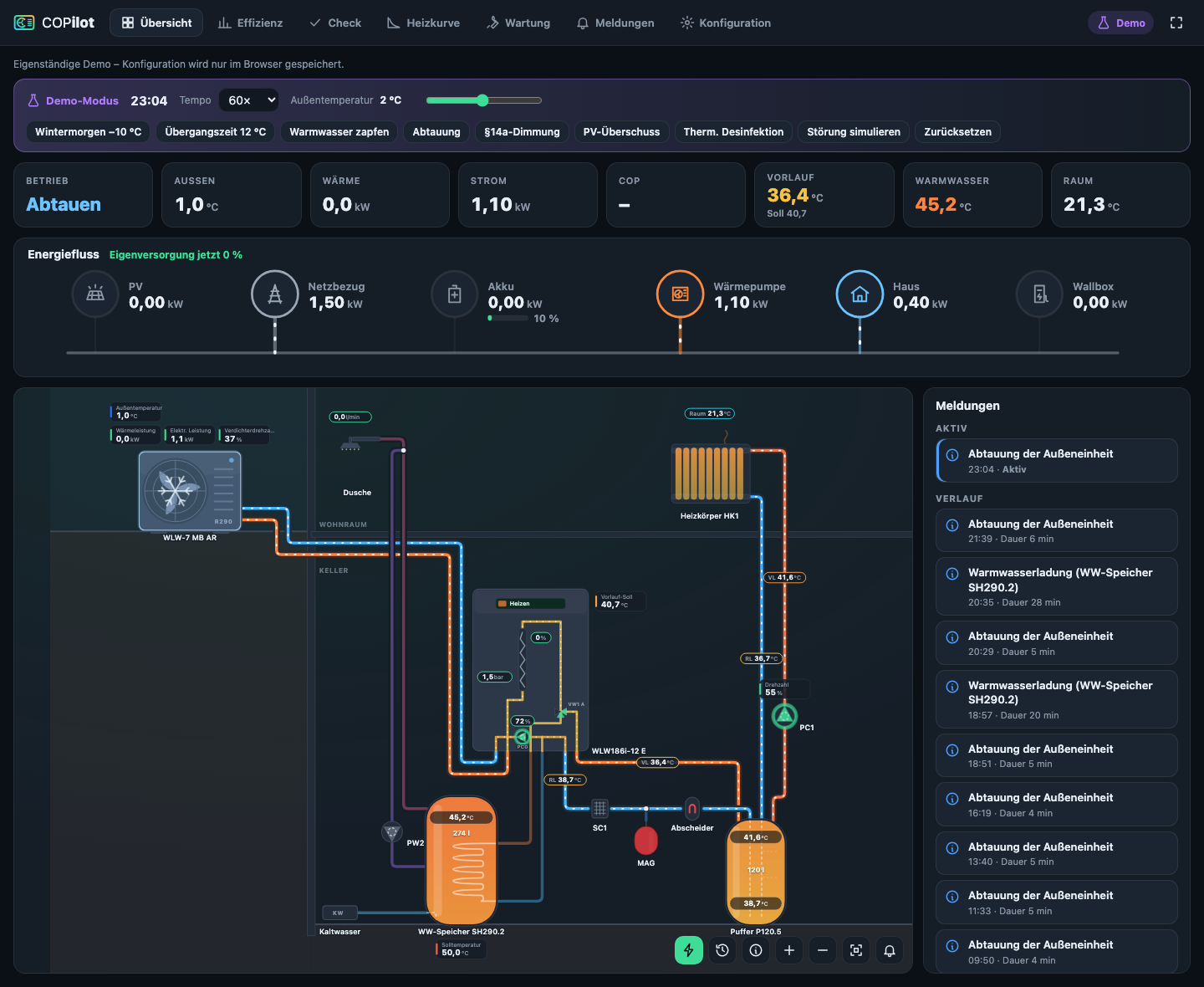
- Own sidebar panel in Home Assistant: overview, messages, configuration
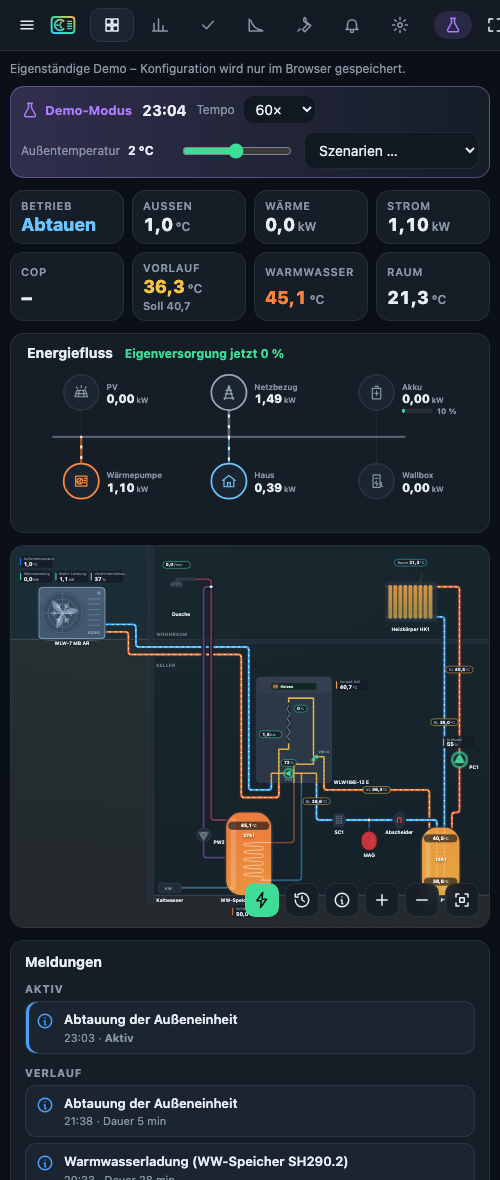
- Animated hydraulic schematic: pipes coloured by water temperature, flow animation while pumps run, spinning fan, defrost frost overlay, glowing backup heater, tank stratification, heat waves on radiators
- Live values at the components (temperatures, power, pressure, flow …) – tap any value for a 24 h sparkline popover
- Configurable components: outdoor/indoor unit, buffer, DHW cylinder, pumps, 3-way valve, mixer, radiators, underfloor heating, tap, cold water, dirt separator, expansion vessel, junctions, value tiles, labels
- Building section: the wizard lays out the plant like an installation scheme – plant room in the basement, outdoor unit outside at ground level with the runs going up beside the indoor unit and through the wall below the ceiling, cylinders and floor-standing units on the floor, wall-hung units on the wall, radiator (side connections) and shower on the living floor; for wall-hung units, TP70, T180 and brine compact units
- Plant wizard generates a laid-out schematic (parallel/serial/no buffer, DHW via diverter, up to 4 circuits, mixed circuits, circulation …)
- Grid editor: drag & drop, connect ports, a handle on every straight run of a pipe, switchable grid with adjustable spacing, grid snap and object snap (ports, edges, centres) with guide lines, value fields movable with grid and object snap, rotate/mirror, undo/redo, per-pipe animation conditions
- EMS-ESP auto mapping: scans MQTT-discovery entities and suggests bindings per component (Buderus WLW186i/WLW176i, Bosch CS5800i/CS6800i and other EMS heat pumps). Any Home Assistant entity can be bound manually (e.g. a smart plug driving the circulation pump)
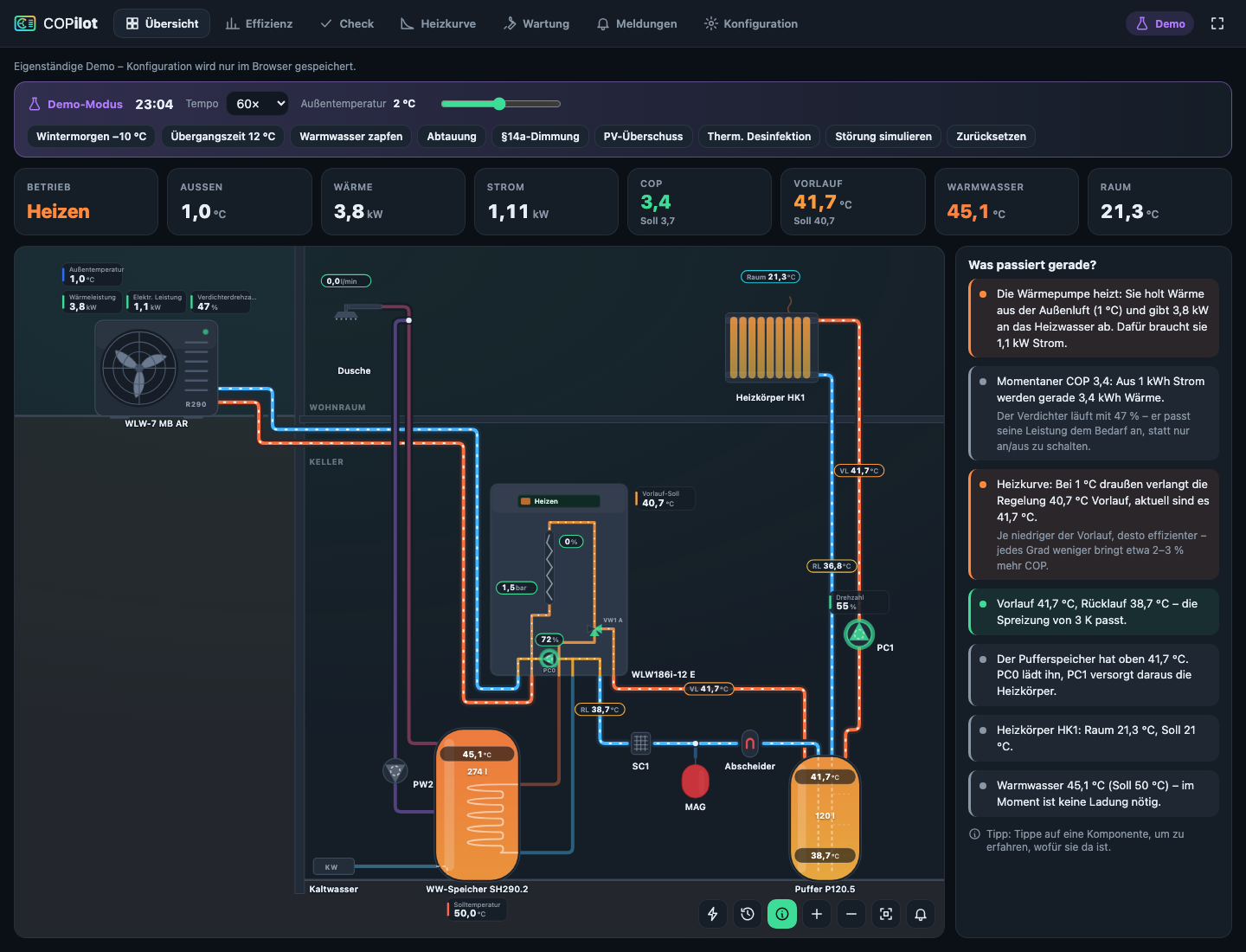
- Explain mode (ⓘ button on the schematic): plain-language description of what the plant is doing right now – heating, hot water, defrost, pauses, heating curve, spread, buffer mixing loss, backup heater, §14a / PV inputs – and a short explanation of every component when you tap it
- Energy layer (⚡ button): live power flow PV / grid / battery → heat pump / house / wallbox with self-supply share, battery state of charge, §14a dimming and PV surplus signal. Entities are detected automatically for evcc and SolaX Modbus (Configuration → Settings → Energy layer); simulated in demo mode
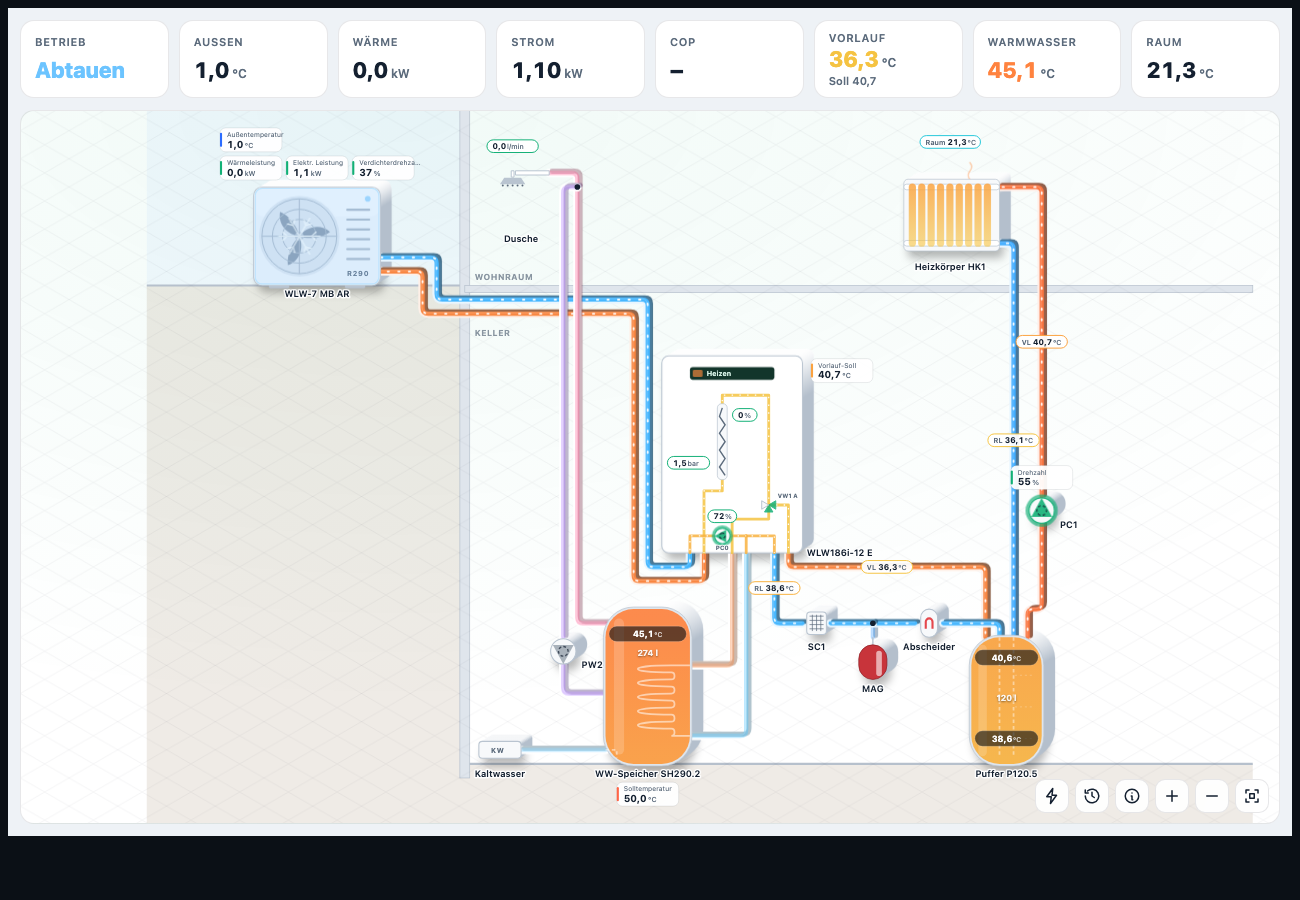
- 2.5D style (Configuration → Settings → Style): components with depth and soft shadows, tube-like pipes and an isometric floor – same layout, values and interaction as the flat style
- Interactive charts (Apache ECharts, as used by Home Assistant itself): tooltips, zoom, series toggled via the legend
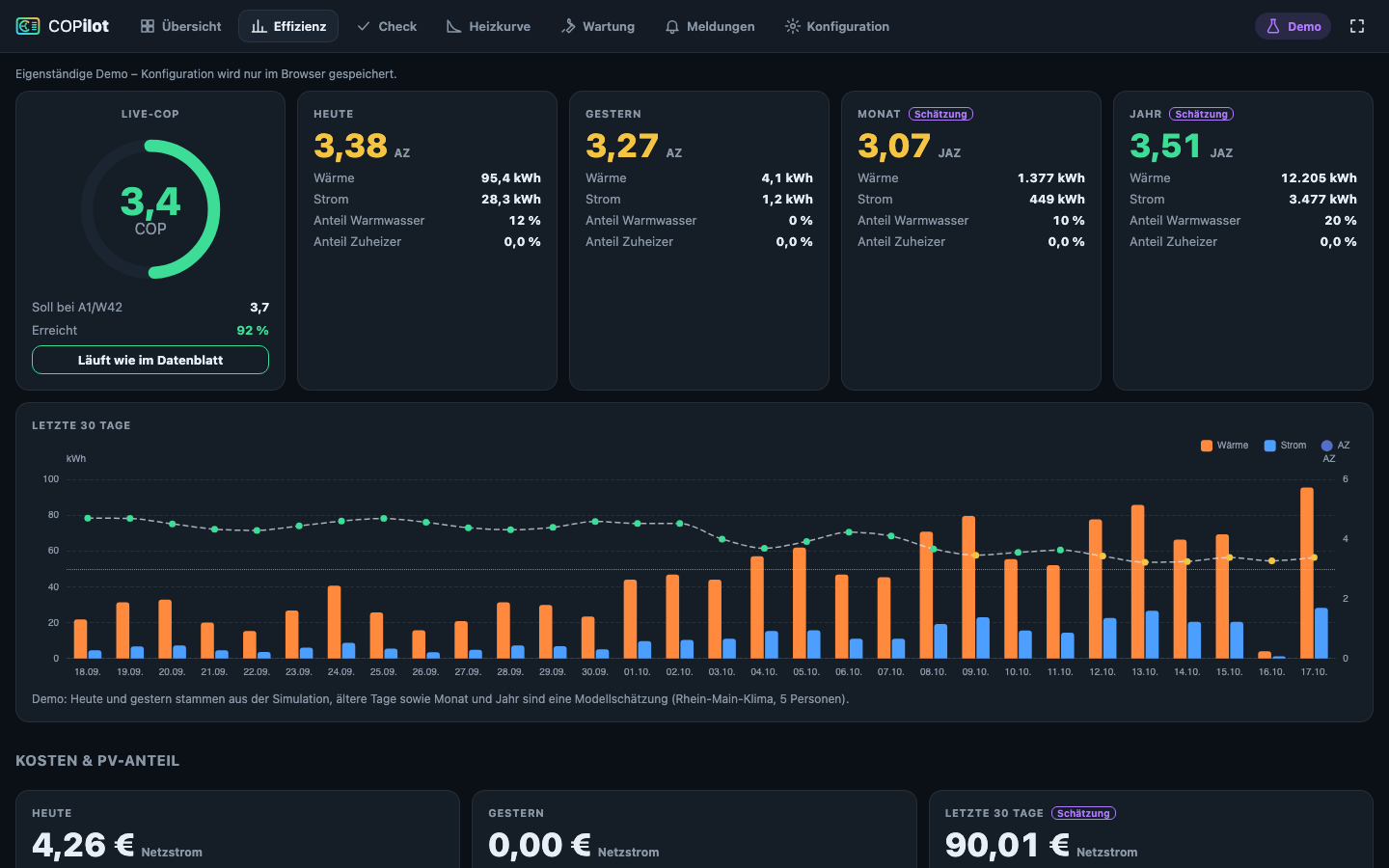
- Costs & PV share (efficiency tab): grid cost of the heat pump per day / 30 days, share covered by PV or battery (hour by hour from the energy layer), feed-in revenue given up, cost per kWh of heat and comparison with a gas boiler; fixed price or a price entity (dynamic tariffs)
- Maintenance calendar (wrench tab): recurring tasks suggested from your components (system pressure, particle filter SC1, dirt separator, expansion vessel, outdoor unit, DHW anode, professional service) plus your own; due tasks become messages and fire
copilot_messagefor push notifications - Write access for selected values: release single values with ✎ in the editor (e.g. DHW setpoint, one-time charge, operating mode – any number / select / switch / button entity). Change them from the value popover with a confirmation step; the backend only accepts released values within the entity limits and logs every change under messages. Admins only, unless allowed for all users in the settings
- Time machine (clock button): replay the last 6 h / 24 h / 3 days from the Home Assistant recorder – the whole schematic, values, explain mode and KPIs at any moment, with a strip of operating modes (heating, hot water, defrost) and playback at up to 1 h per second
- Safe configuration: plant and layout live in Home Assistant's storage (not in the integration folder), so updates never touch them. Before every save and every update the previous layout is backed up automatically (last 15, restorable under Configuration → Settings → Backups); layouts arranged by hand are never regenerated. Export / import as a JSON file
- Messages: backend rule engine (defrost, DHW charging, disinfection, backup heater, external inputs such as §14a / PV, pressure limits, new error codes, gateway offline). Fires a
copilot_messageevent for your own automations (push, ntfy …) - Demo mode with physics simulator: realistic heat pump behaviour (heating curve, buffer stratification, COP, icing/defrost, DHW draws, aux heater) plus scenarios: winter morning, mild season (cycling), shower, defrost, §14a limit, PV surplus, disinfection, fault
- Custom icons: bundled artwork is original and brand-neutral; upload your own SVG/PNG/WebP/JPG per component or per type
- German & English, light & dark (follows HA theme), wall display / phone / tablet / desktop
All screenshots show the built-in demo mode with the physics simulator.
| 2.5D style (light theme) | Explain mode |
|---|---|
 |
 |
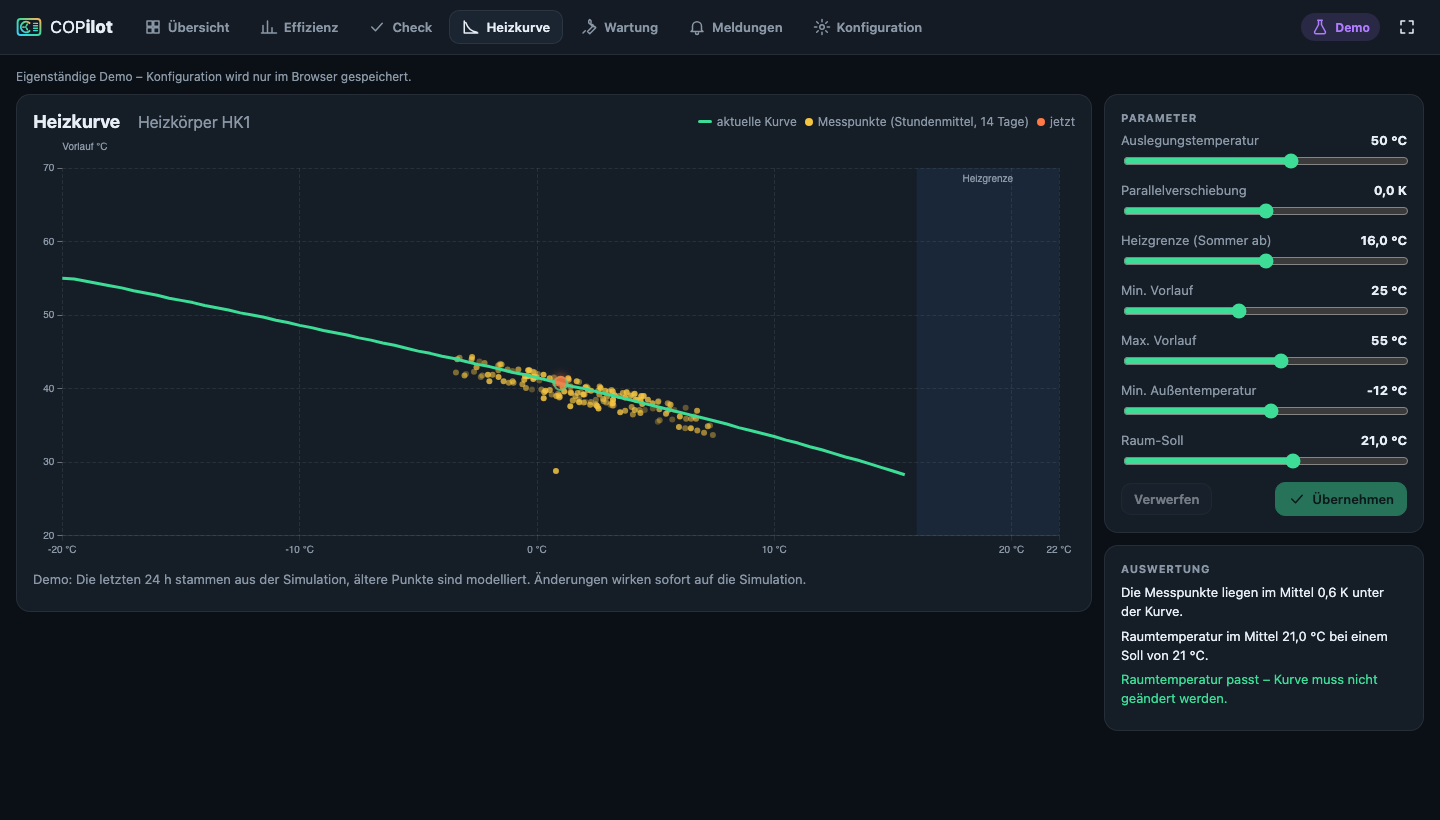
| Efficiency: COP, SPF and daily energy | Interactive heating curve |
 |
 |
- HACS → ⋮ (top right) → Custom repositories → URL
https://github.com/junky84/copilot, type Integration → Add. - Search for COPilot in HACS → Download.
- Restart Home Assistant.
- Settings → Devices & services → Add integration → COPilot.
- Open COPilot in the sidebar. An example plant in demo mode is created automatically.
Updates appear in HACS (and under Settings → Updates); install them and restart Home Assistant.
Manual installation: copy custom_components/copilot from the release zip to /config/custom_components/ and restart.
Components are drawn with their connections where the manufacturer documents them:
- Indoor units: wall-hung E units have all connections at the bottom (to/from heat pump, DHW flow/return, heating return/flow); T180 and TP70 floor-standing units on top. PC0, VW1, the electric backup heater and the manometer are built in and drawn inside the unit (TP70/T180 also PC1 and the integrated buffer/cylinder).
- Outdoor units (MB AR): water connections at the rear, bottom right seen from the front.
- Buffer P120.5: all four connections on top, the two returns through dip tubes.
- DHW cylinder SH290: connection heights from the datasheet.
- Return accessories: particle filter SC1, expansion vessel and magnetite/dirt separator sit in the return directly in front of the indoor unit, as required by the Buderus installation manual.
Sources: Buderus installation manuals WLW186i E (6721892057), WLW186i T180 (6721877118), WLW186i TP70 (6721851711), Logatherm WLW MB AR (6721843846), Logalux P120.5 (6720819646) and the SH290 RS datasheet. Layouts of the brine units (WSW) are approximated.
The integration loads the card automatically – no manual resource needed. For a full-screen tab (e.g. on a wall display) add a view of type Panel (1 card):
title: Heizung
path: heizung
icon: mdi:heat-pump-outline
type: panel
cards:
  - type: custom:copilot-card
    show_kpis: true            # key figures above the schematic
    show_messages: false       # messages column
    show_demo_controls: false  # demo speed / scenarios
# height: 600px # optional; panel views fill the screen- In EMS-ESP: enable MQTT, enable Home Assistant MQTT Discovery, entity ID format “Single instance, short names” (default). The “multiple instances” format works too – set the MQTT base in the integration options.
- Make sure the MQTT integration is running in Home Assistant and the EMS-ESP entities appear.
- COPilot → Configuration → Mapping → Scan entities, review the suggestions and apply.
- Values that do not come from EMS (circulation smart plug, buffer sensors, PV/inverter values, room sensor …) can be bound in the editor with the entity search.
- Switch off demo mode in Configuration → Settings.
EMS-ESP enum values (e.g. compressor activity) are published in the EMS-ESP UI language; COPilot understands English, German, Dutch, French, Polish, Swedish and Italian wording.
- v0.2:
Lovelace card(0.1.4),live COP / SPF with traffic light vs. datasheet(0.1.5),plant check(0.1.8),interactive heating curve(0.1.9),explain mode (“what is happening”)(0.1.21),energy layer (PV, battery, grid, wallbox, §14a)(0.1.22),2.5D style(0.1.24) - v0.3:
time machine(0.1.27),costs & PV share(0.1.28),maintenance calendar(0.1.29),export/import(0.1.27),write access(0.3.0)
cd frontend
npm install
npm run dev        # standalone demo at http://localhost:5173 (no Home Assistant needed)
npm run build      # builds custom_components/copilot/frontend/copilot-panel.js
Backend tests:
uv venv --python 3.13 .venv
VIRTUAL_ENV=.venv uv pip install -r requirements_test.txt
.venv/bin/python -m pytest
To look at a real Home Assistant from a browser that only allows localhost:
HA_TARGET=http://<ha-host>:8123 node tools/ha-proxy.mjs 8123 # then open http://localhost:8123The built panel bundle is committed so the integration works without a build step on the Home Assistant host.
This project is developed with substantial help from an AI coding assistant (Anthropic Claude). Every release is installed and checked on a real Home Assistant instance before it is published. Please report anything odd as an issue.
- EMS-ESP short names and unique-id formats are based on the EMS-ESP sources (v3.8.6).
- Product names (Buderus, Bosch, Logatherm, Compress …) are trademarks of their owners and are used only to identify compatible devices.
- The model list and the simulator use plausible values, not certified manufacturer data.
- The pixel font VT323 in About COPilot is licensed under the SIL Open Font License 1.1 – see VT323-OFL.txt.
License: MIT