
Turn GitHub's auto-generated release notes into human-readable sentences.
Go from this:
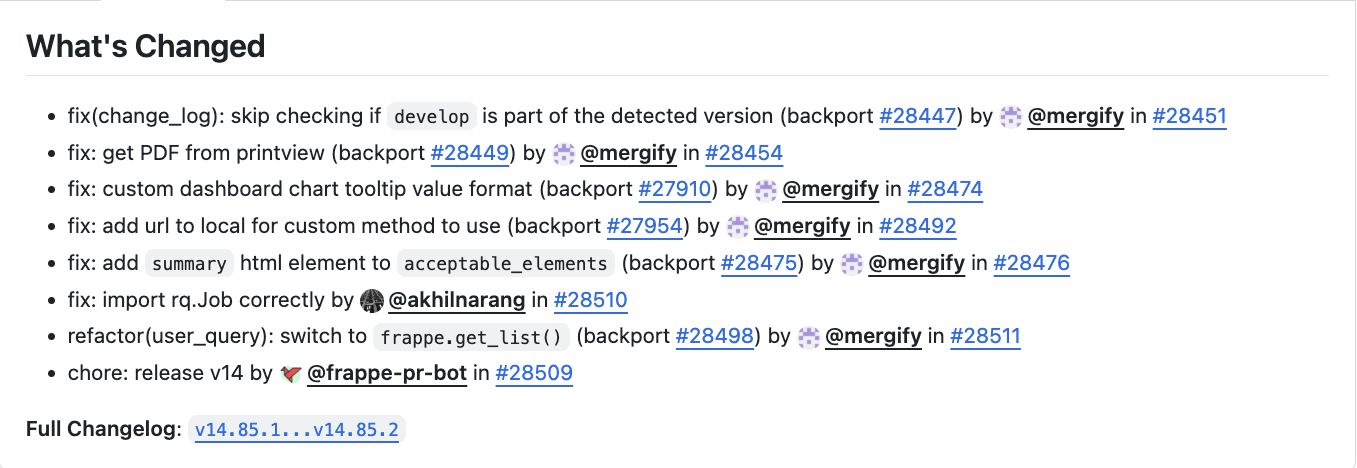
To this:
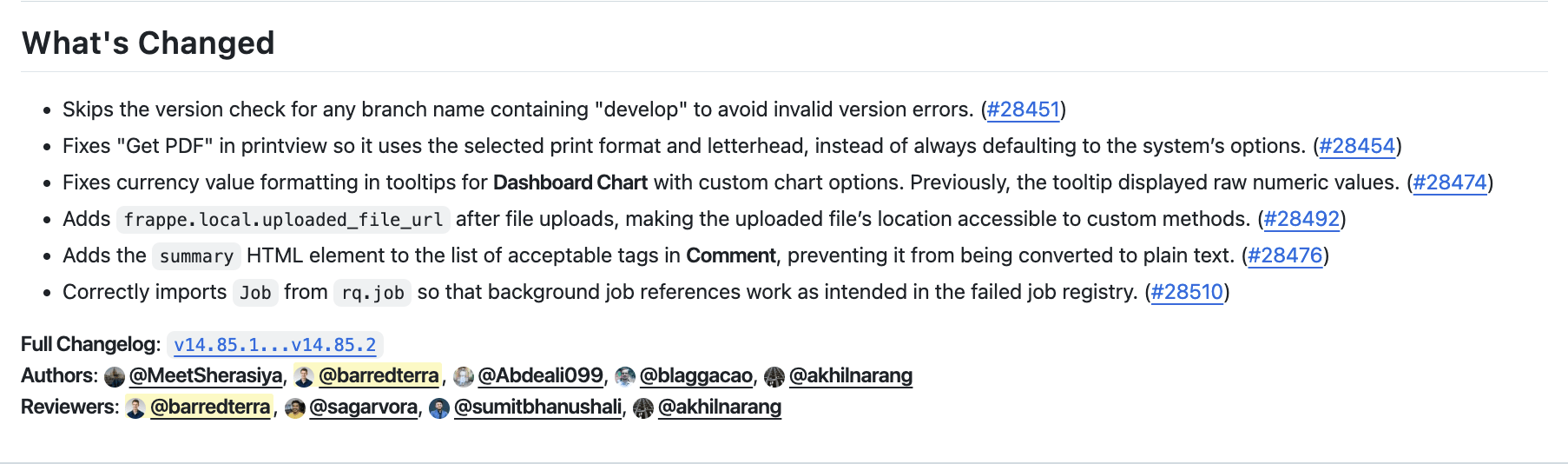
- AI-Powered Summaries - Converts technical PR titles into clear, user-friendly sentences
- Smart Filtering - Automatically excludes non-user-facing changes (chore, ci, refactor, test, style)
- Revert Detection - Automatically filters out PRs that were reverted within the same release
- Backport Intelligence - Reuses summaries from original PRs for backports, maintaining consistency
- Author & Reviewer Attribution - Credits human contributors while excluding bots
- Intelligent Caching - Stores generated summaries to avoid redundant API calls and reduce costs
- Grouped Release Notes - Optional grouping by conventional commit type (Features, Bug Fixes, Performance, etc.) or by area (Accounts, Stock, etc.)
- Multi-Mode Architecture - Use as CLI tool, Python library, or REST API backend
- Rich Context - Incorporates PR descriptions, linked issues, and code diffs for accurate summaries
- Interactive Setup - Guided configuration with validation and migration from legacy formats
Note
The default prompt is geared towards ERPNext and the Frappe Framework. If you want to use this for different projects, set your own prompt_path in config.toml.
uv tool install pretty-release-notesThis puts the pretty-release-notes command on your PATH. To run it once without installing, use uvx pretty-release-notes. Without uv, pip install pretty-release-notes works as well.
The easiest way to configure the tool is using the interactive setup command:
pretty-release-notes setupThis will:
- Guide you through all configuration options with helpful prompts
- Show sane defaults for each setting
- Create the config file at
~/.pretty-release-notes/config.toml
First-time migration from .env? Use the --migrate-env flag:
pretty-release-notes setup --migrate-envThis will read your existing .env file and suggest those values as defaults.
Alternatively, copy config.toml.example to ~/.pretty-release-notes/config.toml and fill in your credentials:
# Create config directory
mkdir -p ~/.pretty-release-notes

# Download the example config
curl -o ~/.pretty-release-notes/config.toml https://raw.githubusercontent.com/barredterra/pretty_release_notes/main/config.toml.example

# Edit with your credentials
nano ~/.pretty-release-notes/config.tomlThe configuration file uses TOML format with sections for GitHub credentials, LLM settings, database caching, and filters. The canonical section name is [llm], while the legacy [openai] section is still accepted for backward compatibility. Prefer fully qualified provider:model values such as openai:gpt-4.1; unqualified model names are still accepted and default to OpenAI for backward compatibility. You can also set reasoning_effort to none, low, medium, high, or xhigh for supported models/providers. See config.toml.example for the complete structure and all available options.
You can override the config location using the --config-path flag.
After installation, you can use the CLI in several ways:
# View all commands
pretty-release-notes --help

# Generate release notes
pretty-release-notes generate erpnext v15.38.4  # using owner from config.toml
pretty-release-notes generate --owner alyf-de banking v0.0.1

# Use a custom config file
pretty-release-notes generate --config-path /path/to/config.toml erpnext v15.38.4

# Specify custom comparison range
pretty-release-notes generate erpnext v15.38.4 --previous-tag v15.38.0

# Override reasoning effort for a single run
pretty-release-notes generate erpnext v15.38.4 --reasoning-effort high
Example output:
---- Original ----
## What's Changed
* fix: list view and form status not same for purchase order (backport #43690) (backport #43692) by @mergify in https://github.com/frappe/erpnext/pull/43706


**Full Changelog**: https://github.com/frappe/erpnext/compare/v15.38.3...v15.38.4

---- Modified ----
## What's Changed
* Removes unnecessary decimal precision checks for _per_received_ and _per_billed_ fields in **Purchase Order**, so the list view status and form status remain consistent. https://github.com/frappe/erpnext/pull/43706


**Full Changelog**: https://github.com/frappe/erpnext/compare/v15.38.3...v15.38.4
**Authors**: @rohitwaghchaureYou can also use pretty_release_notes as a Python library in your own projects:
from pretty_release_notes import ReleaseNotesBuilder

# Build a client with configuration
client = (
    ReleaseNotesBuilder()
    .with_github_token("ghp_your_token")
    .with_llm(
        "sk_your_key",
        model="openai:gpt-4.1",  # or model="anthropic:claude-sonnet-4-5"
        reasoning_effort="medium",
    )
    .with_database("sqlite")
    .with_filters(
        exclude_types={"chore", "ci", "refactor"},
        exclude_labels={"skip-release-notes"},
    )
    .build()
)

# Generate release notes
notes = client.generate_release_notes(
    owner="frappe",
    repo="erpnext",
    tag="v15.38.4",
    previous_tag_name="v15.38.0",  # Optional: custom comparison range
)
print(notes)

# Optionally update on GitHub
client.update_github_release("frappe", "erpnext", "v15.38.4", notes)
For more examples, see examples/library_usage.py.
The tool can also be run as a REST API server for integration with web frontends.
First, install the package with the web dependencies:
uv pip install "pretty-release-notes[web]"Then start the server:
# Using uvicorn directly
python -m uvicorn pretty_release_notes.web.app:app --host 0.0.0.0 --port 8000

# Or using the provided server script
python -m pretty_release_notes.web.server
The API will be available at http://localhost:8000 with interactive documentation at http://localhost:8000/docs.
Health Check
curl http://localhost:8000/healthCreate Release Notes Job
curl -X POST http://localhost:8000/generate \
  -H "Content-Type: application/json" \
  -d '{
    "owner": "frappe",
    "repo": "erpnext",
    "tag": "v15.38.4",
    "previous_tag_name": "v15.38.0",
    "github_token": "ghp_your_token_here",
    "llm_key": "sk-your_key_here",
    "llm_model": "openai:gpt-4.1",
    "reasoning_effort": "medium",
    "exclude_types": ["chore", "ci", "refactor"],
    "exclude_labels": ["skip-release-notes"],
    "exclude_authors": ["dependabot[bot]"],
    "no_read": false,
    "no_write": false
  }'
Legacy openai_key, openai_model, and openai_reasoning_effort request fields are still accepted for backward compatibility. Use no_database to skip both cache reads and writes.
Response:
{
  "job_id": "550e8400-e29b-41d4-a716-446655440000",
  "status": "pending",
  "created_at": "2025-01-19T10:30:00.000000"
}
Check Job Status
curl http://localhost:8000/jobs/{job_id}Response:
{
  "job_id": "550e8400-e29b-41d4-a716-446655440000",
  "status": "completed",
  "created_at": "2025-01-19T10:30:00.000000",
  "completed_at": "2025-01-19T10:30:15.000000",
  "result": "## What's Changed\n* Fixed bug...",
  "progress": [
    {
      "timestamp": "2025-01-19T10:30:05.000000",
      "type": "success",
      "message": "Downloaded PRs in 0.42 seconds."
    }
  ],
  "error": null
}Run release note generation automatically whenever a new release is published. Add the repos you want to watch to your config:
[poll]
repos = ["frappe/erpnext", "frappe/frappe"]
Then set it up:
# Seed state with current releases (so existing ones aren't reprocessed)
pretty-release-notes poll --seed

# Install a cron job that polls every 15 minutes
pretty-release-notes poll --install-cron
You can also run a single poll cycle manually:
pretty-release-notes pollThe poll command uses the same config, database, and filters as generate. Processed releases are tracked in ~/.pretty-release-notes/processed_releases.json.
Some repositories publish releases that are not versions, for example rolling releases for build artifacts. GitHub generates notes for them from an unrelated previous tag, so they can contain many PRs that are not in a release. To skip them, set glob patterns for their tags:
[poll]
repos = ["frappe/erpnext", "frappe/frappe"]
exclude_tags = ["assets-*"]
poll does not change the release notes of excluded releases and does not label their PRs. The label command does not use exclude_tags.
poll can also add a label and a comment to each PR of a release, like semantic-release does. Use this when semantic-release fails to do it for large releases. Set the label in your config:
[poll]
repos = ["frappe/erpnext"]
release_label = "released"
If release_label is not set, poll does not change PRs.
In each cycle, poll adds the label and this comment to each PR of a new release:
:tada: This PR is included in version 16.54.0 :tada:

The release is available on [GitHub release](https://github.com/frappe/erpnext/releases/tag/v16.54.0)- The PRs come from the release notes that GitHub generates. This includes PRs that the filters remove from the release notes. The original PRs of backports do not change.
- PRs that have the label already do not change.
pollsends one write per second. If GitHub returns an error or a rate limit,pollstops labeling for this cycle and continues with the remaining PRs in the next cycle. The release notes step continues.- Labeled releases are tracked separately from processed releases. A failure in one step does not repeat the other step.
poll --seedalso marks the current releases as labeled. If you setrelease_labelafter you seeded, runpoll --seedagain. Otherwise the next cycle adds comments to the PRs of recent releases.- A state file from an older version marks its processed releases as labeled too. Thus, only new releases get labels and comments.
- The token needs "Issues: Read and write" and "Pull requests: Read and write" permissions. The comments show the token's user as the author.
To label the PRs of one release manually:
pretty-release-notes label erpnext v16.54.0 --owner frappe --label releasedThe authors and reviewers of the PRs are added to the release notes.
- An author who reviewed or merged their own PR or backport is not a reviewer.
- A non-author who reviewed or merged someone else's PR is a reviewer.
- The author of the original PR is also the author of the backport.
Large releases are easier to read when each reader can go to the part of the product they use. Use --group-by-area or set group_by_area = true in [grouping]. This option takes precedence over group_by_type.
Each change goes to exactly one area:
- If the conventional scope matches an area, use that area. For example,
fix(stock): ...goes to "Stock". - If there is no matching scope and the PR labels match exactly one area, use that area.
- Else, put the change in the "General" section. This includes changes that affect several areas.
Breaking changes come first, then "General", then the areas in the configured order. In each area, changes are grouped by type, and each group has a label, for example "Bug Fixes":
- If an area has more than 3 changes, each group is collapsed in a
<details>block. The block summary shows the type and the count, for example "Features (2)". - Else, each type label is a paragraph above its bullet list.
Scopes and labels mean different things in different repositories, so each repository has its own areas. Only frappe/erpnext has default areas. A repository without areas puts all changes in "General".
To set the areas of a repository, add a [grouping.repo_area_headings."owner/repo"] table. Keys are scopes or labels, values are headings. Several keys can share one heading. A table for frappe/erpnext replaces its default areas:
[grouping]
group_by_area = true
general_heading = "General"

[grouping.repo_area_headings."frappe/hrms"]
payroll = "Payroll"
"salary-slip" = "Payroll"
attendance = "Attendance"We try to use the same message for backports as for the original PR. For this, we look for (backport #<number>) at the end of the PR title and check if we have existing messages for that PR in our database. If we do, we use the message for the original PR. If we don't, we create a new message for the backport.
This means that backports of backports are currently not supported / will get a new message. To get the same message, PRs must be a direct backport of the original PR.
git clone https://github.com/barredterra/pretty_release_notes
cd pretty_release_notes

python -m venv env
source env/bin/activate
pip install -e .[dev,web]
See CONTRIBUTING.md for development setup, testing, code quality tools, and commit conventions.