

Turn Mac apps into MCP tools your AI agent can call.
Install · How it works · Packs · Security
Ventriloquist learns a Mac app once through the macOS accessibility API
and keeps the actions worth having as typed tools, like
outlook_file_to_receipts or textedit_write_document. An app's tools
live together in one JSON file, its pack. Your agent calls them over MCP,
and every call replays the recorded steps: no screenshots and no vision
model. The agent still decides which tool to call. It never decides where
to click.
Why that matters: sorting six test emails in Outlook, the same model read about 3.6x fewer tokens through vent than through Claude's built-in computer use, and made no wrong clicks (computer use made two).

A real run on test emails, by an agent that hadn't seen the expected answers: 6 of 6 filed. Email 1 plays at real speed with the agent's pauses cut; the other five are sped up 8x.
Needs macOS and uv (brew install uv).
uv tool install ventriloquist-mcp
vent doctor
If your shell says vent: command not found, uv's tool folder isn't on
your PATH yet (common after brew install uv): run uv tool update-shell
and open a new terminal. To upgrade later, run
uv tool upgrade ventriloquist-mcp.
vent doctor checks the one permission vent needs. If it says
Accessibility is missing, open System Settings > Privacy & Security >
Accessibility, switch on your terminal app, restart the terminal, and run
it again. (pipx install ventriloquist-mcp
works too.)
Now drive TextEdit with the pack that ships with vent:
echo "hello" > /tmp/vent-demo.txt && open -a TextEdit /tmp/vent-demo.txt
vent run TextEdit write_document --arg text="typed by a pack"
vent run TextEdit read_document
The document changes with no keystrokes and no screenshot: the pack sets
the text area's value through the accessibility API, then reads it back
to verify. write_document replaces the whole text of the frontmost
TextEdit document, which is why the first line opens a scratch file; don't
run it with a document you care about in front.
vent serve speaks MCP over stdio. GUI apps start MCP servers without
your shell's PATH, so the config needs vent's absolute path, and
vent mcp-config prints the entry with the right path for your machine:
{
  "mcpServers": {
    "ventriloquist": {
      "command": "/Users/you/.local/bin/vent",
      "args": ["serve"]
    }
  }
}-
Claude Desktop: quit Claude, then merge it into
~/Library/Application Support/Claude/claude_desktop_config.json. Claude rewrites that file while it runs, so an edit made with it open gets lost. -
Cursor: merge it into
~/.cursor/mcp.json. -
Claude Code:
claude mcp add --scope user ventriloquist -- ~/.local/bin/vent serve -
Codex CLI: add to
~/.codex/config.toml:[mcp_servers.ventriloquist] command = "/Users/you/.local/bin/vent" args = ["serve"]
The Accessibility permission belongs to whichever app starts
vent serve: Cursor itself, or your terminal for Claude Code and Codex.
Switch it on for that app (use the + button if it isn't in the list yet)
and restart it.
Claude Desktop is the exception. It runs each MCP server as its own
process for permissions, so macOS checks vent's Python rather than
Claude, and switching Claude on does nothing for vent. vent mcp-config
and vent doctor print that file's path. Drag it from Finder into
System Settings > Privacy & Security > Accessibility (the + picker greys
it out), then restart Claude. Use the vent mcp-config entry rather
than uvx here: under uvx, macOS checks uv instead, and a grant for
uv covers everything uv runs.
If every call fails with "not trusted for Accessibility", the message names the app or file to switch on.
Tools show up as textedit_write_document, code_show_search,
slack_filter_channels, and so on. Then ask for things in plain words,
like "open the Search view in VS Code and search the workspace for
TODO". Tools a pack marks read_only or mutating run when called. A
tool marked high risk is hidden unless your client can ask you to
confirm each call (MCP elicitation), or the server was started with
VENT_ALLOW_HIGH=1, which runs it without asking. Start the server with
VENT_READ_ONLY=1 to serve read-only tools and nothing else.
docs/SECURITY.md
explains why (T9).
| App | Tools | Notes |
|---|---|---|
| TextEdit | write_document, read_document |
Acts on the frontmost document; write_document replaces all of its text |
| Notes | create_note, read_open_note |
|
| VS Code | show_explorer, show_search, show_source_control, search_workspace |
Launch VS Code with --force-renderer-accessibility |
| Slack | show_home, filter_channels |
Same flag as VS Code |
The Outlook tools in the demo aren't bundled: they're tied to three test folders. They're in examples/outlook as a pack you can copy and adapt.
Electron apps like VS Code and Slack only publish a working tree when
started with that flag, for example
open -a "Visual Studio Code" --args --force-renderer-accessibility.
Without it the tree can still be read, but actions get silently ignored.
Each step in a tool finds its element through an anchor: a recorded
description of the element (its role, label and identifier, and the chain
of elements above it) that vent matches against the live app. Anchors are
recorded per machine and per app version, so the bundled packs are
working examples of the format more than guarantees for your exact setup.
If a tool refuses to resolve, that's the safety design doing its job (it
never guesses between lookalike elements), and re-recording takes about a
minute with vent inspect and vent anchor, as in
Write a tool by hand. Section 5 of
docs/ARCHITECTURE.md
has the details.
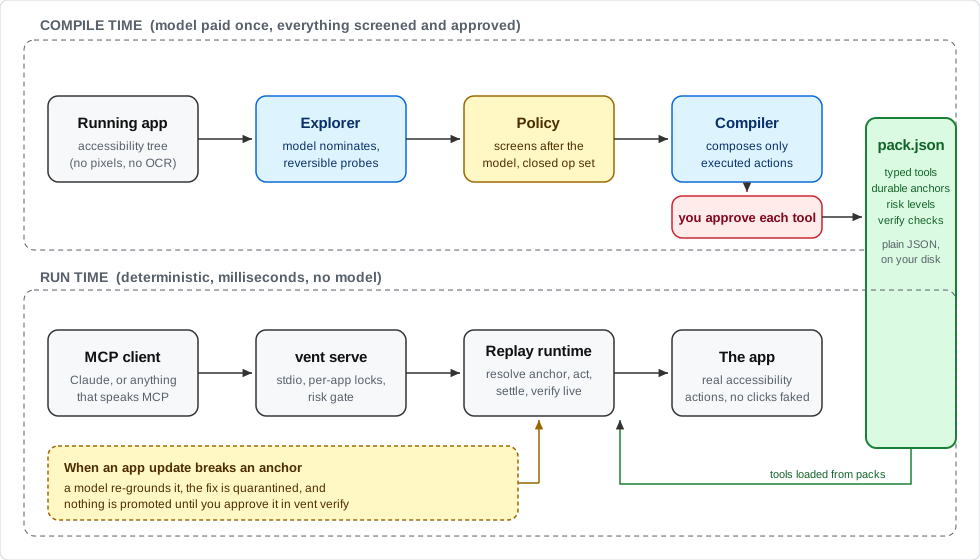
Most computer-use agents are interpreters. A model looks at your app and
decides every action, every time. That works on any app with no setup,
but every run pays again for screenshots and model decisions. This is the
compiler version. You pay the model cost once, while a pack is recorded,
and get back tools like write_document(text) or file_to_receipts(),
which run no model on vent's side. The agent still reads, judges and
picks the tool; vent does the clicking.
On a one-step task the two are even: in a TextEdit test, Claude's computer use needed the same two tool calls and about the same total time, and vent added about 6x fewer tokens to the agent's context. On a longer task the difference shows. Triaging six test emails in new Outlook (read each one, flag it if it needs a reply or has a deadline, file it into one of three folders), both filed all six correctly. vent took 1:59 and made no wrong clicks. Claude's computer use took 2:31, made two harmless wrong moves, and put about 3.6x as many tokens into the context (18k against 5k), because it works from screenshots and vent returns text. The TextEdit test was three rounds each and the Outlook one a single run each, with the same model; docs/BENCHMARKS.md has the method and the caveats.

Sorting six test emails in new Outlook for Mac. Same model, one run each.
On the author's Mac, through Claude Code, a TextEdit read takes about half
a second end to end and a write about 1.1 s. Measured with a plain MCP
client, vent's own share is about 0.1 s for a read and 0.5 s for a write.
If you turn healing on (VENT_HEAL=1), a model is brought back in when an
app update breaks a recorded action, but the fix sits in quarantine until
you approve it.
The top half of the diagram runs once per app and is where the model earns its keep, with a policy screening every probe and a human approving every tool. The bottom half is what you actually use day to day, and it has no model in it unless you turn healing on. The pack file in the middle is the whole interface between the two: plain JSON you can read, diff, and check into a repo.
Native Mac apps have carried an accessibility layer for decades because screen readers depend on it. It turns out it's also a pretty good API for driving apps, if you're careful about how you find elements again later.
- Built-in computer use (the computer-use features in Claude and Codex, and most open-source agents): a model looks at the app, through screenshots and, in Claude's case, the accessibility tree too, and picks the actions on every run. It works on any app with no setup, and each run pays for those screenshots and model decisions.
- Accessibility MCP servers such as Peekaboo and MacOS-MCP: they hand the accessibility tree and its actions to your client's model, which still decides each click on every call. Nothing to record first, and nothing fixed either.
- AppleScript servers: dependable where an app has a scripting dictionary, which most Electron apps don't.
- Ventriloquist: the model works once, while you record. What gets served is a fixed set of tools you approved, replayed with no model. It covers fewer apps than any of the above, by design, and in exchange calls are cheap in tokens and the same every time. The closest idea elsewhere is terminator, which records workflows as deterministic code on Windows.
vent doctor Spotify                 # does this app expose a usable tree?
vent explore Spotify --no-values    # a model probes safely, the policy screens every action
vent compile Spotify                # the model proposes tools; you approve each against its literal steps
vent run Spotify <tool> --arg k=v   # call one tool directly
vent verify Spotify                 # dry-resolve anchors; promote quarantined heals
Approved tools join the app's pack, so a pack can grow over several explore runs. A tool with the same name as one already there is replaced only if you say yes, and an app with a bundled pack starts from it, so its tools stay.
vent compile makes tools that press buttons and type text, because
those are the two things the explorer does. A tool that reads text back
or waits for something to appear is written by hand, and so was every
tool that ships with vent. Write a tool by hand
shows how.
vent explore, vent compile, and vent run --heal call a model, and so
does vent serve if you start it with VENT_HEAL=1 to let it heal broken
anchors. Nothing else does. Healing takes --no-values too
(VENT_NO_VALUES=1 for the server) to keep field contents from the
model. The model comes from the Claude Code CLI if it's installed and
signed in, with no API key needed, run apart from your own Claude Code
setup (none of your MCP servers, hooks or memory), or from the Anthropic
API: install with
uv tool install --with anthropic ventriloquist-mcp
and set ANTHROPIC_API_KEY.
Packs you make live in ~/.ventriloquist/packs/ (set VENT_HOME to move
it), next to the traces vent explore records. A pack there replaces the
bundled pack for the same app, which is also where a healed bundled pack
ends up; delete your copy to go back to the bundled one. If your copy
fails to load, vent warns you rather than quietly serving the bundled
pack in its place, and a broken pack never stops the other apps' tools.
vent appsshows the app's bundle id, andvent inspect <App>lists the elements in its windows, each with a number.vent anchor <App> <number>prints that element's anchor as JSON.- Put it in a step of a tool in
~/.ventriloquist/packs/<bundle id>/pack.json. A read is{"op": "read_value", "anchor": ...}and a wait is{"op": "wait_for", "anchor": ..., "timeout_s": 5}. The bundled TextEdit pack is a short one to copy from. vent run <App> <tool>runs it, andvent verify <App>checks that every anchor in the pack still resolves.
An anchor that records a window title only ever acts in a window with
that title. Empty its window_title for a tool that should act on
whichever window is in front, as the bundled TextEdit tools do.
This is an early release by one developer. What it doesn't do yet, or does with caveats:
- macOS only. The whole approach rests on the macOS accessibility API.
- The Accessibility grant is broad. macOS gives it to the app that starts vent (your terminal, Cursor) or, under Claude Desktop, to vent's Python. Anything else that app starts, or that runs on that Python as its own process, can then drive every app on your Mac. vent's own scoping (named apps, a policy, risk levels) is self-discipline inside that grant, not an OS boundary. SECURITY.md T10 has the details.
- Packs are recorded on one machine. Anchors held up under resizes, full restarts, and a deliberately degraded environment on the author's Mac, but nobody has measured them on a second Mac yet. A bundled pack may refuse on yours and need re-recording.
- The app needs a usable tree. AppKit apps have one. Electron and
Chromium apps need
--force-renderer-accessibility. Anything drawn on a canvas (Figma's design surface, games) exposes its chrome and nothing inside. - The app has to be running, with the window the tool expects. macOS only lists windows on the current Space to accessibility clients, so while you're in a full-screen app or on another desktop, vent goes through the app's main window, which macOS still reports. Reading and writing text work there without switching Spaces. A press in an app that isn't in front can change the button and nothing else (TextEdit's Bold does), so the Notes, VS Code and Slack tools, and the Outlook example's flag and filing tools, bring their app to the front while they run and hand focus back afterwards, switching Spaces if they need to, and fail before acting if the app won't come forward. The Outlook read tool works without coming to the front. The app's other windows on other Spaces stay out of reach, and so does the title bar of a full-screen window. A locked screen makes every app look empty.
- Calls take turns. A GUI is one shared thing, so calls to the same app queue, and tools that bring their app to the front queue across apps, since there's only one front. A call the client cancels while it waits never runs.
- Preconditions are prose. VS Code's
search_workspacesays to open the Search view first, but nothing enforces it, and called cold it fails. Stateful preconditions are planned. - High-risk tools need a client that can ask you. Each call to one
asks you first, through MCP elicitation. A client without it doesn't
see them, unless the server runs with
VENT_ALLOW_HIGH=1, and then they run without asking. - Exploring acts on your real app. The explorer clicks and types
under a policy, and probes are restored, but an app that syncs every
keystroke may send a probe string before it's undone. Explore against
a scratch document or a test account, and use
--no-valuesto keep field contents away from the model. The policy reads English labels, so the explorer refuses an app whose menus are in another language. - Read tools hand app text to your client's model. vent marks it as untrusted data (SECURITY.md T12); whether the client respects that is up to the client.
- No system dialogs, and nothing behind a dialog. File pickers and save sheets are out of scope for now. A step refuses while its window has a sheet open or the app shows a modal dialog, unless the step was recorded inside that sheet or dialog.
On the author's Mac, 82.5% to 100% of the recorded anchors for TextEdit, Finder, VS Code and Slack still resolved after a window resize, and for VS Code and Slack after a full restart too. None bound a wrong element: when two candidates look alike, vent refuses instead of guessing. The numbers, the whole-tool runs and the field notes are in docs/BENCHMARKS.md.
Read docs/ARCHITECTURE.md before the code, and docs/SECURITY.md for the threat model. Both went through adversarial review before implementation and got rewritten from the findings, and each phase since has gotten the same treatment.
Bug reports from Macs other than the author's are the most useful thing
right now, especially vent verify <app> --report out.json output for a
bundled pack. To work on the code:
git clone https://github.com/ShaanGS/ventriloquist && cd ventriloquist
uv run pytest
The test suite needs no Mac permissions, no live apps, and no model credentials, and runs in CI on Linux and macOS. CONTRIBUTING.md has the rules that are load-bearing.
MIT



