Build better speech-to-text and ASR models entirely on your machine.
Record your voice. Clean it up with local AI. Fine-tune Whisper or Moonshine. Deploy something that's actually yours.


Walkthrough | Setup | Configuration | Recording | Dataset | Troubleshooting

- Create good data - Use Listenr to record and collect natural speech with domain-specific vocabulary that generic models miss.
- Process & improve - Pipe it through Lemonade or any OpenAI-compatible provider to transcribe with Whisper and automatically correct grammar, punctuation, and homophones using a local LLM.
- Fine-tune & deploy - Use Listenr to build train/dev/test splits and fine-tune Whisper or Moonshine with LoRA. Merge the adapter into a self-contained model you can deploy.
Everything stays local - no audio, text, or weights ever leave on your machine.
Install Lemonade and pull models:
Lemonade guide: lemonade-server.ai/docs/guide/install
# after installing locally, download default models
lemonade pull Whisper-Base
lemonade pull gpt-oss-20b-mxfp4-GGUF
Install Listenr and start recording:
uv tool install listenr   # or: pipx install listenr
listenr record            # start recording
On PyPI. Python 3.11 or newer. The core install covers recording, transcription and dataset building; fine-tuning and the dataset importers live behind extras, listed in docs/setup.md.
On an AMD GPU, install a ROCm torch before the finetune extra, or pip will
resolve a CUDA wheel that cannot see your card. See
docs/setup.md.
Working on Listenr itself? Clone the repo and uv pip install -e ".[dev]" instead.
Once you have recordings, process & fine-tune:
# Build train/dev/test splits from your manifest
listenr build-dataset --format hf

# Fine-tune Whisper or Moonshine (see docs/finetune-amd.md for AMD GPUs)
podman compose run --rm finetune

# Merge the LoRA adapter into a standalone model
podman compose run --rm merge

# Evaluate it on the held-out test split
listenr eval --compare-base --keyword YourDomainWord
See docs/setup.md for full installation details.
If you want to mix in an external ASR dataset, use the optional importers to
write a separate Listenr-compatible manifest: listenr import-mdc <dataset-id>
(Mozilla Data Collective) or listenr import-hf <dataset-id> (Hugging Face): then pass that manifest to listenr build-dataset alongside your normal one.
See docs/dataset.md for details.
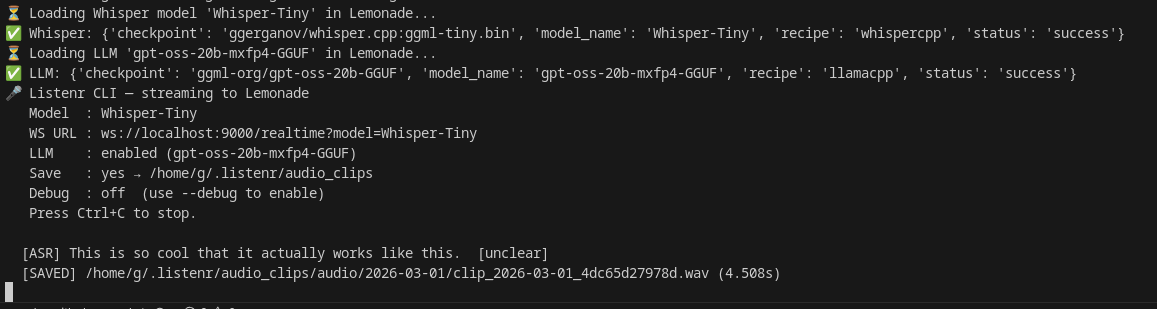
Recording & transcription - Listenr streams your microphone to Lemonade's /realtime WebSocket in ~85 ms chunks (16 kHz). Lemonade's voice activity detection segments speech, runs Whisper.cpp, and streams back transcripts.
Auto-correction - A local LLM cleans up punctuation, grammar, and homophones, producing a higher-quality training corpus than raw Whisper output alone.
Dataset & fine-tuning - Listenr saves each utterance as a .wav clip and a line in manifest.jsonl. One command builds train/dev/test splits in HuggingFace format. Another command fine-tunes any openai/whisper-* or UsefulSensors/moonshine-* model using LoRA (works on AMD and NVIDIA GPUs via Podman). Moonshine is the smaller, English-only, edge-oriented option; Whisper is the multilingual all-rounder.
Deployment - listenr merge folds the LoRA adapter into a self-contained model that loads with plain transformers. No PEFT dependency. Run inference locally or deploy it anywhere.
| Command | What it does | Needs |
|---|---|---|
listenr record |
Record from the microphone with live transcription | core |
listenr asr |
Transcribe an audio file | core |
listenr retranscribe |
Re-run Whisper on saved clips | core |
listenr build-dataset |
Build train/dev/test splits from recordings | core |
listenr categorize |
Filter a manifest to clips matching topics | categorize |
listenr import-mdc |
Import a Mozilla Data Collective dataset | mdc |
listenr import-hf |
Import a Hugging Face dataset | hf |
listenr finetune |
Fine-tune Whisper or Moonshine with LoRA | finetune |
listenr merge |
Merge a LoRA adapter into a standalone model | finetune |
listenr eval |
Evaluate the merged model on the test split | finetune |
Extras install with uv pip install "listenr[finetune]". Running a command
without its extra prints the install line you need.
| Guide | Description |
|---|---|
| docs/setup.md | Installation, Lemonade Server, microphone setup |
| docs/configuration.md | Full config.toml reference, VAD tuning, available models |
| docs/recording.md | CLI usage, how recording works, batch transcription |
| docs/dataset.md | Building train/dev/test splits, importing public corpora, and filtering by topic |
| docs/finetune-amd.md | Fine-tuning on an AMD GPU via ROCm and Podman, merging, and evaluation |
| docs/troubleshooting.md | Common errors and fixes |
- Lemonade Server - unified local inference API
- whisper.cpp - fast local ASR
- llama.cpp - fast local LLMs
Mozilla Public License Version 2.0 - see LICENSE.