




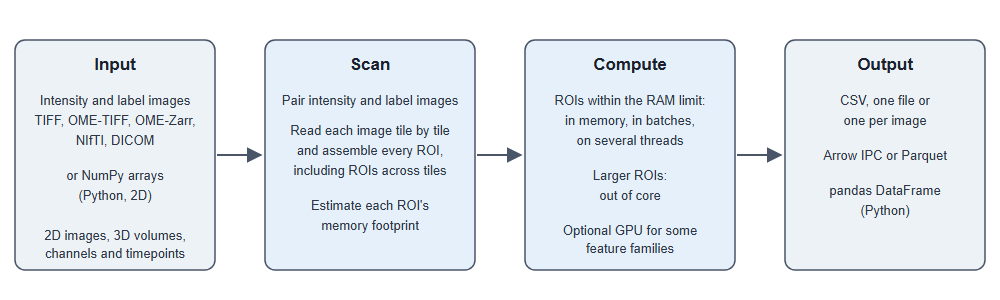
Nyxus computes intensity, texture, morphology and image quality features for every region of interest (ROI) in 2D images and 3D volumes: 758 features in all, 539 for 2D images, 213 for 3D volumes and 6 image quality features. It runs from Python or the command line, reads TIFF, OME-TIFF, OME-Zarr, NIfTI and DICOM files (OME-TIFF and OME-Zarr with up to five dimensions), and assembles ROIs that span several image tiles. Each feature's validation against reference tools such as PyRadiomics, MIRP, MATLAB and CellProfiler is listed in the documentation.
ROIs larger than the memory budget are processed out of core when they come from files; which features then keep their in-memory values is listed under large images.
Documentation: https://nyxus.readthedocs.io
pip install nyxus
or
conda install nyxus -c conda-forge
The conda-forge package has no build for Apple Silicon Macs or Linux aarch64; use pip there.
On Windows, the PyPI wheels do not read OME-Zarr or compressed NIfTI (.nii.gz), and the
conda-forge packages of 0.11.0 need Visual Studio installed (they were built in Debug mode).
GPU wheels, the Docker image and building from source are described in
Installation.
import numpy as np
from nyxus import Nyxus

intensity = np.array([[1, 4, 4, 1],
                      [1, 4, 6, 1],
                      [4, 1, 6, 4],
                      [4, 4, 6, 4]], dtype=np.uint16)
labels = np.array([[1, 1, 0, 2],
                   [1, 1, 0, 2],
                   [1, 1, 0, 2],
                   [1, 1, 0, 2]], dtype=np.uint32)

nyx = Nyxus(["*ALL_INTENSITY*"])
features = nyx.featurize(intensity, labels)
print(features[["ROI_label", "MEAN", "MAX"]])
A directory of image files and their label images is featurized with
nyx.featurize_directory("intensities/", "labels/").
This example writes its volume with tifffile (pip install tifffile).
import numpy as np
import tifffile
from nyxus import Nyxus3D

volume = np.random.default_rng(0).integers(1, 100, size=(8, 32, 32), dtype=np.uint16)
labels = np.zeros_like(volume)
labels[2:6, 8:24, 8:24] = 1
tifffile.imwrite("volume.ome.tif", volume, ome=True, metadata={"axes": "ZYX"})
tifffile.imwrite("labels.ome.tif", labels, ome=True, metadata={"axes": "ZYX"})

nyx = Nyxus3D(["*3D_ALL_INTENSITY*"])
features = nyx.featurize_files(["./volume.ome.tif"], ["./labels.ome.tif"], False)
print(features[["ROI_label", "3MEAN", "3MAX"]])The Python packages do not include the command-line program; run it from the Docker image or build it from source (see Installation). The output directory must already exist.
nyxus --features="*ALL_INTENSITY*,*ALL_MORPHOLOGY*" --intDir=/data/int --segDir=/data/seg --outDir=/data/out --outputType=singlecsv
- Troubleshooting: the common error messages and what they mean
- Command line and Python examples and supported formats
- 3D volumes and large images
- Output formats and columns, GPU acceleration and IBSI mode
- Feature list, feature groups and how features are validated
- Python API and command-line reference
- WIPP plugin
- Developer guide and contributing
If you use Nyxus in your work, please cite it as described in CITATION.cff; GitHub's Cite this repository button gives APA and BibTeX.
Nyxus is released under the MIT License.