

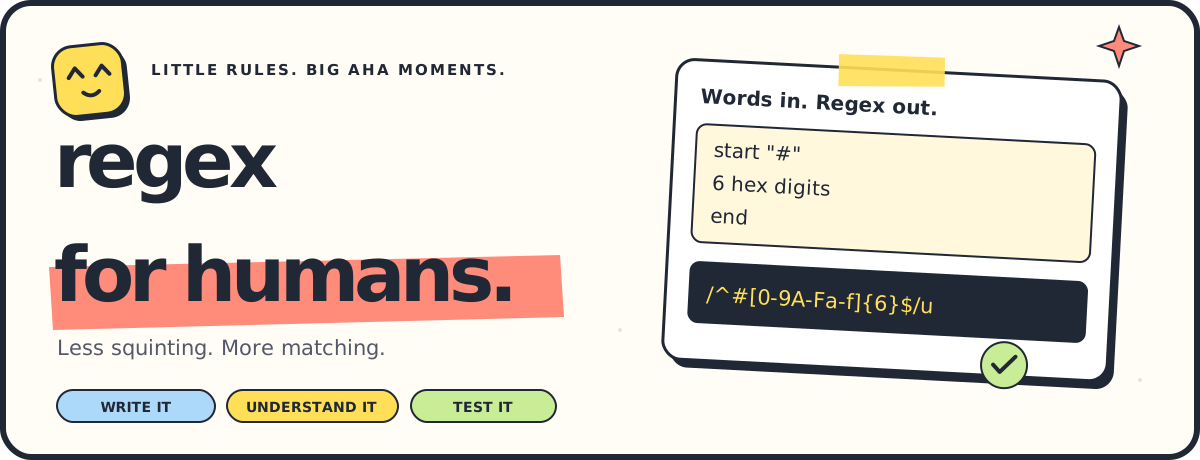
Write it. Understand it. Test it.
A few clear English rules become a JavaScript regex you can actually follow.
🔒 Runs locally 🧩 No runtime dependencies ⚡ One compiler, three ways to use it
English · 简体中文 · Español · Français · Português do Brasil · 日本語 · Deutsch · हिन्दी · العربية · اردو
Regex punctuation gets easier to read when you can see where it came from.
| ✍️ Your rules | ✨ Your JavaScript regex |
|---|---|
|
/^#[0-9A-Fa-f]{6}$/u✅ |
A small, fixed vocabulary, with an exact meaning for every instruction. The library, CLI, and workshop use the same deterministic compiler. Unknown phrases get a line, column, and helpful diagnostic.
🌱 Development preview (
0.1.0-dev.12): the library and CLI need Node.js 22+. The hosted workshop works without installation. Human usability and screen reader reviews are still pending.
Complete a rule: use Complete a rule or Ctrl + Space to finish built-in character classes, including after a count (for example, between 2 and 5 di), or references to earlier closed captures (same as ca). References are offered by number and by name; a preview displays the complete selected rule. Every suggestion must compile with the entire document. Quoted text, comments and selected text are preserved. See completion scope and controls.
Source follow-up after dev.12: completion also offers eight balanced group/assertion templates. The preview shows the proposed document, including reference updates when a new capture changes numbering; the cursor lands in the first body rule. This addition awaits the next verified workshop release.
| Start here | Continue with |
|---|---|
| Install · Playground | Recipes · Complex examples |
| Captures · Cheat sheet | CLI · JavaScript / TypeScript |
| Capabilities · Flags | Local development · FAQ |
Markdown reports: export a Markdown report with the build label, rules, exact JavaScript regex, options, intended tests and reimportable JSON. Exporting does not run or certify the tests.
| Capability | npm 0.1.0-dev.12 API / hosted workshop |
|---|---|
| Readable rules → native JavaScript regex | ✅ |
| Supported regex → editable rules | ✅ |
| Fragment explanations and source navigation | ✅ |
| CLI, ESM API and TypeScript declarations | ✅ |
| Numbered/named captures and nested blocks | ✅ |
| Whole-block repetition and backward references | ✅ |
Ordered alternatives with either { … } |
✅ |
Lazy repetition with lazy |
✅ |
| Lookaround | ✅ |
| Word boundaries | ✅ |
| Unicode character properties | ✅ |
| Composable character classes | ✅ |
| Native Unicode string and nested set operations | ✅ |
| All eight JavaScript flags | ✅ |
| Group editing and capture highlighting | ✅ |
| Interactive structure and SVG export | ✅ |
| Structural risk review | ✅ |
| Engine-aware code exports | ✅ |
| Free-form English | — |
The workshop now offers Edit groups and references: rename captures, change named/numbered/noncapturing forms and jump to their references. Numeric references keep their original targets when numbering changes; removing a referenced capture is rejected without changing the rules. Highlight selects a capture's native input range, including empty captures and captures outside the consumed match. The shared editGroup API returns validated rules. See group editing.
Open Explore the pattern for an AST-driven railroad diagram. See nested groups, ordered alternatives, repetition loops and zero-width checks; hover or select to connect rules, regex fragments and explanations. Actual size keeps text readable; Fit overview shows the whole map. Export SVG saves a standalone file, also available through toSVG(rules, { flags }). This shows structure, not runtime backtracking. Read structural diagrams.
With this preview, lazy digits generates \d+?: try one digit first, then expand if following rules need more. lazy any text generates .*?. Available in npm 0.1.0-dev.12; see greedy and lazy repetition.
The compiler also supports followed by { … }, not followed by { … }, preceded by { … }, not preceded by { … }. They test surrounding text without consuming it. Captures keep native values and positions, which can lie outside the consumed match; lookbehind requires runtime support. Available in npm 0.1.0-dev.12; see lookaround assertions.
The compiler supports word boundary (\b) and not word boundary (\B). These zero-width checks use native JavaScript word status: ASCII letters, digits and underscore, plus case-folding equivalents with i. They do not segment natural-language words. Available in npm 0.1.0-dev.12; see word boundaries.
The compiler also accepts unicode property "L" and not unicode property "L" for native \p{L} and \P{L}. L means Letter; aliases are case-sensitive and classification uses the runtime’s Unicode data. Counts and lazy work as usual. With i, the native u complement can include case-folded letters. Available in npm 0.1.0-dev.12; see Unicode properties.
The compiler supports range "α" to "ω" and character class: digit, "_". Combine one-code-point literals, ranges, singular shorthands and Unicode properties in one class; not character class: negates the whole union. Counts and lazy apply to the class. Property complements keep their native u/i behavior. Available in npm 0.1.0-dev.12; see character classes.
The 0.1.0-dev.12 preview includes groups, captures, backward references and ordered alternatives in the library and CLI. The browser workshop adds capture inspection and multiple search matches. See compatibility and distribution records for the precise evidence.
Open Export to a programming language in the local workshop, call exportRegex(rules, { target: "python" }), or run node bin/regex-for-humans.js --target python --json rules.txt. Nine formats cover JavaScript, TypeScript, Python, Rust, Go, Java, C#, PHP and Ruby. JavaScript/TypeScript retain the existing native pattern; other targets translate supported AST semantics before quoting source code.
Seven native engines have passed generated-code comparisons; PHP is verified on PHP 8.5.11 / PCRE2 10.44. See the tested editions and corpus limits in the compatibility guide. Keep the returned requirements and capture mapping: foreign captures use gN names, and inactive names can be absent. Foreign input must be well-formed Unicode. Unsupported flags (d/g/i/y), Unicode properties and incompatible assertions or capture/repetition behavior produce positioned diagnostics. Download code or the complete export JSON; browser examples still run in JavaScript. Read the profiles and limits.
npm install regex-for-humans@previewUse the CLI without a global install:
printf 'start "ABC"\n3 digits\nend\n' | npx --yes --package=regex-for-humans@preview regex-for-humansThis prints /^ABC\d{3}$/u. To pin the exact preview, use regex-for-humans@0.1.0-dev.12. There are no runtime dependencies or standalone OS executables.
Choose Interface language for English, Simplified Chinese, Spanish or French. Labels, recipes, match feedback and navigation controls update without changing your rules, examples, selections, open panels or generated code. The choice is remembered locally when storage is available. Rules still use controlled English; compiler explanations, diagram labels and exported technical requirements stay in English. See workshop localization.
Use Theme to follow your system appearance or choose a light or dark workshop. The preference is saved locally when storage is available; changing appearance retains your rules, examples, selections and open panels. See theme preference.
the native rule editor colors keywords, quoted strings, captures, quantifiers, assertions, alternatives and comments. It underlines the compiler's diagnosed token while retaining normal typing, selection, copy and scrolling; forced colors and inputs beyond the budgets use plain native text. Whole-line # comments keep their source locations and consume the usual budgets. See comments and editor highlighting.
Build a rule inserts editable capture, optional-section, alternative, repetition, character-class and assertion templates before the current line or selection, inside outer anchors. Adding a capture keeps existing numbered references aimed at the same groups. Invalid or oversized insertions retain the original rules and selection; flags and examples stay in place. See rule construction.
Exact expectations checks complete UTF-16 spans, ordered capture values (null for absence, "" for an empty capture) and JavaScript replacement results using the original flags. Test fixtures imports/exports versioned JSON and manually saves/restores examples locally. Invalid drafts/files retain current work; imported CR/CRLF stays exact until the example field is edited. See the fixture format, examples and limits.
Share a workshop snapshot with Copy share link: preserve rules, flags, match mode, examples and exact expectations in one URL. A fresh page restores it before recipes load; Load shared link explicitly replaces work already in progress. Clipboard refusal leaves a manual-copy field. Links are limited to 32 KiB; larger suites use JSON export. Anyone with the link can read its contents: it is not encrypted. See sharing and its limits.
Draft recovery. Enable Keep a draft in this browser to recover rules, flags, examples, pasted regex and even unfinished expectation JSON after reload. It is off by default, keeps manual saved tests separate and removes the draft when disabled. See recovery and storage limits.
Preview group edits. Choose Preview group edit to compare the current and proposed rules and regex, including renamed or renumbered references. Preview keeps your tests and saved draft; changing source, flags or group fields clears it. Apply the edit to test its result. See before/after comparisons and their limits.
Understand a failed example from native match ranges or provable minimum lengths, missing literals and literal text at the wrong absolute input edge. Prefix/suffix proofs apply to case-sensitive input anchors; line anchors and uncertain cases keep conservative explanations. The workshop admits when the precise failing step is unavailable. This is not a backtracking trace. See failure explanations.
Go to the exact diagnostic for a malformed quoted escape, invalid class/list item, range endpoint or Unicode property alias. Highlighting keeps the original escaped spelling and complete Unicode pairs; errors without a known range retain point navigation. The library and CLI expose optional exclusive UTF-16 endColumn metadata. See diagnostic ranges.
- Pick a recipe or write one instruction per line.
- Follow the fragments to see what every rule means.
- Try your examples and mark what should match.
- Copy the regex when the results make sense.
Partial matches show a short escaped input preview with the match highlighted; an empty match gets a caret marker.
Open a match in the current workshop to inspect capture values and native spans. Absent groups and empty captures stay distinct; repeated groups show their final value. Search anywhere lists up to 100 nonoverlapping matches and advances empty matches by a Unicode code point. Positions count UTF-16 units, with the end excluded. Engines without capture indices show values without inferred positions.
Your rules and examples stay in the browser. No account, AI interpretation, or application backend.
Paste a supported JavaScript regex literal into Already have a regex? in the workshop and turn it into editable rules. Press Ctrl/Cmd + Enter in the regex field or choose Translate to rules. For example, /^[A-Z]{2}-\d{4}$/u becomes:
start
2 uppercase letter
"-"
4 digit
end
The workshop expects a slash-delimited literal with u or v; write line breaks as escapes such as \n. The reverse translator preserves supported flags. The 0.1.0-dev.12 preview imports numbered/named captures, nested groups, ordered alternatives, backward references, lookaround and lazy quantifiers, preserving capture values and numbering. Forward/open references remain unsupported; see the language guide for its limits.
Reverse translation also handles JavaScript's empty negative class [^], which includes line breaks. When ordinary . atoms appear beside it, their output rules explicitly exclude line terminators so matching stays the same.
Letter and hex ranges can appear in equivalent orders: [a-zA-Z] becomes letter, and all six orders of 0-9, A-F and a-f become hex digit. Generated regexes use a canonical range order with the same matching behavior.
Path-component exclusions become readable rules too: /^[^/\\\0\n\r\u2028\u2029]{1,32}$/u becomes start, between 1 and 32 path segment character, end on separate lines. Reordering, duplicate exclusions and equivalent escape spellings keep the same translation.
Control-letter escapes also translate: /^\cJ{2}$/u becomes start, 2 "\n", end on separate lines. Control characters stay visible as escapes in the rules and generated regex.
Separator lists such as [._-] and [-._] translate too: a hyphen at either end stays literal. The generated class escapes it as \-.
Alternatives become editable either { … } blocks: each entry is one ordered choice. Use group { … } for a sequence or an empty choice. Literal pipes such as \| or [|] remain matching data.
Unsupported contents inside assertions remain errors: /^😀(?=ab[])a/u points to the empty class’s [ at column 9. Unsupported forward/open references point to their escape. Use Go to regex error to select that character in your pasted pattern and bring it into view. Failed translation preserves your current rules and options.
Empty non-capturing groups translate too: /(?:)/u becomes 0 any character. Search mode finds an empty match at position 0, including in nonempty input; Entire string mode accepts only blank input for this pattern.
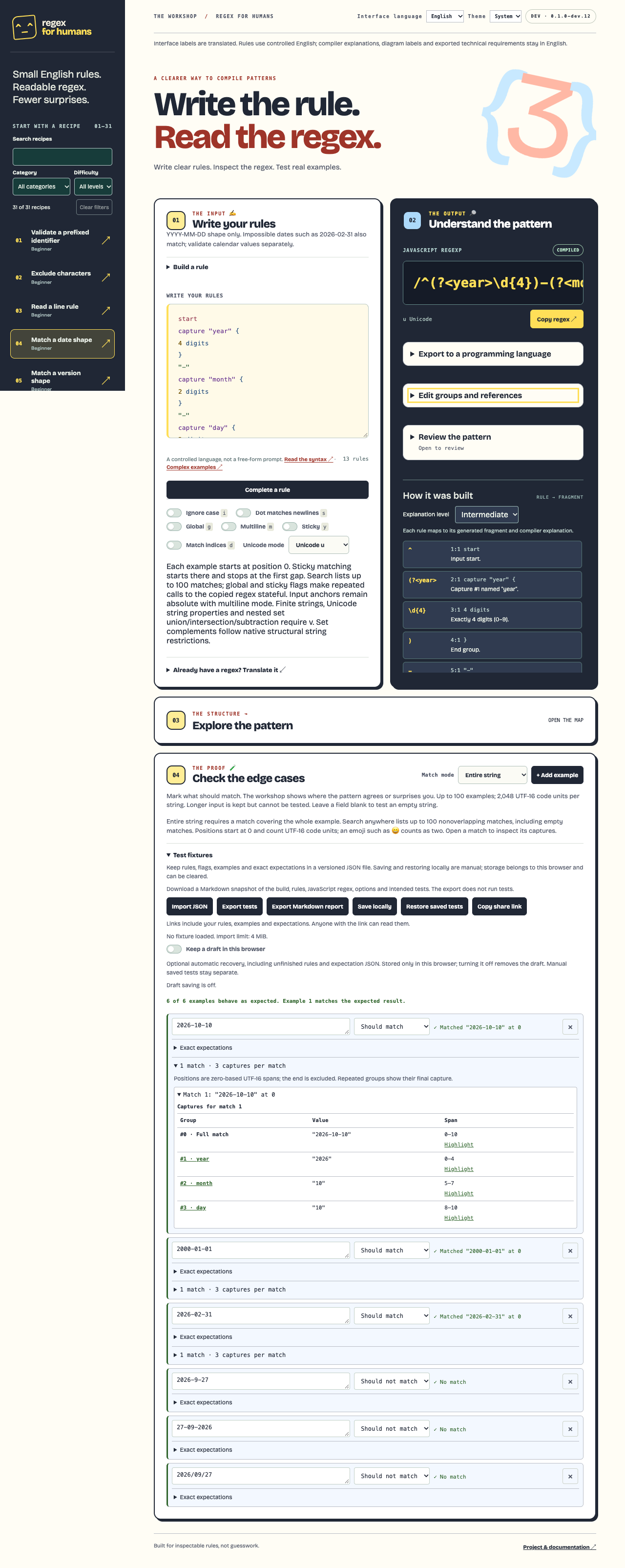
📱 See the mobile workshop

Real screenshot details and checksums.
| Try this | Example | What it checks |
|---|---|---|
| 🏷️ Prefixed ID | ABC123 |
ABC + exactly three digits |
| 🧾 Invoice ID shape | INV-1234 |
INV- + two to six ASCII digits |
| 👤 Username shape | Alice_7 |
ASCII letter first, then word characters; 3–16 total |
| 🎨 Hex color | #12aBcF |
Six hexadecimal digits after #, either letter case |
| 🔌 MAC address shape | 00:1A:2B:3C:4D:5E |
Six colon-separated pairs of ASCII hexadecimal digits |
| 🪪 UUID shape | f81d4fae-7dec-11d0-a765-00a0c91e6bf6 |
Five ASCII hex groups of 8–4–4–4–12 characters, either letter case |
| 🔡 Product-code shape | AB-rgb-0420 |
Two uppercase, three lowercase ASCII letters, and four digits |
| 📅 Date shape | 2026-09-30 |
The YYYY-MM-DD shape |
| ⏰ Time shape | 09:30 |
The HH:MM shape with ASCII digits |
| 📞 Phone-number shape | +33123456789 |
Optional +, then 7–15 ASCII digits |
| 🌐 IPv4 address shape | 192.0.2.42 |
Four groups of 1–3 ASCII digits; range checks are separate |
| 📄 Text filename shape | report.txt |
1–64 Unicode code points before .txt, excluding separators, NUL and line breaks |
| 🗃️ Complex artifact manifest | Tab-separated path, checksum and size | 19 rules, an optional directory, bounded Unicode path and nine preloaded test cases |
| 🌐 Complex access log | Address, timestamp, request and quoted fields | 43 rules and eight preloaded cases; shape checks, without field extraction |
| 🛰️ Complex telemetry event | Timestamp, IDs, duration and optional values | 38 rules and nine preloaded cases; independent optional lane value and retry suffix |
| 📦 Version shape | 1.2.3 |
Three numeric components |
| 🚧 Excluded characters | xyz |
Text without a chosen set of characters |
| 📝 Line rule | item 123 |
A line ending in at least three digits |
| Match a lowercase slug | hello-world |
ASCII letters/digits with single hyphen separators |
| Find a file extension | README.md |
Case-sensitive txt, md or json suffix |
| Match a UTC timestamp shape | 2026-10-11T09:30:00Z |
Optional fractional seconds; calendar checks stay separate |
| Match a simple HTTPS URL shape | https://example.com |
Small ASCII-host subset; not complete URL validation |
| Extract a simple header field | Content-Type: application/json |
Named field and single-line value |
| Match a Markdown heading fragment | # Hello |
One to six # characters and a heading |
| Validate SemVer 2.0 syntax | 1.2.3-alpha.1+001 |
Core, prerelease and build syntax; no precedence comparison |
| Match a Git object hash shape | aaaaaaaaaaaaaaaaaaaaaaaaaaaaaaaaaaaaaaaa |
40 or 64 ASCII hex characters; existence checks stay separate |
| Match two repeated words | hello hello |
Named backward reference to an ASCII word |
| Detect adjacent duplicate tokens | item,item |
One comma-separated pair, 1–16 word characters each |
| Match Unicode letters and marks | العربية / اردو |
Native L/M properties, including Arabic and Urdu |
| Extract named fields from a log fragment | INFO code=200 |
Named level and code from a searched fragment |
| Search and replace a typo | teh then teh → the then teh |
Exact spans, captures and non-global replacement expectations |
The library contains 31 recipes across 24 categories and three difficulty levels. Search titles, limitations and rules in the four interface languages, then combine category and difficulty filters. See the library guide for scope and limits.
Failed examples also receive evidence-based explanations: native match ranges, a provable minimum length or an absent required literal. When the precise failing step is unknown, the workshop says so.
Choose beginner, intermediate or expert explanations. Beginner notes define regex terms; expert notes expose source ranges, capture identities, resolved references and flags. Changing the level preserves your work and runs no matching.
Shapes have limits: UUID shape follows the bare hex-and-dash layout in RFC 9562 section 4; version, variant and uniqueness require separate checks. Braces and a urn:uuid: prefix are excluded. text filename shape allows spaces, dots and punctuation; check filesystem rules and file existence separately. phone-number shape allows leading zeros and excludes spaces and punctuation; check country rules and number validity separately. invoice IDs allow leading zeros; verify invoice records separately. Username shape does not check availability or a service's account rules. Date shape accepts impossible dates such as 2026-02-31; validate calendar values separately. Time shape accepts 25:99; validate hour and minute ranges separately. Version shape allows leading zeros and rejects prerelease suffixes; it isn't full SemVer. Hex color accepts #RRGGBB, not shorthand, alpha, or every CSS color form. Product-code shape accepts only its stated ASCII letter case and counts; adding i ignores case, and the pattern does not verify catalog records.
A three-digit ID is only the starting point. The full complex-examples guide walks through four substantial formats, with 35 accepted/rejected cases and the compiler's complete explanation for every rule:
| Example | What it combines |
|---|---|
| 🌐 Access log | 43 rules for address, timestamp, request, status and quoted fields |
| 🛰️ Structured event | 38 rules, trace/span IDs, bounded fields and independent optional values |
| 📦 Artifact manifest | Optional directory, variable version/path parts, checksum shape and TSV separators |
| 🧾 Multiline order | Unicode buyer, phone/amount shapes, optional approval value and complete optional priority line |
Readable rules
start
"incoming/"
optional "nightly/"
between 1 and 32 path segment characters
"/v"
between 1 and 3 digits
"."
between 1 and 3 digits
"."
between 1 and 3 digits
"/linux-arm64/widget_"
8 digits
"_"
8 hex digits
".tar.gz\t"
64 hex digits
"\t"
between 1 and 12 digits
end
Exact generated JavaScript regex
/^incoming\/(?:nightly\/){0,1}[^\/\\\u{0}\u{a}\u{d}\u{2028}\u{2029}]{1,32}\/v\d{1,3}\.\d{1,3}\.\d{1,3}\/linux-arm64\/widget_\d{8}_[0-9A-Fa-f]{8}\.tar\.gz\u{9}[0-9A-Fa-f]{64}\u{9}\d{1,12}$/uThis synthetic schema accepts a path such as incoming/nightly/WidgetKit/v2.15.3/linux-arm64/widget_20261001_ab12cd34.tar.gz, followed by a tab, 64 hex digits, another tab and a 1–12 digit byte count. The whole nightly/ directory is optional. path segment characters replaces the long escaped exclusion list while keeping its exact matching behavior. Missing version parts, a non-hex token or spaces replacing the tabs are rejected. Check file existence, checksum contents and calendar/version semantics separately.
🧾 Second complete example: a multiline order
Readable rules
start
"ORDER\nid=ORD-"
8 hex digits
"\nbuyer="
between 1 and 60 none of: "\u0000", "\n", "\r", "\u2028", "\u2029"
"\nphone="
optional "+"
between 7 and 15 digits
"\nitems="
between 1 and 4 digits
"\ntotal="
between 1 and 6 digits
"."
2 digits
" EUR\nreference="
16 hex digits
"\napproval="
optional one of: "A", "D"
"\n"
optional "priority=HIGH\n"
"END"
optional "\n"
end
Exact generated JavaScript regex
/^ORDER\u{a}id=ORD-[0-9A-Fa-f]{8}\u{a}buyer=[^\u{0}\u{a}\u{d}\u{2028}\u{2029}]{1,60}\u{a}phone=\+{0,1}\d{7,15}\u{a}items=\d{1,4}\u{a}total=\d{1,6}\.\d{2} EUR\u{a}reference=[0-9A-Fa-f]{16}\u{a}approval=[AD]{0,1}\u{a}(?:priority=HIGH\u{a}){0,1}END\u{a}{0,1}$/uZoë 😀 works as the buyer. The phone's +, approval's A/D value and whole priority=HIGH\n line are optional independently. A missing buyer, one decimal digit in the amount or an unsupported priority value fails. This schema uses explicit LF line endings; the library and CLI preserve that distinction, while browser textareas normalize pasted CRLF.
Captures in the preview: numbered and named capture blocks, nested group blocks, repetition of whole blocks and named/numbered references are available in npm 0.1.0-dev.12, including reverse translation of the supported subset. See the group syntax and complete date example. The flat worked examples above validate shapes without extracting fields.
A date can become three useful fields. This example works with npm 0.1.0-dev.12 and in the hosted workshop.
start
capture "year" {
  4 digits
}
"-"
capture "month" {
  2 digits
}
"-"
capture "day" {
  2 digits
}
end
import { compile, toRegExp } from './index.js';

const rules = `start
capture "year" {
  4 digits
}
"-"
capture "month" {
  2 digits
}
"-"
capture "day" {
  2 digits
}
end`;

const match = toRegExp(compile(rules)).exec('2026-10-10');
console.log(match?.groups); // { year: '2026', month: '10', day: '10' }
Use capture { for a numbered field and group { to group without extracting. Names are unique JavaScript identifiers; numbers follow opening order, including nested captures. Optional groups that do not participate return undefined; a participating empty capture returns "". A repeated capture retains its final value. These are native JavaScript semantics.
Need the same text twice? After the group's closing brace, write same as capture "word" or same as capture 1. The reference example matches cat cat and rejects cat dog. References before or inside their target receive a positioned diagnostic. The reverse translator preserves supported names, numbers and captured values.
This pattern validates YYYY-MM-DD, including impossible dates. Use calendar validation after extraction.
Put one instruction on each line. Quote literal text. Add anchors to check the whole string.
| Say this | Get this | Meaning |
|---|---|---|
start · end |
^ · $ |
Input bounds |
line start · line end |
^ · $ + m |
Line bounds |
digit · not digit |
\d · \D |
One digit / one non-digit |
3 digits · digits |
\d{3} · \d+ |
Exactly three / one or more |
lowercase letters · uppercase letters |
[a-z]+ · [A-Z]+ |
ASCII case-specific letters; i ignores the distinction |
between 2 and 4 digits |
\d{2,4} |
Two to four digits, inclusive |
optional "-" |
-{0,1} |
Zero or one hyphen |
hex digit · 6 hex digits |
[0-9A-Fa-f] · [0-9A-Fa-f]{6} |
ASCII hexadecimal digits |
letter · letters |
[A-Za-z] · [A-Za-z]+ |
One ASCII letter / one or more |
space · spaces |
\s · \s+ |
One whitespace character / one or more, including line breaks |
between 1 and 32 path segment characters |
1–32 Unicode code points | Excludes slash, backslash, NUL and line breaks |
"hello" |
hello |
Exact text, safely escaped |
one of: a, b |
[ab] |
One character from the list |
text without: a, b |
[^ab]* |
Zero or more characters outside the list |
any text |
.* |
Any text; s includes line breaks |
word character matches an ASCII letter, digit or underscore; word characters matches one or more. Set a length with between 3 and 30 word characters. The shorter word and not word rules still use JavaScript's \w / \W. They aren't every Unicode letter: \w includes _ and excludes é. Use letter / letters to exclude digits and underscores; counts work too, such as 3 letters. Without i, lowercase letters and uppercase letters match only their ASCII ranges. The i flag ignores that distinction and adds JavaScript case-folding equivalents such as K and ſ. Unicode matching is always on: the source checkout accepts u or v, with u as the default. See the full language guide for flags, escaping, limits, and diagnostics.
With Node.js 22+, install the preview globally if you want the command on your PATH:
npm install --global regex-for-humans@preview
printf 'start "ABC"\n3 digits\nend\n' | regex-for-humans
Or run directly from a clone:
git clone https://github.com/OthmaneBlial/Regex-For-Humans.git
cd Regex-For-Humans
printf 'start "ABC"\n3 digits\nend\n' | node bin/regex-for-humans.js
/^ABC\d{3}$/u
✅ ABC123 ❌ ABC12, ABC1234, abc123
| Option | What it does |
|---|---|
--explain |
Show each rule's fragment and meaning |
--json |
Structured results on stdout; errors on stderr |
--ignore-case |
Add flag i |
--dot-all |
Add flag s |
--flags |
Select native JavaScript flags; u/v are exclusive |
--flags FLAGS |
Select unique d, g, i, m, s, u, v, y flags |
--help |
Show usage |
--target |
export supported semantics to the named language; see profiles |
--version |
Show the package version |
Read UTF-8 rules from a file or stdin. Use -- before a filename starting with -.
--help includes a runnable POSIX-shell example. Exit codes are 0 for success/help/version, 1 for invalid rules or input/output failures, and 2 for invalid command arguments.
🔧 CLI error contract
Malformed UTF-8 is rejected with a message to save the input as UTF-8 and try again; invalid bytes are never replaced silently. This applies to both rules and reverse-mode regex literals. In JSON mode, rule diagnostics retain their codes, invalid arguments use CLI_USAGE, and file/runtime failures use CLI_ERROR, including invalid UTF-8 and stdout write failures. If stderr also fails, the CLI exits nonzero without a diagnostic.
JSON diagnostics can include endColumn, an exclusive one-based UTF-16 column on the same line. The workshop highlights and selects the complete known token; errors without a range retain point navigation.
Control characters and Unicode line separators from rules, arguments and filenames appear as visible escapes in CLI output. JSON decoding restores the original data; displayed regexes still match the original characters.
The 0.1.0-dev.12 preview includes --reverse. Translate a slash-delimited JavaScript regex with u or v:
printf '%s\n' '/^[A-Z]{2}-[0-9]{4}$/u' | npx --yes --package=regex-for-humans@preview regex-for-humans --reversestart
2 uppercase letter
"-"
4 digit
end
Use --reverse --json for { rules, flags }, matching regexToRules(). Pass the returned flags to compile(rules, { flags }) to preserve native matching and cursor behavior. All eight flags are supported; g/y regexes remain stateful. Text output reports required options on stderr while retaining a successful exit code.
After npm install regex-for-humans@preview, import the package in an ES module (.mjs, or a project with "type": "module"). TypeScript declarations are included. From a source checkout, use ./index.js instead.
import { compile, regexToRules, toRegExp } from 'regex-for-humans';

const result = compile('start 3 digits\nend');
console.log(result.source);                // ^\d{3}$
console.log(toRegExp(result).test('123'));  // true
console.log(result.segments);              // Each fragment + explanation

const reverse = regexToRules(/^[A-Z]{2}-\d{4}$/u);
console.log(reverse.rules);                 // start\n2 uppercase letter\n"-"\n4 digit\nend
console.log(reverse.flags);                 // Flags to pass back to compile()
TypeScript accepts cached compile metadata: toRegExp({ source, flags }). Both fields must be strings; explanation segments are not needed or read. Complete compile results remain accepted.
compile("digit", { flags: undefined }) uses the default u flag, just like omitting flags. Its TypeScript option type accepts this with exactOptionalPropertyTypes enabled. toRegExp() metadata still requires string flags.
regexToRules() also accepts genuine regexes from other JavaScript contexts, such as iframes or Node's vm, and leaves their lastIndex unchanged. It translates the stored native pattern and flags; subclass or own-property metadata overrides do not change the translation. Matching methods and custom Symbol.match getters are not called.
Unicode escapes can include leading zeros: /^\u{00000041}$/u translates to start, "A", end on separate lines. The same escapes work in character lists and literal groups; the regex source still has a 16,384-code-unit limit.
| Flag | How to enable it | What changes |
|---|---|---|
u |
Default, or explicit { flags: 'u' } |
Unicode code-point matching; emoji are single matching atoms |
i |
compile(rules, { flags: 'i' }) or --ignore-case |
Native JavaScript case folding, including its Unicode equivalents |
s |
compile(rules, { flags: 's' }) or --dot-all |
any character / any text can include line breaks |
m |
{ flags: 'm' } or line start / line end |
Native line anchors; input anchors remain absolute |
d |
{ flags: 'd' } |
Native match and capture indices |
g |
{ flags: 'g' } |
Repeated native calls advance lastIndex |
y |
{ flags: 'y' } |
Match at lastIndex; search stops at the first gap |
v |
{ flags: 'v' } |
Native Unicode-set class escaping and complement semantics |
In the preview: all eight flags are accepted in any order and returned canonically as dgimsuvy. Duplicates and combining u with v are errors; omitting both selects u. For example, use { flags: 'dgiv' } or --flags dgiv. Reverse translation preserves the options without changing the input regex's lastIndex. The workshop resets each example to position 0 and lists up to 100 search matches; copied g/y regexes remain stateful. Mixed input/line anchors work without weakening absolute input boundaries. Unsupported runtime capabilities fail explicitly. Available in npm 0.1.0-dev.12.
In the preview: select v for one of strings: "a", "ab", "" or unicode property "RGI_Emoji". Native sets try longer members first, regardless of list order; later rules can require a shorter member. Empty strings are allowed. Use string "ab" inside a class. String properties and empty/multi-code-point members cannot be complemented. Available in npm 0.1.0-dev.12.
In the preview: native nested sets use character set union {, character set intersection { and character set subtraction {, closed by }. Each line is one character, range, class, property, string set or nested set. Intersection keeps shared members; subtraction removes right-hand members from the first operand. Counts and lazy apply to the whole block. not follows native structural string restrictions; an empty union matches nothing. Select v; Available in npm 0.1.0-dev.12. Set syntax and examples.
Local group flags. Open group with flags "i" {, put "hello" inside and close with } to generate (?i:hello). It accepts HELLO while later rules keep their original case behavior. Use "im-s" to enable local case folding and line anchors while disabling dot-all. Nested scopes restore enclosing options, and captures can go inside the block. Scoped syntax and examples.
Check the receiving runtime. Syntax support alone is insufficient: verified Chrome, Firefox and WebKit Unicode modes pass; tested Node 22 lacks the syntax and Node 25/26 have native matching defects, so compilation reports UNSUPPORTED_TARGET_FEATURE. Cached toRegExp({ source, flags }) also checks actual scoped behavior in the supplied mode after native construction; invalid native syntax retains SyntaxError. Unsupported scopes are never approximated. See distribution status for the published version.
Run the workshop locally:
npm ci
npm run build
npm run serve
Open http://127.0.0.1:4174/. Go to error jumps to a reported source position.
To choose an available port automatically, use npm run serve -- 0 and open the URL printed by the server. Directory URLs automatically redirect to their trailing-slash form, preserving query strings so nested pages and their relative assets load correctly.
Run all quality checks locally:
npm ci
npm exec -- playwright install firefox webkit
npm run verify
This runs lint, formatting, types, docs, Node tests, the Pages build, clean-consumer package checks, desktop/mobile Chromium tests, Firefox/WebKit compatibility smoke tests, and a dependency audit. GitHub CI is disabled. The full gate uses installed Chrome plus Playwright Firefox and WebKit.
If Chrome is unavailable, install all three Playwright engines after npm ci and use bundled Chromium for the desktop/mobile suites:
npm exec -- playwright install chromium firefox webkit
CI=1 npm run verify
CI=1 selects the bundled browser locally; it does not enable GitHub Actions.
Output targets JavaScript RegExp. Raw regex is not accepted as rule text; regexToRules() translates only the documented supported subset back into rules. Free-form English, u-mode empty character classes and forward/open references remain unsupported. The workshop tests examples in a time-limited worker; a copied regex needs its own execution safeguards. Read the security model.
Is this an AI regex generator? No. A deterministic parser maps a documented vocabulary to an AST, then emits native regex and explanations. The same rules and options give the same result. Unknown syntax fails explicitly.
Will it parse every regex? No. Unsupported syntax returns a diagnostic and preserves workshop edits. It never removes a capture, assertion or alternative to manufacture a translation. Captures and nested groups are supported in the checkout; the compatibility table lists the remaining limits.
Does a passing example prove the pattern is safe? No. Examples check selected behavior. Source and repetition limits, plus the worker's deadline, protect the workshop interaction. They do not guarantee that every copied regex is fast in another program.
Is digit every Unicode numeral? No: \d is ASCII 0–9. letter is [A-Za-z], and word follows native \w semantics. The u flag does not turn these into universal Unicode categories.
What are the limits? Rules: 16,384 UTF-16 code units, 200 lines, at most 1,000 for bounded repetition, and 64 group levels. Workshop: 100 examples, 2,048 UTF-16 units per example, and a 1,200 ms worker deadline. An emoji normally uses two UTF-16 units even though u matches it as one code point.
Result batches also have limits: 1,000 matches, 20,000 captures and 1,048,576 UTF-16 units of result text. When output is too large, the whole run stops; your rules and examples remain editable.
Can I use it offline? The library and CLI run locally. After dependencies are installed, you can build and serve the workshop locally. The hosted site needs a connection to load; no offline caching or installable PWA is claimed.
Where should I report a problem? Use GitHub issues for reproducible bugs and syntax requests. Include rules, flags, input, expected behavior and runtime version. Report security issues privately using SECURITY.md.
| Guide | What you will find |
|---|---|
| Language | Exact grammar, groups, references, escaping, flags and diagnostics |
| Complex examples | Complete patterns and explanations for four larger formats |
| Architecture | Parser → AST → compiler → API/CLI/workshop |
| Compatibility | Supported constructs and verified runtimes |
| Testing | Reproducible commands and scoped verification records |
| Security model | Trust boundaries, worker isolation and known limits |
| Distribution | Published npm, release and hosted-site evidence |
| Current roadmap | Implemented milestones and the next priorities |
| Competitor gaps | Source-backed comparison and remaining capability gaps |
| Contributing | Setup, scope and contribution conventions |
Release validation: the verification record separates compiler/CLI checks, Chromium desktop/mobile workflows, Firefox/WebKit checks, homepage tests, clean JavaScript/TypeScript consumers and dependency auditing. Node 22 consumers are checked separately. Human usability, translation and screen reader reviews remain open.
Open Review the pattern in the local workshop for source-linked notes on nested/adjacent variable repetitions, overlapping alternatives, broad wildcards, line anchors and large generated patterns. Hover connects the rule, regex fragment, explanation and diagram without moving the caret; selecting a note returns to its source line. Source, flag, recipe and group edits refresh the review.
The shared analyze(rules, { flags }) API returns canonical flags, typed findings with source locations/spans and explicit limitations. Positive class/range witnesses cover selected overlaps; an unknown set is not treated as proven disjoint. This is heuristic analysis: it may miss expensive patterns or report false positives, and no findings does not prove performance safety. Analysis does not run matches or measure backtracking. Example matching keeps its isolated worker and deadline.
See the structural risk review contract.
Move the source cursor or select generated regex to follow the structure; hover leaves the source caret and scroll position unchanged. Enter/Space on a diagram node returns to its rule. Long labels retain complete explanations in titles. Read the structural diagram contract for the API, display rules and limits.
Small language. Clear meaning. Happy matching. 🥳
📖 Language · 🧪 Testing · 🤝 Contributing · 📝 Changelog · ⚖️ MIT
Security issue? Use the private process in SECURITY.md.