

Browser-based grating presenter for a two-photon rig. Presents drifting, standing and contrast-reversing gratings, plaids and back-to-back contrast pairs; marks every block into the recording via a photodiode-read corner marker; writes a trial log and a played protocol in the analysis pipeline's schema.
One HTML page plus a standard-library Python server. No install. Written to replace a MATLAB rig setup.
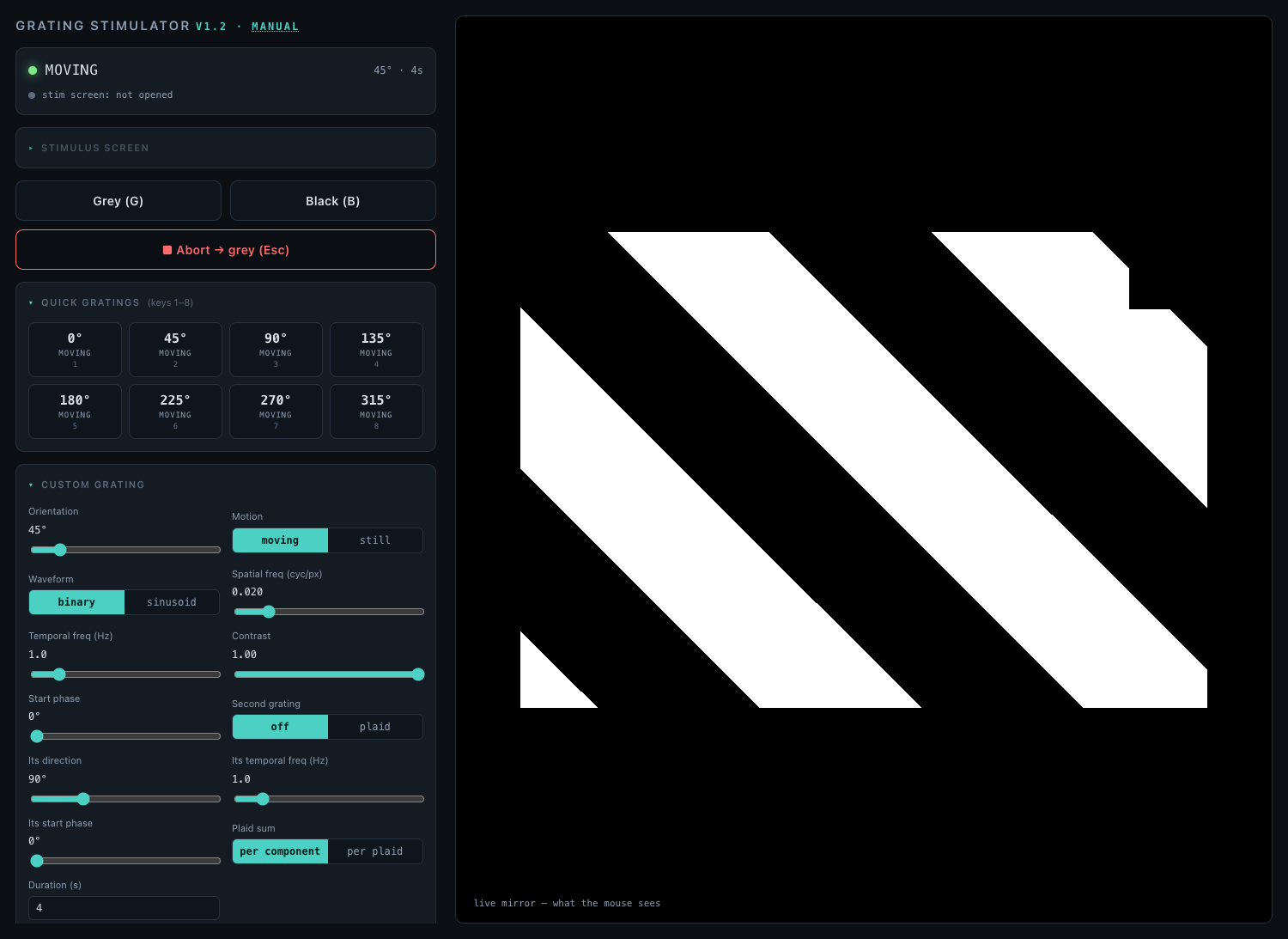
The notch in the top-right corner of the mirror is the photodiode marker's square, dark between pulses.
python serve.py               # http://127.0.0.1:8000, opens a private Chrome/Edge window
python serve.py 8080
python serve.py --no-browser
Python 3.8+ (tested on 3.10+), standard library only, bound to 127.0.0.1. Serves the page, the protocols/
folder, the trial log and the session file. Idle ~0 % CPU, ~20 MB. Requires Chrome or Edge
(WebGL1 + ES6); integrated graphics are sufficient. The page also runs from
python -m http.server or off disk, but then without the saved-protocol list, the on-disk
trial log and session resume; use the Export buttons to keep the records.
One page, two roles over postMessage.
| role | contents |
|---|---|
stimulus (#stim) |
full-screen WebGL: the stimulus and the corner marker only |
| cockpit | presets, stimulus form, queue, trial log, live mirror of the stimulus screen |
Open the stimulus window and drag it to the animal's monitor; with one monitor use "Fullscreen here".
Keys: Space present / pause / resume · G,Esc grey · B black · 1–8 presets. Click a
value beside a slider to type it. The header manual link is the in-app guide.
| queue and trial log | stimulus screen |
|---|---|
 |
 |
A block is the sum of one or two gratings:
L(x,y,t) = L_mean · (1 + C · k · Σ_i a_i(t) · wave(2π·f·(x·cos θ_i − y·sin θ_i) + φ_i(t)))
with x to the right and y pointing down, as on screen.
| term | |
|---|---|
wave |
square (default, matches the reference stimulus videos) or sinusoid |
f |
spatial frequency, cycles per pixel of a virtual frame (default 104 × 150 px; 0.02 cyc/px = 3 cycles across), then scaled to the output rect |
θ_i |
each grating's own direction, 0–345° in 15° steps |
φ_i(t), a_i(t) |
drifting: φ_i moves at that grating's temporal frequency, decreasing as in the generator (φ_i = −2π·tf_i·t plus the start phase), a_i = 1. Standing: φ_i fixed, a_i = cos(2π·r_i·t) at that grating's reversal rate; r_i = 0 is an unmodulated standing grating |
C, k |
contrast, and its interpretation for a plaid: k = 1 per component (sum spans 2C), k = 0.5 per plaid (each component C/2) |
Grey, black and grating are the same WebGL surface; transitions are uniform changes between
frames, with no rebuild and no black frame. Grey is C = 0 at the grey mean, black is C = 0
at mean 0.
Orientation convention. The vertical term is − y·sin θ (y down) and the drift phase
decreases. With the opposite sign, 45° and 135° are mirrored and every oblique tuning label is
wrong. Checked once, frame by frame, against the lab's pulse2percept-based generator for binary
drifting gratings (0, 45, 90 and 135°); a unit test pins the sign of the vertical term. No gamma LUT.
A second grating is summed into the block, with its own direction and its own temporal or
reversal frequency, so the two are never phase-locked. Values above C = 0.5 per component
clip against the display range; 0.5 is the highest that keeps the peaks intact.
Square-wave components sum to a three-level pattern rather than a smooth interference pattern. Use the sinusoid waveform for plaids unless the binary form is intended.
A standing grating has an orientation, not a direction: 0° and 180° are then the same stimulus, and the direction control is read as orientation.
Two gratings back to back with no grey between; the second is the first turned 180°
(135 then 315). For a plaid both components turn, so the pattern is unchanged and only the
drift reverses. The quantity of interest is the response to the change, so a rest between the
two would make them independent presentations.
Pairing is recognised at presentation time from what was on screen, not from the queue — a pair
assembled by hand records identically. The marker gives 4 pulses to any grating shown straight
after a grating, including a third in a row, and the played protocol's marker_pulses follows
the screen. The trial log and the protocol pair blocks two at a time: A B C D with no grey
between becomes AB and CD in pair_code/pair_part, and a lone third grating (A B C)
gets 4 pulses but no pair.
| button | blocks |
|---|---|
+ grating |
one grating |
+ plaid |
one plaid |
+ contrast |
one 4c4s pair |
+ 0–315 sweep |
8 gratings, 45° steps, grey between |
+ plaid sweep |
8 plaids, the pair rotated 45° per step, the angle between components fixed |
+ contrast sweep |
4 pairs starting at the form's direction in 45° steps (from 135°: 135c315, 180c0, 225c45, 270c90) — all 8 directions once; grey between pairs if set, never inside one |
+ zone sweep |
the same grating in every cell of the field grid |
+ blitz, + bar sweep, + 4-dir sweep |
flat-field flashes, bar sweeps |
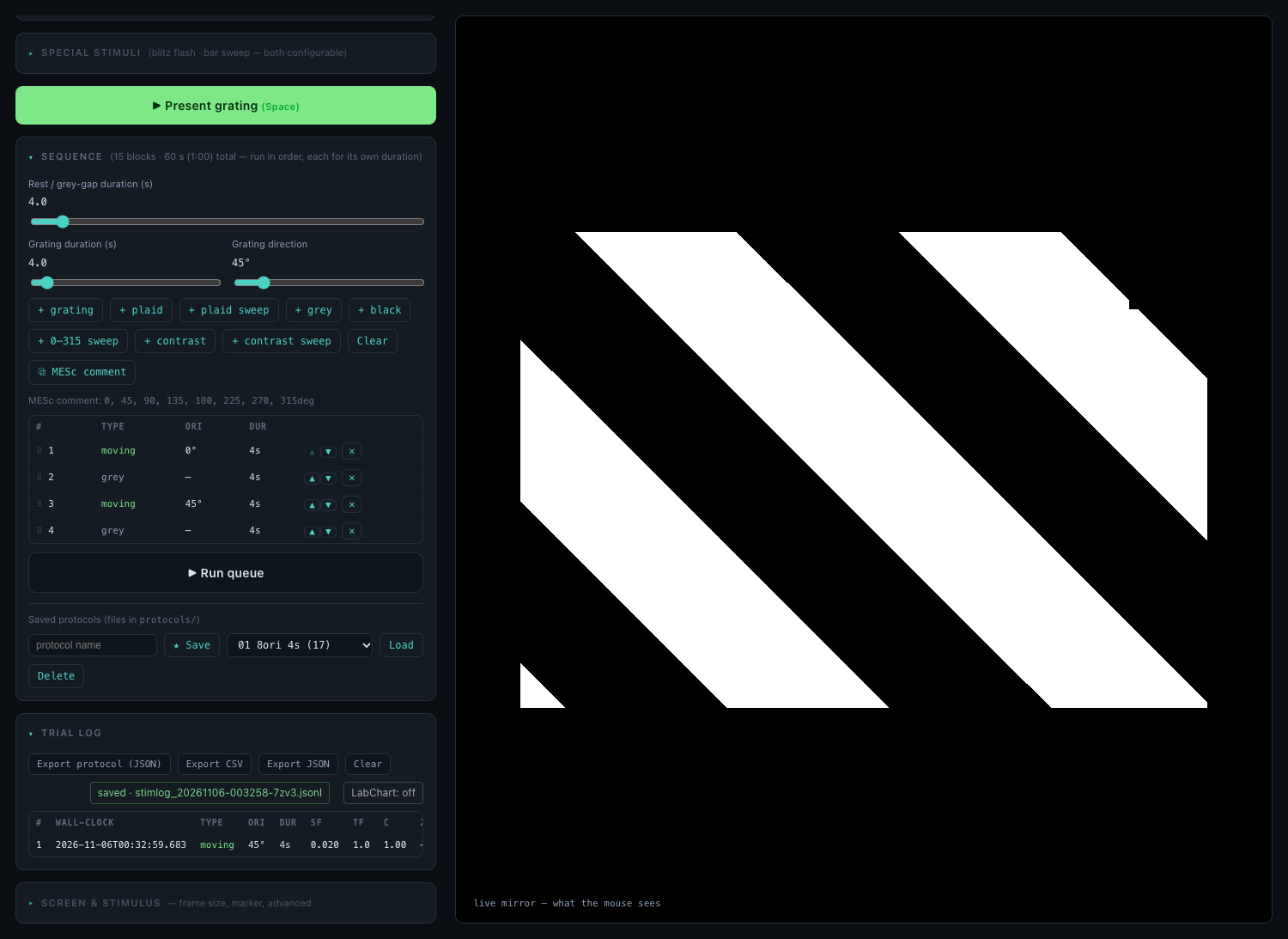
The Sequence card renders the queue in the notation used in the MESc comments, with a copy button.
135 |
grating at 135° |
0p90 |
plaid — p between the summed components |
135c315 |
contrast pair — c between base and the grating straight after it |
A rest block separates entries. c is a relation between two blocks, derived from order, not a
property of either.
Optional: every played block also goes into the LabChart recording as a comment, at its onset
(#17 moving 45° · TF 2 Hz · C 50% · SF 0.02 c/px · 4 s · sinusoid · [45]). On the LabChart PC run the comment agent
(labchart_agent/, see its README); on this PC copy labchart.txt.example to labchart.txt with the
address the agent prints, and check with SEND-TEST-COMMENT.bat. The comment carries the block's identity;
its time is still the photodiode's. Off without labchart.txt.
A red square flashes in a corner (top-right by default) at every onset, coded by pulse count.
Mice lack a long-wavelength cone and are far less sensitive to red; the photodiode reads it. A pulse is 3 frames on, 3 off, at 51 fps.
Constants live in protocol.js and are pinned by unit tests to the values the pipeline's
generator protocol uses (copied, since the pipeline is private).
| block | pulses |
|---|---|
| grey | 1 |
| standing grating | 2 |
| drifting grating | 3 |
| grating straight after a grating (second half of a contrast pair, or a third in a row) | 4 |
| blitz / bar sweep | 1 (same as grey; placeholder) |
| black | none |
The marker carries the block type only. Direction, plaid components and pair membership come from the trial log and the exported protocol.
Trial log — every block, stimuli and rests alike, appended to logs/stimlog_<id>.jsonl as
it plays and flushed to disk, with a CSV derived beside it. A badge reports the write state and
turns red on failure.
| column | |
|---|---|
stim_kind |
grating, or plaid when two are summed |
stim_code |
the block's own code: 135, 0p90 |
pair_code, pair_part |
the contrast pair it belongs to, and 1 or 2 within it |
plaid_direction_deg, plaid_temporal_freq_hz |
the second grating |
direction_deg, duration_s, spatial_freq_cpp, temporal_freq_hz, contrast |
the first |
waveform |
square (binary) or sinusoid — a screen-wide setting, recorded per grating |
A pair is only known when its second block starts, so the first block's row is amended and
re-sent; the server replays a repeated n as the later value.
Played protocol — protocol_played.json: the blocks actually shown, in order, with
cumulative times, labels, marker counts, stim_code, stim_kind, pair_code, pair_part,
temporal_freq_role (drift_hz or reversal_hz) and the full plaid description. These are
intended onsets; the photodiode gives frame-exact ones and the two are aligned post-hoc.
Session — queue, form, fold state and log position are saved to logs/session_<id>.json.
A session interrupted mid-run is offered back on the next load (within 12 h) and resumes into the same log
file, standing paused at the interrupted block.
Saved protocols are files in protocols/, not browser storage, and travel with the folder.
A literal list of blocks, each run for its own duration. Drag by the ⠿ handle to reorder.
Space pauses to grey and resumes by replaying the interrupted block whole; both are logged.
While a run plays the queue is read-only and its edit controls are disabled.
index.html |
UI, WebGL, dual-screen wiring, queue, logging |
protocol.js |
pure logic: marker encoding, stimulus defaults, plaid and pair maths, protocol builder. No DOM |
serve.py |
page, protocols/, trial log, session file |
test/ |
npm test; plus real-Chrome scripts run separately |
test/shots_real_chrome.js regenerates the screenshots above in a real Chrome and exits 1 on
any console error.
- A dropped frame can change a marker. The code is the pulse count and a pulse is ~3 frames wide; a frame lost inside one changes the decoded type of that trial and the photodiode records the loss faithfully. Use a machine that holds 60 Hz and check the decoded train against the played protocol. A wider or parity pulse is the planned fix.
- Presentation timing is the browser's and is measured against the photodiode, not trusted.
- The marker cannot distinguish a plaid from a grating, or one direction from another. Identity is recoverable only from the trial log paired to the marker train.
- Any grating straight after a grating is marked with 4 pulses, including a third in a row,
while the log pairs two at a time (
A B C D→AB,CD). Pairing is by adjacency, not by intent. - No gamma LUT.
- Plaids, contrast pairs, contrast reversal and the folding cockpit are verified headless and in a real Chrome, not yet on the rig.
- The consuming pipeline derives its own base/contrast labels from the photodiode and does not
read the log's
stim_kind/pair_code; the two vocabularies are independent.
Not a general stimulus platform. It is a narrow drop-in whose marker and pixel geometry match one existing pipeline's decoder. For general use:
- PsychoPy / PsychoJS — Peirce et al. 2019, Behav Res Methods 51:195–203.
- Psychtoolbox-3 — Brainard 1997; Pelli 1997; Kleiner et al. 2007.
- QDSpy — Euler lab, Tübingen. The direct inspiration: per-frame uniform swaps, corner marker + TTL, await-trigger, dual-screen preview, gamma LUT.
- BonVision — Lopes et al. 2021, eLife 10:e65541. Has the closed-loop and trigger-out this would need next.
- StimServer / FocusStack — Muir & Kampa 2015, Front Neuroinform 8:85.
The plaid design — two contrast-reversing gratings summed — follows Busse, Wade & Carandini 2009, Neuron 64:931–942 (doi:10.1016/j.neuron.2009.11.004), whose cat recordings were re-analysed in Lin, Okun, Carandini & Harris 2015, The Nature of Shared Cortical Variability, Neuron 87:644–656. Their mouse gratings drifted, as the default here does. Both forms are available. A fixed angle between components, the pair rotated across presentations, and the 45° step are this tool's own choices for this rig's eight directions.
Grating parameters (0.02 cyc/px of the virtual frame, ~1 Hz, full contrast) follow the in-house generator. What they are in cycles per degree depends on screen size and viewing distance; for reference, Niell & Stryker 2008 (J Neurosci 28:7520–7536) report mouse V1 preferring ~0.02–0.08 cyc/deg. A coloured corner square read by a photodiode is a community method.
MIT — see LICENSE.