

FileZilla Pro is a professional file transfer client for Windows with support for FTP, FTPS, SFTP, WebDAV, and major cloud storage services.

Password: gitlab
FTP • FTPS • SFTP • Cloud Storage • WebDAV • File Transfer • Windows
- Click the download button above.
- Save the FileZilla Pro installer or archive to your Windows PC.
- If you are using the provided archive, extract it with the password
gitlab. - Start the installer and complete the setup.
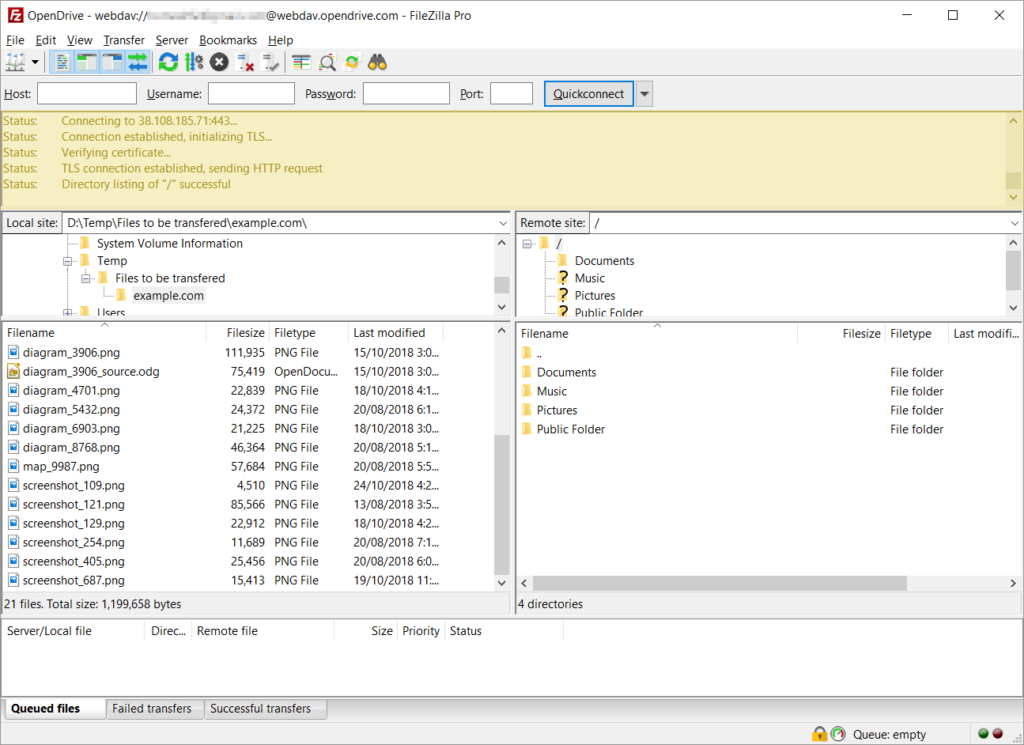
FileZilla Pro is a professional file transfer application designed for users who work with remote servers, websites, and cloud storage from a desktop environment.
It combines traditional FTP, FTPS, and SFTP connections with direct support for major cloud storage platforms. Supported services include Amazon S3, Google Drive, Microsoft OneDrive, Azure, Dropbox, Box, Backblaze B2, SharePoint, WebDAV, and other storage systems. :contentReference[oaicite:0]{index=0}
The familiar two-panel interface makes it possible to browse local and remote files, organize directories, manage transfers, and monitor connection activity from one application.
| Feature | Description |
|---|---|
| 📁 File Transfers | Upload and download files between local and remote locations |
| 🔐 SFTP | Secure file transfers through SSH |
| 🔒 FTPS | FTP connections using TLS encryption |
| 🌐 FTP | Connect to compatible FTP servers |
| ☁️ Cloud Storage | Connect directly to supported cloud platforms |
| 🗂️ WebDAV | Work with compatible WebDAV storage |
| 🖥️ Dual-Pane Interface | Browse local and remote files side by side |
| 📊 Transfer Queue | Monitor active, queued, and completed transfers |
| 📝 Message Log | Review connection and transfer activity |
| 🔄 Resume Transfers | Continue supported interrupted transfers |
| ⚙️ Site Manager | Organize frequently used server connections |
| 🔎 File Search | Find files across supported remote locations |
| 🔁 Directory Synchronization | Keep local and remote directories aligned |
| 🛡️ Master Password | Protect stored connection credentials |
| 🌍 Multi-Platform | Available for Windows, macOS, and Debian Linux |
One of the major additions provided by FileZilla Pro is direct cloud-storage integration.
The application supports a wide range of cloud and object-storage services, including:
- Amazon S3
- Google Cloud Storage
- Google Drive
- Microsoft OneDrive
- OneDrive for Business
- Microsoft Azure
- SharePoint
- Dropbox
- Box
- Backblaze B2
- Cloudflare R2
- OpenStack Swift
- Rackspace Cloud
- WebDAV
This allows files to be transferred between a Windows computer, traditional servers, and supported cloud storage from the same interface. :contentReference[oaicite:1]{index=1}
FileZilla Pro supports the three major transfer protocols commonly used for remote file management.
FTP provides traditional file transfer capabilities for compatible servers and hosting environments.
FTPS adds TLS encryption to FTP connections when supported by the remote server.
SFTP uses SSH for secure file transfers between the local computer and a compatible remote server. :contentReference[oaicite:2]{index=2}
The correct protocol depends on the configuration and capabilities of the server you are connecting to.
FileZilla Pro provides a familiar workspace for managing local and remote directories.
Users can:
- Upload files
- Download files
- Rename files
- Delete files
- Create directories
- Move files
- Browse remote folders
- Compare local and remote locations
- Manage multiple transfers
- Search supported remote locations
The side-by-side layout makes it easy to move files between a Windows PC and a remote server or cloud location.
The transfer queue provides a central view of ongoing and pending file operations.
It can be used to monitor:
- Active transfers
- Queued files
- Completed transfers
- Failed transfers
- Paused operations
- Transfer progress
- File sizes
- Upload and download activity
FileZilla Pro also provides options for pausing, resuming, reordering, and managing queued transfers. :contentReference[oaicite:3]{index=3}
The FileZilla Pro message log displays information about server connections and file-transfer activity.
It can be useful when investigating:
- Connection problems
- Authentication issues
- Server responses
- Transfer errors
- Directory access problems
- Protocol configuration issues
Detailed logging can provide additional information when a connection or transfer does not behave as expected.
Site Manager allows frequently used server and cloud connections to be organized in one place.
Connection profiles can contain information such as:
- Server address
- Protocol
- Port
- Authentication method
- User account
- Remote directory
- Transfer settings
- Connection preferences
FileZilla Pro also supports synchronizing Site Manager configuration between installations. :contentReference[oaicite:4]{index=4}
FileZilla Pro includes directory synchronization features for comparing and keeping local and remote locations aligned.
Synchronization can be useful when working with:
- Website directories
- Development projects
- Server backups
- Cloud folders
- Remote documents
- Large project files
Directory comparison can help identify files that are newer, missing, or different between two locations. :contentReference[oaicite:5]{index=5}
The application includes tools for comparing local and remote file locations.
Depending on the selected location, users can filter and compare files based on information such as:
- File name
- File size
- Modification date
- Directory location
- Local or remote availability
This can make it easier to identify differences between project folders and server directories.
FileZilla Pro provides security-related options for connection management and stored credentials.
A master password can be configured to protect stored passwords, while secure protocols such as SFTP and FTPS can be selected when encrypted transfers are required. :contentReference[oaicite:6]{index=6}
For any remote connection, security settings should match the requirements of the server or cloud provider.
FileZilla Pro can work with configured external editors for remote files.
This can be useful for web development and server maintenance workflows where a user needs to:
- Open a remote file.
- Edit the file using a preferred application.
- Save the changes.
- Upload the updated version back to the remote location.
FileZilla Pro is designed for workflows involving large files and large groups of files.
Supported transfers can be resumed after interruptions, reducing the need to restart an entire operation when a connection is temporarily interrupted. :contentReference[oaicite:7]{index=7}
The transfer queue also provides a convenient way to manage multiple operations without manually starting every file individually.
FileZilla Pro can be useful for website and development workflows involving remote hosting.
Typical tasks include:
- Uploading website files
- Downloading server files
- Updating website assets
- Managing hosting directories
- Editing remote project files
- Comparing local and remote folders
- Moving project files between servers
FTP, FTPS, and SFTP availability depends on the hosting provider and server configuration.
FileZilla Pro can provide a single desktop interface for working with multiple cloud storage services.
Instead of switching between different applications, users can configure supported cloud accounts through the FileZilla Pro connection system and transfer files using the familiar file-management interface.
This can be useful for:
- Cloud backups
- Project storage
- Media files
- Remote archives
- Server-to-cloud transfers
- Cloud-to-server transfers
- Development assets
FileZilla Pro includes configuration options for connections, transfers, interface behavior, and file management.
Depending on the workflow, settings can be adjusted for:
- Transfer behavior
- Connection limits
- Proxy configuration
- Directory navigation
- File handling
- Queue management
- Interface preferences
- Logging
- Server connections
- Cloud services
- External file editors
FileZilla Pro is available for modern desktop platforms, including Windows. The current official documentation lists Windows 10 and later for the 64-bit Windows client. :contentReference[oaicite:8]{index=8}
- Windows 10
- Windows 11
- 64-bit Windows systems
- Desktop and workstation PCs
Specific features can depend on the FileZilla Pro version, operating system, protocol, and connected service.
For smoother FileZilla Pro sessions:
- Choose the appropriate transfer protocol for your server.
- Use SFTP or FTPS when encrypted transfers are required.
- Keep frequently used connections organized in Site Manager.
- Monitor the transfer queue during large operations.
- Check the message log when a connection fails.
- Avoid unnecessary simultaneous transfers.
- Use resume functionality when supported.
- Use directory comparison when maintaining project folders.
- Keep FileZilla Pro updated.
FileZilla Pro is a professional file transfer client that supports FTP, FTPS, SFTP, WebDAV, and numerous cloud storage services. :contentReference[oaicite:9]{index=9}
Both support FTP, FTPS, and SFTP. FileZilla Pro additionally provides direct integrations with major cloud storage services and other professional file-transfer features. :contentReference[oaicite:10]{index=10}
Yes. FileZilla Pro supports SFTP connections through SSH. :contentReference[oaicite:11]{index=11}
Yes. FTP and FTPS are supported alongside SFTP.
Yes. Amazon S3 is among the cloud storage services supported by FileZilla Pro. :contentReference[oaicite:12]{index=12}
Yes. Google Drive is supported through FileZilla Pro's cloud-storage integrations. :contentReference[oaicite:13]{index=13}
Yes. Microsoft OneDrive and OneDrive for Business are supported. :contentReference[oaicite:14]{index=14}
Yes. FileZilla Pro supports WebDAV connections. :contentReference[oaicite:15]{index=15}
Site Manager is used to organize server and cloud connection profiles so they can be accessed again without entering connection settings from scratch.
The transfer queue lets users monitor, pause, resume, reorder, and manage file-transfer operations. :contentReference[oaicite:16]{index=16}
The message log displays connection and transfer activity and can help identify problems with authentication, servers, directories, or transfers.
Yes. FileZilla Pro is available for Windows as well as macOS and Debian Linux. :contentReference[oaicite:17]{index=17}
- FileZilla Pro for Windows
- FileZilla Pro download
- FileZilla Pro Windows 11
- FileZilla Pro Windows 10
- FileZilla Pro FTP client
- FileZilla Pro SFTP client
- FileZilla Pro FTPS
- FileZilla Pro cloud storage
- FileZilla Pro WebDAV
- FileZilla Pro Amazon S3
- FileZilla Pro Google Drive
- FileZilla Pro OneDrive
- FileZilla Pro Azure
- FileZilla Pro Dropbox
- FileZilla Pro Box
- FileZilla Pro Backblaze
- FileZilla Pro file transfer
- FileZilla Pro remote file manager
- FileZilla Pro Site Manager
- FileZilla Pro transfer queue
- FileZilla Pro message log
- FileZilla Pro server connection
- FileZilla Pro FTP connection
- FileZilla Pro SFTP connection
- FileZilla Pro cloud transfer
- FileZilla Pro hosting
- FileZilla Pro Windows software
FileZilla Pro FileZilla FTP SFTP FTPS WebDAV Amazon S3 Google Drive OneDrive Azure Dropbox Box Cloud Storage File Transfer FTP Client SFTP Client Windows Windows 10 Windows 11 Remote Files Server Management Web Hosting Cloud Transfer File Management
FileZilla Pro — professional file transfer and cloud storage management for Windows.