
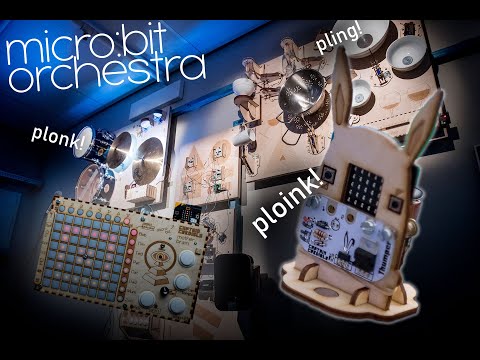
This is a makecode extension for setting up a micro:bit to take part in a micro:bit orchestra. Your microbit can have the role of either conductor, musician or instrument.
The conductors role in the micro:bit orchestra is to keep all the musicians in time, decide what musicians are allowed to transmit messages at any given time, and mute / unmute individual instruments. To be able to use the conductor blocks you need to add the "unlock conductor blocks with password" block and enter the password "1983". This is to avoid curious workshop participants from causing mayhem by creating multiple conductors all counting their own time. To make a conductor that starts sending clock ticks for the other musicians to follow, simply add the block "make master clock" to the on start block.
The musicians can either be simple devices that will instantly trigger a sound on one of the instruments when a button on the musician is pressed, or they can be set up to run their own little sequencers kept in sync with the conductors clock ticks. The musicians then send out radiomessages with the names of the instruments they want to control and the number corresponding to the note or notes that they want played. When running as a sequencer it is very important that each musician has a unique "musician ID" number. This is so the individual musician knows when it's their turn to transmit whatever notes they want to send to their instrument. If they send at the same time the radiomessages will be all muddled and the instruments won't be able to understand them.
Game - Micro:bit Orchestra Hero The musicians can also be set up to play a guitar hero like game using this video: https://www.youtube.com/watch?v=0TxRSQvg2RU&feature=youtu.be Currently the way the game works is by having a "game master" that is hopefully pretty good that pushes A and B in time with the video and the participants receive points for pushing the corresponding buttons within a few milliseconds of the gamemaster. We are working on an automated program that will act as gamemaster though.
The instruments are set up to receive radiomessages with their name and a number. The instrument will then perform an action corresponding to the number it received. This could be striking an object using a solenoid, playing a synthesizer note, striking a xylophone, playing a sound through a speaker or anything you please. To make a simple instrument you can use the "make a thumper" block. This will use preset actions for notes 0-5 to control solenoids connected to pins 1 and 2 and play corresponding notes through a speaker for numbers above 5 Alternatively you can use the block "make instrument with name" and a bunch of "when instrument receives note number..." to set up an instrument that does whatever you like.
A note on polyphonic messages: to keep the amount of radio messages down, the sequencers will send multiple notes to one instrument as one combined. The way this workes is by using the individual bits in a 16 bit number to represent different notes. For example if a sequencer wanted to send notes 2, 5 and 9 to an intrument called "Joe" it would send ("JoeP" 9280). The "P" appended to the instruments name tells the instrument to trat this as a "polyphonic" number and just look at the individual bits. 9280 in binary is 0010010001000000, and if you count from the left (starting with zero in the first position) you can see that there is a "1" in positions 2,5 and 9.
If the instrument receives a message without a "P" appended to its name, it will just treat the number as a single number. In the above example it would then attempt to play note number 9280.
- Add a reference for your blocks here
- Add "icon.png" image (300x200) in the root folder
- Add "- beta" to the GitHub project description if you are still iterating it.
- Turn on your automated build on https://travis-ci.org
- Use "pxt bump" to create a tagged release on GitHub
- Get your package reviewed and approved https://makecode.microbit.org/packages/approval
Read more at https://makecode.microbit.org/packages/build-your-own
- for PXT/microbit (The metadata above is needed for package search.)