docs: 更新文档部分图片#8765
Conversation


 dosubot
Bot
added
the
size:M
dosubot
Bot
added
the
size:M

![sourcery-ai[bot]](https://avatars.githubusercontent.com/in/48477?s=60&v=4)

There was a problem hiding this comment.
Hey - I've left some high level feedback:
- The new
<img>tags all usealt="image", which regresses from the more descriptive alt texts in some of the original markdown images; consider restoring meaningful alt descriptions to keep the docs accessible and searchable. - Hard-coding width/height (often
1910x883) on the new<img>elements may hurt responsiveness on smaller screens; you may want to rely on markdown-style images or use CSS/responsive attributes instead of fixed dimensions.
Prompt for AI Agents
Please address the comments from this code review:

## Overall Comments
- The new `<img>` tags all use `alt="image"`, which regresses from the more descriptive alt texts in some of the original markdown images; consider restoring meaningful alt descriptions to keep the docs accessible and searchable.
- Hard-coding width/height (often `1910x883`) on the new `<img>` elements may hurt responsiveness on smaller screens; you may want to rely on markdown-style images or use CSS/responsive attributes instead of fixed dimensions.Help me be more useful! Please click 👍 or 👎 on each comment and I'll use the feedback to improve your reviews.
![gemini-code-assist[bot]](https://avatars.githubusercontent.com/in/956858?s=60&v=4)

There was a problem hiding this comment.
Code Review
This pull request updates the documentation by replacing Markdown image syntax with HTML tags containing explicit dimensions across multiple English and Chinese files, and refines some terminology (e.g., updating 'Streaming Reply' to 'Streaming Output'). The review feedback highlights opportunities to improve accessibility and SEO by preserving descriptive alt attributes instead of using generic 'image' placeholders. Additionally, it suggests updating the alt text in wecom_ai_bot.md to match the new terminology and unifying the term '默认聊天模型' to '默认对话模型' in siliconflow.md for consistency.
Important
The consumer version of Gemini Code Assist on GitHub is being sunset. Starting June 18, 2026, new organization installations will be blocked, and all code review activity will officially cease on July 17, 2026.
For more details on the timeline and next steps, please review the Help Documentation.
| Navigate to the messaging platform, click to add a new adapter, find Discord and click to enter the Discord configuration page. | ||
|
|
||
| 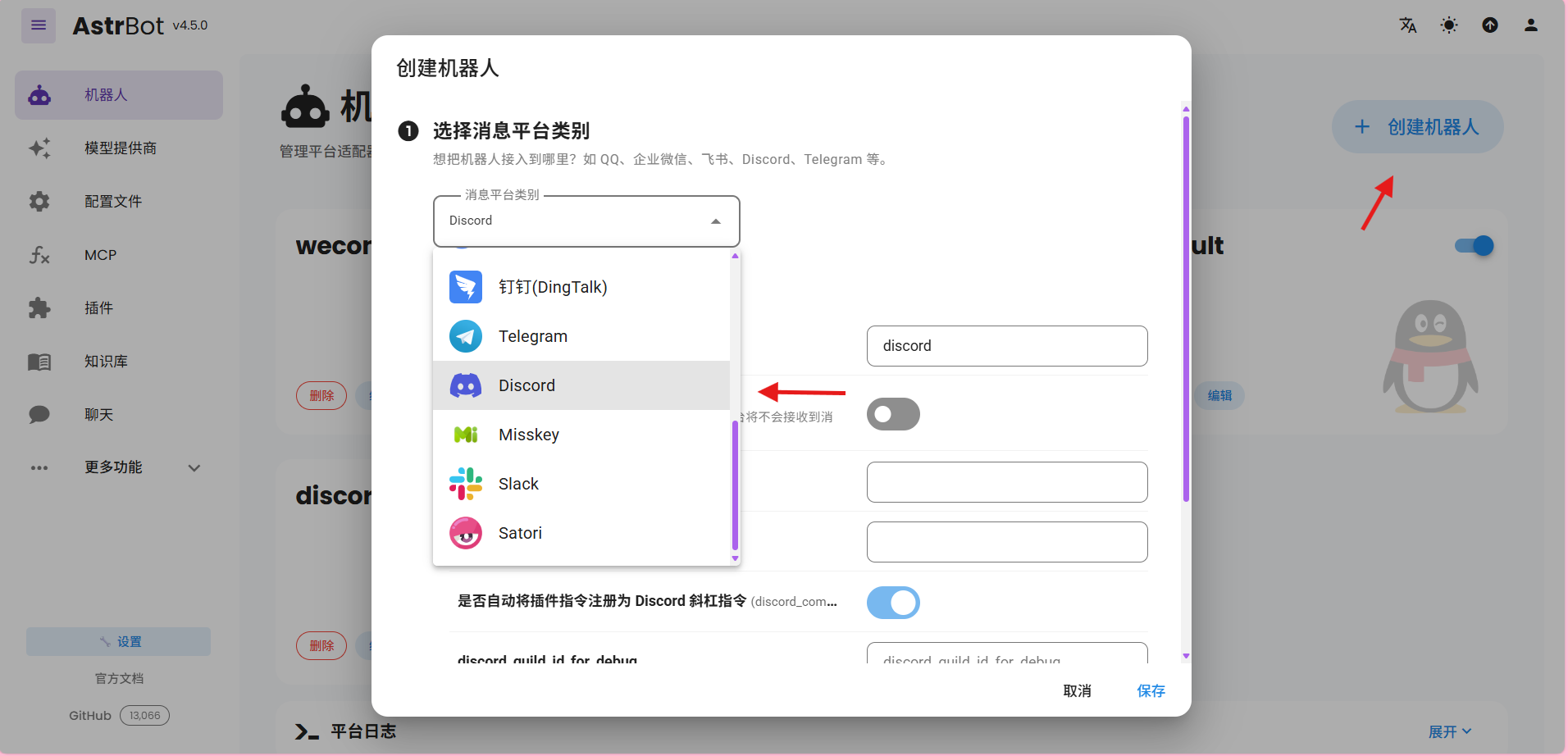 | ||
| <img width="1910" height="883" alt="image" src="https://github.com/user-attachments/assets/dea8c9f6-c870-428d-ab8c-379382d8a761" /> |
There was a problem hiding this comment.

将图片替换为 <img> 标签时,原有的描述性 alt 属性(Click to create bot, select discord type)被替换为了通用的 alt="image"。为了保证文档的可访问性(Accessibility)和 SEO 友好性,建议保留原有的描述性 alt 文本。
| <img width="1910" height="883" alt="image" src="https://github.com/user-attachments/assets/dea8c9f6-c870-428d-ab8c-379382d8a761" /> | |
| <img width="1910" height="883" alt="Click to create bot, select discord type" src="https://github.com/user-attachments/assets/dea8c9f6-c870-428d-ab8c-379382d8a761" /> |
| 进入机器人,点击新增适配器,找到 Discord 并点击进入 Discord 配置页。 | ||
| > 旧版本`机器人`为`消息平台` | ||
|  | ||
| <img width="1910" height="883" alt="image" src="https://github.com/user-attachments/assets/b8f5842a-a186-4eeb-b8f8-9bce9d909a98" /> |
There was a problem hiding this comment.
将图片替换为 <img> 标签时,原有的描述性 alt 属性(点击创建机器人,选择discord类型)被替换为了通用的 alt="image"。为了保证文档的可访问性和 SEO 友好性,建议保留原有的描述性 alt 文本。
| <img width="1910" height="883" alt="image" src="https://github.com/user-attachments/assets/b8f5842a-a186-4eeb-b8f8-9bce9d909a98" /> | |
| <img width="1910" height="883" alt="点击创建机器人,选择discord类型" src="https://github.com/user-attachments/assets/b8f5842a-a186-4eeb-b8f8-9bce9d909a98" /> |
| ## 应用对话模型 | ||
|
|
||
| 在 AstrBot WebUI,点击左栏 `配置文件`,找到 AI 配置中的 `默认聊天模型`,选择刚刚创建的 `siliconflow`(硅基流动) 提供商,点击保存。 No newline at end of file | ||
| 在 AstrBot WebUI,点击左栏 `配置文件`,找到 AI 配置中的 `默认聊天模型`,选择刚刚创建的 `siliconflow`(硅基流动) 提供商,点击保存。 |
There was a problem hiding this comment.
为了与 newapi.md 和 tokenpony.md 中的术语保持一致,建议将 默认聊天模型 统一修改为 默认对话模型。
| 如果您需要类似实时打字机的效果,请确保在 AstrBot 中开启了 `流式回复` 功能。 | ||
| 如果您需要类似实时打字机的效果,请确保在 AstrBot 中开启了 `流式输出` 功能。 | ||
|
|
||
| <img width="1910" height="883" alt="image" src="https://github.com/user-attachments/assets/fd962fba-eebd-448a-bf42-8d79c159c8c8" /> |
There was a problem hiding this comment.
原有的描述性 alt 属性(流式回复)被替换为了通用的 alt="image"。由于正文已将 流式回复 更新为 流式输出,建议将图片的 alt 属性也更新为 流式输出,以保持一致性并提高文档的可访问性。
| <img width="1910" height="883" alt="image" src="https://github.com/user-attachments/assets/fd962fba-eebd-448a-bf42-8d79c159c8c8" /> | |
| <img width="1910" height="883" alt="流式输出" src="https://github.com/user-attachments/assets/fd962fba-eebd-448a-bf42-8d79c159c8c8" /> |
1 participant

Related #8745
更新文档图片
文档中图片暂使用 GitHub 自动生成的链接,合并后需手动转存至 R2。
Screenshots or Test Results / 运行截图或测试结果
Checklist / 检查清单
😊 If there are new features added in the PR, I have discussed it with the authors through issues/emails, etc.
/ 如果 PR 中有新加入的功能,已经通过 Issue / 邮件等方式和作者讨论过。
👀 My changes have been well-tested, and "Verification Steps" and "Screenshots" have been provided above.
/ 我的更改经过了良好的测试,并已在上方提供了“验证步骤”和“运行截图”。
🤓 I have ensured that no new dependencies are introduced, OR if new dependencies are introduced, they have been added to the appropriate locations in
requirements.txtandpyproject.toml./ 我确保没有引入新依赖库,或者引入了新依赖库的同时将其添加到
requirements.txt和pyproject.toml文件相应位置。😮 My changes do not introduce malicious code.
/ 我的更改没有引入恶意代码。
Summary by Sourcery
Update documentation screenshots and align terminology with current AstrBot UI.
Documentation: