A simulation imitates a real-world process using a model, inputs, rules, and outputs.
-
-
- 🎯
-
Why use simulations?
-
When real testing would be expensive, dangerous, slow, or impossible to repeat.
-
-
- 🌦️
-
What affects accuracy?
-
Missing variables, weak assumptions, or bad data make simulation results less reliable.
-
-
- 📈
-
What to observe?
-
Look for patterns over many trials. One result can be random — many reveal a trend.
-
-
-
-
-
-
AP CSP Simulation Vocabulary
-
-
-
-
-
-
-
-
-
-
Click a vocabulary word to see a quick AP CSP definition.
-
-
-
-
-
-
-
Simulation 1
-
Dice Probability Simulator
-
Roll a die repeatedly and watch experimental probability move closer to theoretical probability.
-
-
-
-
-
-
-
-
-
How this is a simulation
-
The die roll uses a random number generator. Each roll is one trial. The program stores results, calculates frequencies, and displays the output in a table.
-
-
-
-
-
-
?
-
-
✦
-
✧
-
✦
-
-
Last roll
- No rolls yet
-
-
-
-
-
-
-
-
-
-
Total Rolls0
-
Most CommonN/A
-
Least CommonN/A
-
-
-
-
-
-
-
Live Frequency Chart
-
Theoretical probability per side ≈ 16.7%
-
-
-
-
-
-
-
Recorded Results
-
-
-
-
-
-
Dice Value
Frequency
Exp. Probability
Diff from 16.7%
Bar
-
-
-
-
-
-
-
-
Quick Discussion Prompt
-
Why do the results usually become more balanced after more trials?
-
-
-
-
-
-
-
-
-
Simulation 2
-
Flight Risk Simulator
-
Change the input variables and run a flight model that calculates risk using rules plus randomness.
-
-
-
-
-
-
-
-
-
How this is a simulation
-
The flight model uses selected conditions as inputs. The algorithm converts them into a safety score (the likelihood of success). An uncertainty factor — a random number simulating unpredictable real-world variables like bird strikes, turbulence, or equipment glitches — is then compared to that score. If the uncertainty exceeds the safety margin, the flight fails.
-
-
-
-
-
-
-
-
☀️
-
-
-
-
-
✈️
-
-
💥
-
-
-
-
-
-
-
-
-
Safety Score--%
-
Uncertainty Factor--
-
OutcomeWaiting
-
-
Choose inputs and run the flight simulation.
-
-
-
-
-
-
Risk Factor Breakdown
-
These deductions show how the model makes decisions.
-
-
-
-
-
-
Quick Discussion Prompt
-
Which input seems to affect the simulation the most, and why?
-
-
-
-
-
-
-
-
Lesson Wrap-Up
-
Both simulations show that results depend on the model, assumptions, data, and number of trials — not just randomness alone.
-
-
-
Dice Simulator
-
Best for showing randomness, repeated trials, probability, and data collection.
-
-
-
Flight Simulator
-
Best for showing input variables, weighted conditions, assumptions, and limits of a model.
-
-
\ No newline at end of file
diff --git a/_notebooks/2025-09-23-random_py_sprinters_IPYNB_2_.md b/_notebooks/2025-09-23-random_py_sprinters_IPYNB_2_.md
deleted file mode 100644
index bfe9a74b61..0000000000
--- a/_notebooks/2025-09-23-random_py_sprinters_IPYNB_2_.md
+++ /dev/null
@@ -1,559 +0,0 @@
----
-layout: post
-courses: {'csp': {'week': 1}}
-categories: ['Python', 'Random-Values']
-lesson_language: Python
-lesson_topic: Random-Values
-lesson_part: interactive
-lesson_type: lesson
-toc: True
-comments: False
-title: 3.15 Random Numbers (py)
-description: Random Numbers in Python
-breadcrumbs: True
-permalink: /csp/big-idea-3/RandomPY/p3/Lesson
-authors: Rudra J, Darshan S.
----
-
-
-
-
-
🎲 Random Numbers
-
-
The Random Module
-
- To make anything random in Python, you need a module called random.
- This module must be imported into your script beforehand like this:
-
-
-
-
-
-```python
-import random
-```
-
-
-
-
-
📖 The Spellbook of Randomness
-
-
- Think of this as a spellbook! Every Python spell must derive from the spellbook.
- In this case, that spellbook we need is random.
-
-
-
🔮 A Basic Number Generator
-
- Let’s analyze the following generator:
-
-
-
-
-
-```python
-import random
-# Generate a random integer between 1 and 10 (inclusive)
-random_integer = random.randint(1, 10)
-print(f"Random Integer: {random_integer}")
-```
-
- Random Integer: 2
-
-
-
-
-
-
-
-
import random: Allows us to access the random module
-
random_integer: This is our variable to hold the number we generate
-
random.randint(1,10): This basically says “from the random module, use the randint function and use parameters 1 and 10.”
- Randint is the function used to determine a random integer in a range. In this case, that range is 1 and 10.
-
print(f"Random Integer: {random_integer}"): Prints the number
-
-
-
✨ Another Type of Generator
-
Let’s look at one more generator:
-
-
-
-
-
-```python
-import random
-# Generate a random float between 0 and 1 (inclusive)
-random_float = random.uniform(0, 1)
-print(f"Random Float: {random_float}")
-```
-
- Random Float: 0.1742626429831371
-
-
-
-
-
-
📜 Before We Begin: Types of Random
-
-
Randint:
- - What it does: Picks a whole number between two values, with equal chance for each.
- - Distribution type: Discrete uniform distribution.
-
-
Uniform:
- - What it does: Picks a decimal (float) between two numbers, again with equal chance for every value in that range.
- - Distribution type: Continuous uniform distribution.
-
-
Normalvariate:
- - What it does: Picks a number where values near the average (mean) are more likely, and extreme values are rare.
- - Distribution type: Normal (bell curve).
-
-
This code right here uses Uniform. It needs to pick a float or decimal and the Uniform function works best when dealing with decimals between 2 numbers with equal chance to roll it.
-
-
-
-
🪄 Hacks!
-
Here are a few challenges you can try making with the concept of RNG in Python:
-
-
🎲 Dice or Lottery Numbers
-
📏 Random Decimal Precision
-
🔀 Random Shuffle with Numbers
-
-
-
-
-
-
-
-
- Learn About Random Module & RNG
-
-
-
-
-
Learn the Random Module & Try RNGs
-
-
-
About Python’s random Module
-
The random module in Python is used to generate random numbers. Some key functions include:
-
-
random(): Returns a float between 0.0 and 1.0.
-
randint(a, b): Returns an integer between a and b (inclusive).
-
uniform(a, b): Returns a float between a and b.
-
choice(seq): Returns a random element from a sequence.
-
-
-
-
-
Generate Random Float (0.0 – 1.0)
-
-
-
-
-
-
Generate Random Integer (randint(a, b))
-
-
-
-
-
-
-
-
-
Generate Random Float in Range (uniform(a, b))
-
-
-
-
-
-
-
-
-
-
-
-
-
-
-
-
-
🧪 Extra Demos (Python)
-
- Below are small, self-contained Python snippets you can run inside the notebook.
- They use the standard random module and a tiny seeded helper so results can be reproduced for tests.
-
-
-
-
-
-```python
-# Seeded RNG helper using random.Random (reproducible)
-from random import Random, choices, randint, shuffle, uniform, gauss
-
-def make_rng(seed):
- return Random(seed)
-
-rng = make_rng(42)
-print('rng sample floats:', [rng.random() for _ in range(3)])
-
-```
-
-
-```python
-# Two-dice simulation and heatmap (counts for face1 vs face2)
-import numpy as np
-import matplotlib.pyplot as plt
-from random import Random
-
-def two_dice_heatmap(trials=10000, seed=1):
- rng = Random(seed)
- grid = np.zeros((6,6), dtype=int)
- for _ in range(trials):
- a = rng.randint(1,6) - 1
- b = rng.randint(1,6) - 1
- grid[a,b] += 1
- return grid
-
-g = two_dice_heatmap(5000, seed=7)
-print(g)
-# If matplotlib is available, show a simple heatmap (optional)
-try:
- plt.imshow(g, cmap='viridis')
- plt.colorbar()
- plt.title('Two-dice frequency heatmap (face1 x face2)')
- plt.xlabel('Die 2 face (1-6)')
- plt.ylabel('Die 1 face (1-6)')
- plt.show()
-except Exception as e:
- print('matplotlib display skipped:', e)
-
-```
-
-
-```python
-# Loot box simulator (with adjustable probabilities)
-from random import Random
-
-def simulate_loot(n=1000, seed=0, pool=None):
- if pool is None:
- pool = [('Common',0.7), ('Rare',0.25), ('Epic',0.045), ('Legendary',0.005)]
- rng = Random(seed)
- names = [p[0] for p in pool]
- weights = [p[1] for p in pool]
- counts = {name:0 for name in names}
- for _ in range(n):
- pick = rng.random()
- s = 0
- for name,w in zip(names, weights):
- s += w
- if pick < s: counts[name] += 1; break
- return counts
-
-print(simulate_loot(1000, seed=42))
-
-```
-
-
-```python
-# Seeded shuffle and reproducible playlist example
-from random import Random
-
-def seeded_shuffle(arr, seed):
- rng = Random(seed)
- a = list(arr)
- rng.shuffle(a)
- return a
-
-songs = ['Song A','Song B','Song C','Song D','Song E']
-print('seed=1:', seeded_shuffle(songs,1))
-print('seed=1 again:', seeded_shuffle(songs,1))
-print('seed=2:', seeded_shuffle(songs,2))
-
-```
diff --git a/_notebooks/2025-09-26-codemaxxers_nested_conditionals_lesson_IPYNB_2_.md b/_notebooks/2025-09-26-codemaxxers_nested_conditionals_lesson_IPYNB_2_.md
deleted file mode 100644
index 65f9d6eba5..0000000000
--- a/_notebooks/2025-09-26-codemaxxers_nested_conditionals_lesson_IPYNB_2_.md
+++ /dev/null
@@ -1,225 +0,0 @@
----
-layout: post
-courses: {'csp': {'week': 1}}
-categories: ['Python', 'Nested-Conditionals']
-lesson_language: Python
-lesson_topic: Nested-Conditionals
-lesson_part: interactive
-lesson_type: lesson
-toc: True
-comments: False
-title: 3.7 Nested Conditionals
-description: Explore how to use nested conditionals in JavaScript and Python to make complex, hierarchical decisions in code.
-permalink: /csp/codemaxxers/nested-conditionals-lesson
----
-
-# Nested Conditionals Lesson
-
-## What are Nested Conditionals?
-
-Nested conditionals are **conditionals within conditionals**. They allow us to check multiple conditions in a hierarchical way, where the result of one condition determines which other conditions we check next.
-
-## Pseudocode Structure
-
-Here's the basic structure of nested conditionals:
-
-```
-if (condition) {
- if (condition) {
- // code
- } else {
- // code
- }
-} else {
- if (condition) {
- // code
- } else {
- // code
- }
-}
-```
-
-In this structure, we check an initial condition. Depending on whether it's true or false, we move to one segment of code and check another conditional. **Going down one path means you do not go down another.**
-
-## Example 1: Game Level Completion
-
-Let's look at a real-world example. Imagine we're playing a game that checks if we've completed a level by satisfying two requirements:
-- **TIME** is less than 3 seconds
-- **SCORE** is greater than 1000
-
-If both conditions are met, we add 3 lives and increase the level.
-
-
-```javascript
-%%js
-// Initial game state
-let score = 1200;
-let time = 2.5;
-let level = 2;
-let lives = 3;
-
-console.log(`Starting state: Score=${score}, Time=${time}, Level=${level}, Lives=${lives}`);
-
-// Simple condition (not complete yet)
-if (time < 3 && score > 1000) {
- lives = lives + 3;
- level = level + 1;
- console.log("Both conditions met! +3 lives, +1 level");
-}
-
-console.log(`Final state: Score=${score}, Time=${time}, Level=${level}, Lives=${lives}`);
-```
-
-### Problem: What if the conditions aren't met?
-
-The above code doesn't tell the game what to do if:
-- Only one condition is met
-- Neither condition is met
-
-Let's fix this with **nested conditionals**!
-
-## Complete Nested Conditional Example
-
-
-```javascript
-%%js
-// Initial game state
-let score = 1200;
-let time = 4.2;
-let level = 2;
-let lives = 3;
-
-console.log(`Starting state: Score=${score}, Time=${time}, Level=${level}, Lives=${lives}`);
-
-// Complete nested conditional
-if (time < 3 && score > 1000) {
- // Both conditions met
- lives = lives + 3;
- level = level + 1;
- console.log("Both conditions met! +3 lives, +1 level");
-} else {
- // At least one condition was NOT met
- if (time < 3 || score > 1000) {
- // At least one condition is met
- lives = lives + 1;
- console.log("One condition met! +1 life");
- } else {
- // Neither condition is met
- lives = lives - 1;
- console.log("No conditions met! -1 life");
- }
-}
-
-console.log(`Final state: Score=${score}, Time=${time}, Level=${level}, Lives=${lives}`);
-```
-
-### 🤔 Prediction Exercise
-
-Before you ran the code above, what did you predict would happen?
-
-**Answer:** Since `time = 4.2` (NOT less than 3) and `score = 1200` (IS greater than 1000), only ONE condition is met. So we take the `else` branch, then the inner `if` branch is true, giving us +1 life. The player ends with 4 lives and stays at level 2.
-
-## Example 2: Temperature and Weather Advisory System
-
-Let's look at another real-world application: a weather advisory system that gives recommendations based on temperature and whether it's raining.
-
-
-```javascript
-%%js
-let temperature = 85;
-let isRaining = false;
-
-console.log(`Current conditions: ${temperature}°F, Raining: ${isRaining}`);
-console.log("\nWeather Advisory:");
-
-if (temperature > 80) {
- // It's hot
- if (isRaining) {
- console.log("It's hot and rainy - stay hydrated and bring an umbrella!");
- } else {
- console.log("It's hot and sunny - wear sunscreen and stay hydrated!");
- }
-} else {
- // It's not hot
- if (isRaining) {
- console.log("It's cool and rainy - bring a jacket and umbrella!");
- } else {
- console.log("It's cool and clear - perfect weather for outdoor activities!");
- }
-}
-```
-
-## Try It Yourself!
-
-Modify the temperature and `isRaining` values in the cell above and run it again to see different advisories.
-
-## Example 3: Student Grade Calculator
-
-Here's a more complex example that determines a student's grade and eligibility for honors based on their test score and homework completion.
-
-
-```javascript
-%%js
-let testScore = 88;
-let homeworkCompleted = 0.95; // 95% of homework completed
-
-console.log(`Test Score: ${testScore}`);
-console.log(`Homework Completion: ${homeworkCompleted * 100}%`);
-console.log("\nGrade Evaluation:");
-
-if (testScore >= 90) {
- // A grade territory
- if (homeworkCompleted >= 0.9) {
- console.log("Grade: A");
- console.log("Status: Honors eligible! Excellent work!");
- } else {
- console.log("Grade: A");
- console.log("Status: Great test score, but complete more homework for honors.");
- }
-} else {
- // Below A grade
- if (testScore >= 80) {
- // B grade territory
- if (homeworkCompleted >= 0.9) {
- console.log("Grade: B+");
- console.log("Status: Good work! A little more effort on tests for honors.");
- } else {
- console.log("Grade: B");
- console.log("Status: Solid performance. Focus on homework completion.");
- }
- } else {
- // Below B grade
- console.log("Grade: C or below");
- console.log("Status: Let's meet to discuss how to improve your grade.");
- }
-}
-```
-
-## 🎯 Quick Check: Test Your Understanding
-
-What would happen in the grade calculator if:
-1. `testScore = 92` and `homeworkCompleted = 0.85`?
-2. `testScore = 85` and `homeworkCompleted = 0.95`?
-3. `testScore = 75` and `homeworkCompleted = 0.80`?
-
-Try changing the values above and running the code to check your predictions!
-
-## Real-World Applications
-
-Nested conditionals are used everywhere in programming:
-
-1. **Video Games**: Checking player state, inventory, and abilities
-2. **E-commerce**: Determining shipping costs, discounts, and eligibility
-3. **Social Media**: Filtering content based on user preferences and privacy settings
-4. **Banking Apps**: Validating transactions based on balance, limits, and security checks
-5. **Fitness Apps**: Providing workout recommendations based on fitness level and goals
-
-The key is that nested conditionals let you make **hierarchical decisions** where one choice determines what other choices you need to make next.
-
-## Summary
-
-- **Nested conditionals** are conditionals inside other conditionals
-- They allow us to create complex decision-making logic
-- Each path through the nested structure is exclusive - you only go down one path
-- Use nested conditionals when the conditions you need to check depend on previous conditions
-- Remember to handle all possible cases (including edge cases!)
diff --git a/_notebooks/2025-09-26-data_abstractions_remakers_IPYNB_2_.md b/_notebooks/2025-09-26-data_abstractions_remakers_IPYNB_2_.md
deleted file mode 100644
index 86440dad05..0000000000
--- a/_notebooks/2025-09-26-data_abstractions_remakers_IPYNB_2_.md
+++ /dev/null
@@ -1,557 +0,0 @@
----
-layout: post
-codemirror: True
-courses: {'csp': {'week': 1}}
-categories: ['Python', 'Data-Abstraction']
-lesson_language: Python
-lesson_topic: Data-Abstraction
-lesson_part: interactive
-lesson_type: lesson
-toc: True
-comments: False
-title: 3.2 Data Abstractions
-description: Intro to data abstractions in Python and JavaScript.
-permalink: /csp/big-idea-3/data-abstractions/p4/introduction
-author: Jaynee Chauhan, Michelle Ji, Lucas Masterson
----
-
-## 🎮 Data Abstraction Quest — Gamified Review
-
-Test your knowledge in an interactive RPG! Explore the world below and talk to 5 NPC teachers — each one quizzes you on a different concept from this lesson.
-
-| Key | Action |
-|-----|--------|
-| **WASD** | Move your character |
-| **E** | Talk to an NPC (walk into them first) |
-
-| NPC | Concept | Topic |
-|-----|---------|-------|
-| List Keeper (wizard) | Lists | Ordered sequences of elements |
-| Index Oracle (robot) | Indexing | 0-based access, string indexing |
-| Loop Sage (octocat) | Loops + Lists | Computing with iteration |
-| Abstraction Architect (penguin) | Why Abstraction? | Managing complexity |
-| AP Guardian (nerd) | AP Exam | 1-based indexing, pseudocode |
-
-Complete all 5 to become **Master of Abstraction!** Watch your score in the top-right HUD.
-
-
-
-{% capture challenge0 %}
-Explore the Data Kingdom! Walk to each NPC (WASD) and press E to answer quiz questions on Data Abstraction. Score 5/5 to become the Master of Abstraction!
-{% endcapture %}
-
-{% capture code0 %}
-// ─── Imports (GameEngine v1 — no engine files modified) ───
-import GameControl from '/assets/js/GameEnginev1/essentials/GameControl.js';
-import GameEnvBackground from '/assets/js/GameEnginev1/essentials/GameEnvBackground.js';
-import Player from '/assets/js/GameEnginev1/essentials/Player.js';
-import Npc from '/assets/js/GameEnginev1/essentials/Npc.js';
-
-// ═══════════════════════════════════════════════════════════
-// SRP Module 1: QuizEngine — manages questions & grading
-// ═══════════════════════════════════════════════════════════
-var QuizEngine = {
- banks: {
- 'List Keeper': [
- { q: "What is a list in programming?", choices: ["A single variable","An ordered sequence of elements","A function","A loop"], answer: 1 },
- { q: "In Python, how do you create a list?", choices: ["list = (1,2,3)","list = {1,2,3}","list = [1,2,3]","list = <1,2,3>"], answer: 2 },
- { q: "Lists can contain:", choices: ["Only numbers","Only strings","Only booleans","Different types of elements"], answer: 3 }
- ],
- 'Index Oracle': [
- { q: "What index is the FIRST element in Python/JS?", choices: ["1","0","-1","None"], answer: 1 },
- { q: "Given word = 'hello', what is word[1]?", choices: ["'h'","'e'","'l'","'o'"], answer: 1 },
- { q: "On the AP exam, lists are:", choices: ["0-indexed","1-indexed","2-indexed","Not indexed"], answer: 1 }
- ],
- 'Loop Sage': [
- { q: "scores=[85,92,78,90]; What is sum/len?", choices: ["345","85","86.25","90"], answer: 2 },
- { q: "Why use a loop with a list?", choices: ["It is slower but safer","It manages complexity and is reusable","Loops are required by Python","There is no advantage"], answer: 1 },
- { q: "Which keyword iterates over a JS array?", choices: ["for...of","for...at","each...in","loop...over"], answer: 0 }
- ],
- 'Abstraction Architect': [
- { q: "Data abstraction means:", choices: ["Deleting unused variables","Treating collections as a single unit","Making code longer","Avoiding lists"], answer: 1 },
- { q: "Which is a benefit of data abstraction?", choices: ["Harder to read code","Easier maintenance","More memory usage","Slower programs"], answer: 1 },
- { q: "Abstraction lets you manipulate a group using:", choices: ["Individual memory addresses","A single name like scores","Only print statements","Manual indexing of every element"], answer: 1 }
- ],
- 'AP Guardian': [
- { q: "On the AP CSP exam, what index is the first list element?", choices: ["0","1","2","-1"], answer: 1 },
- { q: "A string is:", choices: ["An unordered set","An ordered sequence of characters","A number type","A boolean"], answer: 1 },
- { q: "Data abstractions can be created using:", choices: ["Only dictionaries","Only integers","Lists","Only functions"], answer: 2 }
- ]
- },
- getQuestion: function(npcId) {
- var bank = this.banks[npcId];
- if (!bank || bank.length === 0) return null;
- return bank[Math.floor(Math.random() * bank.length)];
- },
- check: function(question, choiceIndex) {
- return choiceIndex === question.answer;
- }
-};
-
-// ═══════════════════════════════════════════════════════════
-// SRP Module 2: ScoreTracker — tracks which NPCs are beaten
-// ═══════════════════════════════════════════════════════════
-var ScoreTracker = {
- _done: {},
- total: 5,
- mark: function(npcId) { this._done[npcId] = true; },
- isComplete: function(npcId) { return this._done[npcId] === true; },
- score: function() { return Object.keys(this._done).length; },
- allDone: function() { return Object.keys(this._done).length >= this.total; },
- reset: function() { this._done = {}; }
-};
-
-// ═══════════════════════════════════════════════════════════
-// SRP Module 3: QuizOverlay — renders DOM quiz popup
-// ═══════════════════════════════════════════════════════════
-var QuizOverlay = {
- active: false,
- _escHandler: null,
-
- show: function(npcId, npcGreeting) {
- if (this.active) return;
- this.active = true;
-
- if (ScoreTracker.isComplete(npcId)) {
- this._showMessage(npcId, 'You already answered my question correctly! Move on, scholar!', '#4CAF50');
- return;
- }
-
- var question = QuizEngine.getQuestion(npcId);
- if (!question) { this.active = false; return; }
- var self = this;
-
- var overlay = document.createElement('div');
- overlay.id = 'quiz-overlay';
- overlay.style.cssText = 'position:fixed;top:0;left:0;width:100%;height:100%;background:rgba(0,0,0,0.85);display:flex;align-items:center;justify-content:center;z-index:10000;font-family:Segoe UI,sans-serif;';
-
- var card = document.createElement('div');
- card.style.cssText = 'background:linear-gradient(135deg,#1a1a2e,#16213e);color:#fff;border-radius:16px;padding:32px;max-width:520px;width:90%;box-shadow:0 0 40px rgba(100,100,255,0.3);border:2px solid #6c63ff;text-align:center;';
-
- var header = document.createElement('h2');
- header.textContent = npcId + ' asks:';
- header.style.cssText = 'color:#6c63ff;margin:0 0 8px 0;font-size:1.3em;';
- card.appendChild(header);
-
- var flavor = document.createElement('p');
- flavor.textContent = npcGreeting;
- flavor.style.cssText = 'color:#aaa;font-style:italic;margin:0 0 16px 0;font-size:0.9em;';
- card.appendChild(flavor);
-
- var qText = document.createElement('p');
- qText.style.cssText = 'font-size:1.1em;line-height:1.5;margin-bottom:20px;white-space:pre-wrap;';
- qText.textContent = question.q;
- card.appendChild(qText);
-
- var btnBox = document.createElement('div');
- btnBox.style.cssText = 'display:flex;flex-direction:column;gap:10px;';
- question.choices.forEach(function(choice, idx) {
- var btn = document.createElement('button');
- btn.textContent = choice;
- btn.style.cssText = 'padding:12px 16px;border:2px solid #6c63ff;border-radius:10px;background:transparent;color:#fff;font-size:1em;cursor:pointer;transition:all 0.2s ease;';
- btn.onmouseenter = function() { btn.style.background = '#6c63ff'; btn.style.transform = 'scale(1.03)'; };
- btn.onmouseleave = function() { btn.style.background = 'transparent'; btn.style.transform = 'scale(1)'; };
- btn.onclick = function() { self._handleAnswer(npcId, question, idx, overlay); };
- btnBox.appendChild(btn);
- });
- card.appendChild(btnBox);
-
- var hint = document.createElement('p');
- hint.textContent = 'Press Escape to close without answering';
- hint.style.cssText = 'color:#555;font-size:0.75em;margin-top:16px;';
- card.appendChild(hint);
-
- overlay.appendChild(card);
- document.body.appendChild(overlay);
-
- this._escHandler = function(e) { if (e.key === 'Escape') self._close(overlay); };
- document.addEventListener('keydown', this._escHandler);
- },
-
- _handleAnswer: function(npcId, question, choiceIndex, overlay) {
- var correct = QuizEngine.check(question, choiceIndex);
- if (correct) {
- ScoreTracker.mark(npcId);
- HUD.update();
- if (ScoreTracker.allDone()) {
- this._close(overlay);
- this._showVictory();
- return;
- }
- }
- var msg = correct
- ? 'Correct! You have mastered this concept!'
- : 'Not quite — review the lesson above and try again!';
- var color = correct ? '#4CAF50' : '#f44336';
- this._close(overlay);
- this._showMessage(npcId, msg, color);
- },
-
- _showMessage: function(npcId, text, borderColor) {
- var self = this;
- var overlay = document.createElement('div');
- overlay.id = 'quiz-overlay';
- overlay.style.cssText = 'position:fixed;top:0;left:0;width:100%;height:100%;background:rgba(0,0,0,0.7);display:flex;align-items:center;justify-content:center;z-index:10000;font-family:Segoe UI,sans-serif;';
-
- var box = document.createElement('div');
- box.style.cssText = 'background:#1a1a2e;color:#fff;border-radius:16px;padding:32px;max-width:420px;width:85%;text-align:center;border:2px solid ' + borderColor + ';box-shadow:0 0 30px ' + borderColor + '40;';
-
- var icon = document.createElement('div');
- icon.style.cssText = 'font-size:3em;margin-bottom:12px;';
- icon.textContent = borderColor === '#4CAF50' ? '\u2705' : '\u274C';
- box.appendChild(icon);
-
- var p = document.createElement('p');
- p.textContent = text;
- p.style.cssText = 'font-size:1.15em;line-height:1.5;margin:0 0 16px 0;';
- box.appendChild(p);
-
- var btn = document.createElement('button');
- btn.textContent = 'OK';
- btn.style.cssText = 'padding:10px 32px;border:none;border-radius:8px;background:' + borderColor + ';color:#fff;font-size:1em;cursor:pointer;font-weight:bold;';
- btn.onclick = function() { self._close(overlay); };
- box.appendChild(btn);
-
- overlay.appendChild(box);
- document.body.appendChild(overlay);
- this._escHandler = function(e) { if (e.key === 'Escape') self._close(overlay); };
- document.addEventListener('keydown', this._escHandler);
- },
-
- _showVictory: function() {
- var overlay = document.createElement('div');
- overlay.id = 'quiz-overlay';
- overlay.style.cssText = 'position:fixed;top:0;left:0;width:100%;height:100%;background:rgba(0,0,0,0.9);display:flex;align-items:center;justify-content:center;z-index:10000;font-family:Segoe UI,sans-serif;';
-
- var box = document.createElement('div');
- box.style.cssText = 'background:linear-gradient(135deg,#0d0d2b,#1a1a4e);color:#fff;border-radius:20px;padding:40px;max-width:500px;width:90%;text-align:center;border:3px solid #ffd700;box-shadow:0 0 60px rgba(255,215,0,0.4);';
-
- var trophy = document.createElement('div');
- trophy.style.cssText = 'font-size:4em;margin-bottom:8px;';
- trophy.textContent = '\uD83C\uDFC6';
- box.appendChild(trophy);
-
- var title = document.createElement('h1');
- title.textContent = 'MASTER OF ABSTRACTION';
- title.style.cssText = 'color:#ffd700;font-size:2em;margin:0 0 10px 0;';
- box.appendChild(title);
-
- var sub1 = document.createElement('p');
- sub1.textContent = 'You answered all 5 NPC challenges!';
- sub1.style.cssText = 'font-size:1.2em;color:#ccc;margin-bottom:8px;';
- box.appendChild(sub1);
-
- var sub2 = document.createElement('p');
- sub2.textContent = 'You truly understand Data Abstraction — lists, indexing, loops, complexity management, and AP concepts.';
- sub2.style.cssText = 'font-size:1em;color:#aaa;margin-bottom:20px;';
- box.appendChild(sub2);
-
- var btn = document.createElement('button');
- btn.textContent = 'Continue Exploring';
- btn.style.cssText = 'padding:12px 40px;border:none;border-radius:10px;background:#ffd700;color:#000;font-size:1.1em;cursor:pointer;font-weight:bold;';
- btn.onclick = function() { overlay.remove(); };
- box.appendChild(btn);
-
- overlay.appendChild(box);
- document.body.appendChild(overlay);
- },
-
- _close: function(overlay) {
- if (overlay && overlay.parentNode) overlay.remove();
- if (this._escHandler) document.removeEventListener('keydown', this._escHandler);
- this.active = false;
- }
-};
-
-// ═══════════════════════════════════════════════════════════
-// SRP Module 4: HUD — heads-up display for score
-// ═══════════════════════════════════════════════════════════
-var HUD = {
- el: null,
-
- create: function() {
- var old = document.getElementById('abstraction-hud');
- if (old) old.remove();
-
- this.el = document.createElement('div');
- this.el.id = 'abstraction-hud';
- this.el.style.cssText = 'position:fixed;top:12px;right:12px;z-index:9999;background:linear-gradient(135deg,#1a1a2e,#16213e);border:2px solid #6c63ff;border-radius:12px;padding:10px 18px;color:#fff;font-family:Segoe UI,sans-serif;box-shadow:0 0 20px rgba(100,100,255,0.3);min-width:180px;';
- document.body.appendChild(this.el);
- this.update();
- },
-
- update: function() {
- if (!this.el) return;
- var s = ScoreTracker.score();
- var filled = '';
- var empty = '';
- for (var i = 0; i < s; i++) filled += '\u2B50';
- for (var j = 0; j < 5 - s; j++) empty += '\u2606';
-
- var titleDiv = document.createElement('div');
- titleDiv.style.cssText = 'font-weight:bold;font-size:1.1em;margin-bottom:4px;';
- titleDiv.textContent = 'Data Quest';
-
- var starsDiv = document.createElement('div');
- starsDiv.style.cssText = 'font-size:1.3em;letter-spacing:2px;';
- starsDiv.textContent = filled + empty;
-
- var countDiv = document.createElement('div');
- countDiv.style.cssText = 'color:#aaa;font-size:0.85em;margin-top:4px;';
- countDiv.textContent = s + '/5 NPCs completed';
-
- this.el.innerHTML = '';
- this.el.appendChild(titleDiv);
- this.el.appendChild(starsDiv);
- this.el.appendChild(countDiv);
- },
-
- destroy: function() {
- if (this.el) { this.el.remove(); this.el = null; }
- }
-};
-
-// ═══════════════════════════════════════════════════════════
-// SRP Module 5: DataAbstractionLevel — composes everything
-// ═══════════════════════════════════════════════════════════
-class DataAbstractionLevel {
- constructor(gameEnv) {
- var path = gameEnv.path;
- var width = gameEnv.innerWidth;
- var height = gameEnv.innerHeight;
-
- ScoreTracker.reset();
- HUD.create();
-
- var bgData = {
- name: 'data_kingdom',
- greeting: 'Welcome to the Data Kingdom! Speak to each NPC to prove your abstraction knowledge.',
- src: path + '/images/gamify/city.png',
- pixels: { height: 654, width: 966 }
- };
-
- var SCALE = 5;
- var playerData = {
- id: 'Scholar',
- greeting: 'I seek the wisdom of Data Abstraction!',
- src: path + '/images/gamify/chillguy.png',
- SCALE_FACTOR: SCALE,
- STEP_FACTOR: 1000,
- ANIMATION_RATE: 50,
- INIT_POSITION: { x: width / 2 - 30, y: height - (height / SCALE) },
- pixels: { height: 384, width: 512 },
- orientation: { rows: 3, columns: 4 },
- down: { row: 0, start: 0, columns: 3 },
- downRight: { row: 1, start: 0, columns: 3, rotate: Math.PI / 16 },
- downLeft: { row: 2, start: 0, columns: 3, rotate: -Math.PI / 16 },
- left: { row: 2, start: 0, columns: 3 },
- right: { row: 1, start: 0, columns: 3 },
- up: { row: 3, start: 0, columns: 3 },
- upLeft: { row: 2, start: 0, columns: 3, rotate: Math.PI / 16 },
- upRight: { row: 1, start: 0, columns: 3, rotate: -Math.PI / 16 },
- hitbox: { widthPercentage: 0.45, heightPercentage: 0.2 },
- keypress: { up: 87, left: 65, down: 83, right: 68 }
- };
-
- function npcData(id, greeting, sprite, px, initPos, scaleFactor, orient, downAnim) {
- return {
- id: id,
- greeting: greeting,
- src: path + sprite,
- SCALE_FACTOR: scaleFactor,
- ANIMATION_RATE: 100,
- pixels: px,
- INIT_POSITION: initPos,
- orientation: orient,
- down: downAnim,
- hitbox: { widthPercentage: 0.1, heightPercentage: 0.2 },
- reaction: function() {
- if (ScoreTracker.isComplete(id)) {
- alert(id + ': Already conquered! Move to the next NPC.');
- } else {
- alert(greeting);
- }
- },
- interact: function() {
- QuizOverlay.show(id, greeting);
- }
- };
- }
-
- var listKeeper = npcData(
- 'List Keeper',
- 'I am the List Keeper! Lists are ordered sequences of elements. Can you prove you understand them?',
- '/images/gamify/wizard.png',
- { width: 163, height: 185 },
- { x: width * 0.10, y: height * 0.20 },
- 3,
- { rows: 1, columns: 1 },
- { row: 0, start: 0, columns: 1 }
- );
-
- var indexOracle = npcData(
- 'Index Oracle',
- 'Beep boop! I am the Index Oracle. Do you know how indexing works in Python and JavaScript?',
- '/images/gamify/robot.png',
- { width: 627, height: 316 },
- { x: width * 0.80, y: height * 0.15 },
- 8,
- { rows: 3, columns: 6 },
- { row: 1, start: 0, columns: 6 }
- );
-
- var loopSage = npcData(
- 'Loop Sage',
- 'Meow-code! I am the Loop Sage. Loops and lists together are powerful — let me test you!',
- '/images/gamify/octocat.png',
- { width: 801, height: 301 },
- { x: width * 0.45, y: height * 0.40 },
- 6,
- { rows: 1, columns: 1 },
- { row: 0, start: 0, columns: 1 }
- );
-
- var abstractArch = npcData(
- 'Abstraction Architect',
- 'I am the Architect of Abstraction! Treating collections as single units manages complexity. Prove it!',
- '/images/gamify/tux.png',
- { width: 256, height: 352 },
- { x: width * 0.15, y: height * 0.65 },
- 4,
- { rows: 1, columns: 1 },
- { row: 0, start: 0, columns: 1 }
- );
-
- var apGuardian = npcData(
- 'AP Guardian',
- 'Greetings, future AP scholar! I guard the AP CSP knowledge. Remember: AP lists are 1-indexed!',
- '/images/gamify/nerd.png',
- { width: 343, height: 503 },
- { x: width * 0.78, y: height * 0.60 },
- 4,
- { rows: 1, columns: 1 },
- { row: 0, start: 0, columns: 1 }
- );
-
- this.classes = [
- { class: GameEnvBackground, data: bgData },
- { class: Player, data: playerData },
- { class: Npc, data: listKeeper },
- { class: Npc, data: indexOracle },
- { class: Npc, data: loopSage },
- { class: Npc, data: abstractArch },
- { class: Npc, data: apGuardian }
- ];
- }
-}
-
-export var gameLevelClasses = [DataAbstractionLevel];
-export { GameControl };
-{% endcapture %}
-
-{% include runners/game.html
- runner_id="csp-big-idea-3-data-abstractions-p4-introduction-0"
- challenge=challenge0
- code=code0
-%}
-
-
-## Learning Objectives
-
-> 3.A Generalize data sources through variables.
->
-> 3.B Use abstraction to manage complexity in a program.
->
-> 3.C Explain how abstraction manages complexity.
-
-## Data Abstractions
-
-Data abstraction means *treating collections of values as a single unit* (like a list, array, or string), so you don’t have to think about all the small details every time you use them. This manages complexity by letting us use a name (like `numbers`) instead of repeatedly referencing each individual element.
-
-For example, in Python:
-
-```py
-# A list in Python
-numbers = [10, 20, 30, 40]
-
-# Access by index (0-based in Python)
-print(numbers[0]) # 10
-print(numbers[2]) # 30
-
-# Strings work similarly
-word = "hello"
-print(word[1]) # 'e'
-```
-
-or in JavaScript:
-
-```js
-// An array in JavaScript
-let numbers = [10, 20, 30, 40];
-
-console.log(numbers[0]); // 10
-console.log(numbers[2]); // 30
-
-// Strings are also indexable
-let word = "hello";
-console.log(word[1]); // 'e'
-```
-
-## Using Abstractions to Manage Complexity
-
-Instead of writing code for each item, we use loops and functions to work with lists.
-
-For example, in Python, we could iterate over a list and find the average of its elements:
-
-```py
-scores = [85, 92, 78, 90]
-
-# Sum with a loop
-total = 0
-for score in scores:
- total += score
-print("Average:", total / len(scores)) # 86.25
-```
-
-and in JS:
-
-```js
-let scores = [85, 92, 78, 90];
-
-// Using a loop
-let total = 0;
-for (let score of scores) {
- total += score;
-}
-console.log("Average:", total / scores.length);
-```
-
-## How Abstraction Manages Complexity
-
-Instead of thinking about *every score individually*, you can use the abstraction "list of scores."
-- With a name (`scores`), you manipulate the entire group.
-- You don't need to worry about how the list is stored in memory.
-- Functions and loops let you work with the *concept* of a collection, not every detail.
-
-What we mean by the last part may be a bit more understandable in some examples of benefits.
-- Easier maintenance (add/remove scores without rewriting logic over and over again).
-- Reusable functions (average can work for any list of numbers).
-- Clearer code (you read "average of scores" instead of `score1 + score2 + score3 + ...`).
-
-## Nuances
-
-Remember that Python and JS both use 0-based indexing, which means that the first element of a list/array/string is at index 0 (like we showed before).
-
-## Quick Facts (From AP)
-
-- A *list* is an ordered sequence of elements. For example, `[value1, value2, value3, ...]` describes a list where `value1` is the first element, `value2` is the second element, and `value3` is the third element, and so on.
-- An *element* is an individual value in a list that is assigned a unique index.
-- An *index* is a common method for referencing the elements ina list or string using natural numbers.
-- A *string* is an ordered sequence of characters.
-- Data abstraction provides a separation between the abstract properties of a data type and the concrete details of its representation.
-- Data abstractions manage complexity in programs by giving a collection of data a name without referencing the specific details of the representation.
-- Data abstractions can be created using lists.
-- Developing a data abstraction to implement in a program can result in a program that is easier to develop and maintain.
-- Data abstractions often contain different types of elements.
-- The use of lists allows multiple related items to be treated as a single value. Lists are referred to by different names such as array, depending on the programming language.
-- **For AP, lists are 1-indexed!**
diff --git a/_notebooks/2025-09-26-iterations_scratchers_lesson_IPYNB_2_.md b/_notebooks/2025-09-26-iterations_scratchers_lesson_IPYNB_2_.md
deleted file mode 100644
index 32fb5d6033..0000000000
--- a/_notebooks/2025-09-26-iterations_scratchers_lesson_IPYNB_2_.md
+++ /dev/null
@@ -1,518 +0,0 @@
----
-layout: post
-courses: {'csp': {'week': 1}}
-categories: ['Python', 'Iterations']
-lesson_language: Python
-lesson_topic: Iterations
-lesson_part: interactive
-lesson_type: lesson
-toc: True
-comments: False
-title: 3.8 Iterations
-description: An introduction to College Board's Big Idea 3.8 Iterations. This will help you understand how to write loops in Python and JavaScript.
-permalink: /csp/big-idea-3/scratchers/iterations/p4/lesson
----
-
-## Iteration Lesson – Big Idea 3.8
-
-
-
-## Warm-Up
-Think about these questions:
-- How do you brush your teeth every morning?
-- Do you repeat steps until your teeth feel clean?
-- What are other examples in daily life where we repeat steps?
-
-Iteration is like repeating those steps in code until a condition is met.
-
-
-## Key Vocabulary
-- **Loop** – A structure that repeats instructions.
-- **For loop** – Repeats a block of code a specific number of times.
-- **While loop** – Repeats a block of code as long as a condition is true.
-- **Iteration** – Each repetition of the loop body.
-
-
-## Language comparison: Python vs JavaScript
-
-
-Short notes for beginners:
-- Python uses indentation to mark the loop body; JavaScript uses braces `{}`.
-- Python commonly uses `range()` and direct iteration over lists; JavaScript often uses `for`, `for...of`, or array methods like `.forEach()`.
-- Behavior of `break` and `continue` is the same in both languages but the syntax differs slightly.
-- When converting between languages, focus on the loop's goal (counting, iterating, waiting for a condition) and pick the matching pattern in the target language.
-
-## For loops
-
-A `for` loop is used when you know (or can determine) how many times you want to repeat something. In Python, `for variable in sequence:` runs the body once for each item in the sequence.
-
-`for` loops are **definate** loops meaning they only run for a definate amount of variables
-
-Key parts:
-- `variable`: a name that refers to the current item or index each iteration.
-- `sequence`: something you can loop over (like `range()`, lists, strings).
-
-### What happens during a `for` loop (step-by-step)
-
-Let's look at a tiny loop and trace exactly what the computer does each step. This helps us see how the loop variable changes and when the loop stops.
-
-Code to trace:
-```python
-for i in range(1, 4):
- print('i is', i)
-```
-
-Step-by-step explanation:
-1. `range(1, 4)` creates the sequence [1, 2, 3].
-2. The loop picks the first item (1) and assigns it to `i`.
-3. The body `print('i is', i)` runs and shows `i is 1`.
-4. The loop picks the next item (2), assigns to `i`, runs the body, prints `i is 2`.
-5. The loop picks the next item (3), prints `i is 3`.
-6. There are no more items, so the loop ends.
-
-Try changing the range numbers to see more or fewer iterations.
-
-
-```python
-# Run the tiny loop so you can see the trace
-for i in range(1, 4):
- print('current value of i =', i)
-
-```
-
-### `for` Popcorn Hack: Iterate a list of names
-Example: iterate a list of names and greet each person.
-
-
-```python
-blanks = ['', '', '']
-for blank in blanks:
- print('Hello,', blank)
-
-```
-
-### Python vs JavaScript: `for` Loops
-
-### 1) Simple `for` loop (counting)
-Python explanation: `for i in range(start, end)` runs i through a sequence of numbers.
-```python
-for i in range(1, 6):
- print(i) # prints 1,2,3,4,5
-```
-JavaScript explanation: `for (let i = start; i < end; i++)` is the usual counting loop.
-```javascript
-for (let i = 1; i <= 5; i++) {
- console.log(i); // prints 1,2,3,4,5
-}
-```
-### 2) Looping over an array/list
-Python (list): use `for item in list:`
-```python
-names = ['Anwita','Nicholas','Varada']
-for name in names:
- print('Hello', name)
-```
-JavaScript (array): use `for...of` or index loop
-```javascript
-const names = ['Anwita','Nicholas','Varada'];
-for (const name of names) {
- console.log('Hello', name);
-}
-```
-
-## while Loop
-
-A `while` loop repeats as long as a condition remains true. Use `while` when you don’t know in advance how many iterations you need — just the condition that should stop the loop.
-
-A `while` loop is an **indefinate** loop meaning it will repeat as long as a condition is true
-Important ideas:
-- Ensure something in the loop eventually makes the condition false (like updating a counter).
-- Be careful with input-driven loops — always validate and provide a clear exit path.
-
-Example: Create a list of numbers and end and 5
-
-We are going to use what we learned previously in math expressions!
-
-
-```python
-# Initialize a variable
-num = 1
-
-# While loop starts
-while num <= 5: # This loop will continue as long as num is less than or equal to 5
- print(num) # Print the current value of the number
- num += 1 # This is equivalent to num = num + 1
-# End of the loop
-```
-
-## Homework help!
-
-To do what we did above with the list of names, you can also use a while loop!
-
-
-```python
-names = ['Anwita', 'Nicholas', 'Varada']
-
-# i = 0 # Initialize a variable i to 0
-# while i < ___(names): # Loop continues as long as i is less than the length of the names list (The length is 3)
-# print('Hello', names[i]) # Print the name at index i
-# i += 1
-```
-
-### Doubling using `while` loops
-
-This loop will continue as long as the number is less than or equal to 100 starting at 2
-
-
-```python
-# Keep doubling until the number is greater than 100
-num = 2 # Start with 2
-while num <= 100: # This loop will continue as long as num is less than or equal to 100
- print(num) # Print the current value of the number
- num = num * 2 # This is equivalent to num *= 2
-```
-
-### JavaScript equivalent
-Here is the same behavior in JavaScript (prints to console):
-
-
-```javascript
-%%js
-// Start with 2, keep doubling while <= 100
-let num = 2;
-while (num <= 100) {
- console.log(num);
- num = num * 2; // or num *= 2 for shorter syntax
-}
-```
-
-### `while` Popcorn Hack: countdown with a safety counter
-
-This `while` loop counts down from 10 to 1. Let's built a countdown to blast off with `while` loops!
-
-
-```python
-n = 10
-# while n > 0:
-# print('T minus', n)
-# n -= 1 # same as n = n - 1
-
-#print('Blast off!')
-```
-
-## JavaScript vs. Python: `while` Loops
-### 3) `while` loop (indefinite)
-Python: repeat until condition false
-```python
-count = 1
-while count <= 5:
- print(count)
- count += 1
-```
-JavaScript: similar structure, but different syntax
-```javascript
-let count = 1;
-while (count <= 5) {
- console.log(count);
- count += 1;
-}
-```
-### `while` loop in arrays/lists
-
-```python
-names = ['Anwita', 'Nicholas', 'Varada']
-i = 0
-while i < len(names):
- print('Hello', names[i])
- i += 1
-
-```
-
-```javascript
-let names = ['Anwita', 'Nicholas', 'Varada'];
-let i = 0;
-while (i < names.length) {
- console.log('Hello ' + names[i]);
- i++;
-}
-```
-
-
-## Control flow inside loops: break and continue
-
-- `break` exits the entire loop immediately.
-- `continue` skips the rest of the current iteration and goes to the next one.
-
-Example: print numbers 1–6 but skip 3 and stop when you reach 5.
-
-
-```python
-for n in range(1, 8): # numbers 1 to 8
- if n == 3: # when n is 3
- continue # skip number 3
- if n == 6: # when n is 6
- break # stop the whole loop at 6
- print(n) # what number is printed
-
-# Output: 1
-# 2
-# 4
-# 5
-```
-
-### 4) `break` and `continue`
-Python:
-```python
-for i in range(1, 6):
- if i == 3:
- continue # skip the rest of this iteration
- if i == 5:
- break # exit the loop early
- print(i)
-```
-JavaScript:
-```javascript
-for (let i = 1; i <= 5; i++) {
- if (i === 3) continue;
- if (i === 5) break;
- console.log(i);
-}
-```
-
-## Iterations Game — Multiple Choice (JavaScript / Python)
-Choose a language, read the snippet, and pick the correct output or behavior. You will get immediate "Correct" or "Incorrect" feedback and an explanation.
-
-
-
-
-
-
-
-
Question 1
-
-
-
-
-
-
-
-
-
-
-
-
-
-
-
-## Check for Understanding
-
-**Question:** What will this code output?
-```python
-for i in range(3):
- print("hi")
-```
-
-- A) `hi`
-- B) `hi hi`
-- C) `hi hi hi`
-- D) Nothing
-
-**Correct Answer:** C
-
diff --git a/_notebooks/2025-09-26-math-expressions-collaborators_IPYNB_2_.md b/_notebooks/2025-09-26-math-expressions-collaborators_IPYNB_2_.md
deleted file mode 100644
index 153ccf181c..0000000000
--- a/_notebooks/2025-09-26-math-expressions-collaborators_IPYNB_2_.md
+++ /dev/null
@@ -1,739 +0,0 @@
----
-layout: post
-courses: {'csp': {'week': 1}}
-categories: ['Python', 'Mathematical-Expressions']
-lesson_language: Python
-lesson_topic: Mathematical-Expressions
-lesson_part: reference
-lesson_type: lesson
-title: 3.3 Math Expressions
-permalink: /csp/big-idea-3/p3/math-expressions/lesson
-Authors: Nitya R, Brandon C, Alice L
----
-
-
-
-
-
-
-
3.3 — Math Expressions
-
Sequencing, Selection, Iteration, and Arithmetic Operations.
-
-
-
-
-
-
-
-
Learning Objectives
-
-
Express an algorithm that uses sequencing without a programming language.
-
Represent a step-by-step algorithmic process using sequential code statements.
-
Evaluate expressions that use arithmetic operators.
-
-
-
-
-
What is an Algorithm?
-
An algorithm is a finite set of instructions that accomplish a specific task.
-
Key concepts:
-
-
Sequencing: first step → second step → third step
-
Selection: decision-making (yes/no) → different steps depending on outcome
-
Iteration: repeat steps until a condition is met
-
-
-
-
-
-
-
Example Algorithm: Count Even Numbers in a List
-
-
Set count ← 0
-
Get next number from the user
-
check if its even, if yes then count ← count + 1
-
If more numbers in list, go back to Step 2
-
Display count
-
-
Sequencing: Steps 1 → 2 → 3 → 4 → 5
-
Selection: Step 3 (even or odd decision)
-
Iteration: Step 4 (loop until list exhausted)
-
-
-
-
💡 Hack 1: Identify Sequencing, Selection, and Iteration
-
Analyze the following algorithm and identify which parts demonstrate sequencing, selection, and iteration:
-
-
Set item to the number to search for
-
Get next number in the list
-
If number = item, display “item found”
-
If there are more numbers in the list, go back to Step 2
Step 1: Track how num1, num2, and num3 change at each line.
-
Step 2: Apply arithmetic operations carefully and in order.
-
Step 3: Remember that assignment updates the variable immediately.
-
-
-
-
-
Arithmetic Operators & Order of Operations
-
-
-
+  addition (a + b, grade + 10)
--  subtraction (a - b, 100 - pointsDeducted)
-*  multiplication (a * b, base * height)
-/  division  (a / b, sum / 28)
-MOD  modulus (remainder) (a MOD b, 17 MOD 2)
-
note: Python MOD is %
-
-
-
-
-
-
Hack 3: Practice
-
Predict the value of result after executing the code:
Fly through 10 gates. Each gate asks a tiny math/code question. Answer right to keep going! Click game or press F for fullscreen.
-
-
-
-
-
-
-
-
-
Score: 0 / 10
-
-
-
-
-
-
Press Space / click / tap to flap • F to toggle fullscreen
-
-
-
-
-
-
-
-
-
-
-
-
Click / tap to flap. Pass a pipe ➜ answer a quick expression question. Get to 10!
-
Tip: please don't use full screen! PRESS SPACE BAR FIRST, THEN CLICK START TO START THE GAME
-
-
-
-
-
-
-
-
-
-
diff --git a/_notebooks/2025-09-27-strings_zombies_IPYNB_2_.md b/_notebooks/2025-09-27-strings_zombies_IPYNB_2_.md
deleted file mode 100644
index 346f3f9313..0000000000
--- a/_notebooks/2025-09-27-strings_zombies_IPYNB_2_.md
+++ /dev/null
@@ -1,182 +0,0 @@
----
-layout: post
-courses: {'csp': {'week': 1}}
-categories: ['Python', 'Strings']
-lesson_language: Python
-lesson_topic: Strings
-lesson_part: interactive
-lesson_type: lesson
-title: 3.4 Strings
-description: This page will teach you about strings in programming.
-permalink: /csp/strings/zombies
-breadcrumb: True
-Author: Ethan Patel, Tanay Paranjpe, Neil Manjrekar
----
-
-## Strings
----
-### What are Strings?
-- A **string** is a sequence of characters **(letters, numbers, symbols, spaces)** enclosed in quotes.
-##### Examples:
-
-- ``"Hello"``
-
-- ``"12345"``
-
-- ``"Good Morning"``
-
-### **Python**
-
-
-```python
-myName = "Neil" # <-- Here, we define a string variable called myName and assign it the value "Aneesh".
-myNameType = type(myName).__name__ # <-- Here, we use the type() function to get the data type of myName, which is str (string). The __name__ attribute gives us the name of the type as a string.
-
-print(f"{myName} is a {myNameType} data type.") # <-- This line prints out the value of myName and its data type in a formatted string.
-```
-
-### **JavaScript**
-
-
-```javascript
-%%javascript
-
-let myName = "Tanay"; // <-- Define a string variable called myName and assign it "Tanay"
-let myNameType = typeof myName; // <-- typeof gives the data type (string)
-
-console.log(`${myName} is a ${myNameType} data type.`); // Makes the two variables into a sentence
-
-```
-
-
-
-
-
-### Defining Strings
-- In most programming languages, you can make a string with either single (') or double (") quotes:
-
-### **Python**
-
-
-```python
-word = "hello" # <-- Here, we use double quotes instead of single quotes
-sentence = 'Python is fun!' # <-- Here, we use single quotes instead of double quotes
-# Both are valid ways to define strings in Python
-multiline = """This is
-a multi-line
-string.""" # <-- Triple quotes allow for multi-line strings
-print(word)
-print(sentence)
-print(multiline)
-```
-
-### **JavaScript**
-
-
-```javascript
-%%javascript
-
-let word = "hello" // Single quotes
-let sentence = 'JavaScript is better than Python!' // Double quotes
-// Similar to Python, it does not matter whether you use double or single quotes
-let multiLine = `Multiline strings
-are
-very
-cool!` // Use ` in JavaScript for multi line quotes
-
-console.log(word)
-console.log(sentence)
-console.log(multiLine)
-```
-
-
-
-
-
-## Common String Operations
----
-
-### **Python**
-
-
-```python
-name = "Aneesh"
-
-print(name.upper()) # "ANEESH"
-print(name.lower()) # "aneesh"
-print(len(name)) # 6
-print(name[0]) # "A" (first character)
-print(name[-1]) # "h" (last character)
-print(name[1:3]) # "ne" (slice)
-```
-
-### **JavaScript**
-
-
-```javascript
-%%javascript
-
-let food = "Pizza"
-
-console.log(food.toUpperCase()); // prints pizza in all upper case
-console.log(food.toLowerCase()); // prints pizza in all lower case
-console.log(food.length) // prints the number of characters in the word pizza
-console.log(food[0]); // prints the first character in pizza
-console.log(food[food.length - 1]); // prints the last character in pizza
-console.log(food.substring(1,4)); // substring slices the word to get a chunk, the index/numbers are assigned to letters
-// pizza = 01234
-```
-
-
-
-
-
-## Concatenation (Combining Strings)
----
-
-### **Python**
-
-
-```python
-first = "Hello"
-second = "World"
-
-print(first + " " + second) # "Hello World"
-print(first + ", " + second + "!") # "Hello, World!"
-print("{} {}".format(first, second)) # "Hello World" (str.format)
-print(f"{first}, {second}!") # "Hello, World!" (f-string)
-```
-
-### **JavaScript**
-
-
-```javascript
-%%javascript
-
-let first = "Goodbye";
-let second = "Universe";
-
-// Using concat()
-console.log(first.concat(" ", second)); // uses concat to combine strings
-console.log(first.concat(", ", second, "!")); // also uses concat but adds a ! at the end
-console.log(second.concat(first)); // can use concat to combine strings any way
-
-```
-
-
-
-
-
-### Practice Questions!
-
-1. What will the command **concat** do in JavaScript?
-2. Is the **substring** command used in?
-3. How do you do **multiline** strings in JavaScript?
-
----
-### MCQ
-Go as fast as you can to try to win!
-
-[Click here for qualifying](https://whitelunarium.github.io/Aneesh_2026/mcq_strings)
-
-[Click here for final](https://whitelunarium.github.io/Aneesh_2026/mcq_strings2)
diff --git a/_notebooks/2025-09-29-functions_tinkerers_js_lesson_IPYNB_2_.md b/_notebooks/2025-09-29-functions_tinkerers_js_lesson_IPYNB_2_.md
deleted file mode 100644
index 7634375480..0000000000
--- a/_notebooks/2025-09-29-functions_tinkerers_js_lesson_IPYNB_2_.md
+++ /dev/null
@@ -1,851 +0,0 @@
----
-layout: post
-courses: {'csse': {'week': 5}}
-categories: ['JavaScript', 'Functions']
-lesson_language: JavaScript
-lesson_topic: Functions
-lesson_part: interactive
-lesson_type: lesson
-toc: False
-title: Functions
-description: This lesson explains JavaScript functions.
-author: Tinkerers - Anish G, James B, Vihaan B
----
-
-
-
-
-
-
Role
-
Name
-
-
-
📋 Scrum Master
-
Anish Gupta
-
-
-
💻 Scrummer
-
James Blazek
-
-
-
💻 Scummer
-
Vihaan Budhraja
-
-
-
-
-
-
Setup
-Copy the homework file into your personal repository by doing this:
-
-1. Open the `Open-Coding-Society/pages` repo in one VSCode window and your own `portfolio` repo in the other
-2. Drag and drop `2025-09-29-functions_tinkerers_js_hw.ipynb` from pages to your own repo. It is in `_notebooks/CSSE/JavaScriptLessons/Functions`.
-
-Alternatively, you can use wget:
-
-```bash
-# First cd to the base of your repo
-
-mkdir -p _notebooks/CSSE/JavascriptLessons/Functions
-
-wget -O _notebooks/CSSE/JavascriptLessons/Functions/2025-09-29-functions_js_tinkerers_hw "https://raw.githubusercontent.com/Open-Coding-Society/pages/main/_notebooks/CSSE/JavaScriptLessons/Functions/2025-09-29-functions_js_tinkerers_hw.ipynb"
-```
-
-
-Your homework is now copied into your personal repo! This notebook also contains popcorn hacks #1 and #2.
-
-
-
-
What are functions?
-
-
-> Functions in programming are modular units of code designed to perform specific tasks. They encapsulate a set of instructions, allowing for code reuse and organization. - GeeksForGeeks
-
-Functions allow you to take a piece of code, and almost put it into a box so you can reuse it a lot of times. It also let you modularize code. For example, let's look at the code below.
-
-
-```python
-%%html
-
-
-
Program Output
-
-
-
-
-```
-
-
-
-
-
Program Output
-
-
-
-
-
-
-
-This code, while it works, has a lot of code that is reused. We can modularize this code as shown below.
-
-
-```python
-%%html
-
-
-
Program Output
-
-
-
-
-
-```
-
-
-
-
-
Program Output
-
-
-
-
-
-
-
-
-
-
Try it out for yourself!
-
-
-
-
-```python
-%%html
-
-
-
Program Output
-
-
-
-
-
-
-
-
-
-
-
-
-```
-
-
-
-
-
Program Output
-
-
-
-
-
-
-
-
-
-
-
-
-
-
-
-
-
-
-
-
-
-flowchart LR
- A["Inputs: Alice, 16"] --> B["greet() function"]
- B --> C["Output: Hello, Alice (16)!"]
- A2[Inputs: Bob, 999999999] --> B
- B --> C2["Output: Hello, Bob (999999999)!"]
- A3[Inputs: Charlie, 1] --> B
- B --> C3["Output: Hello, Charlie (1)!"]
- A4[Inputs: myname, myage] --> B
- B --> C4["Output: Hello, [myname] ([myage])!"]
-
- classDef func fill:#4169e1,stroke:#333,stroke-width:2px,color:#ffffff;
- class B func;
-
-
-
-
-
Defining Functions & Function Syntax
-
-The code to create a function is as follows:
-
-
-
-Let's look at the below code.
-
-```
-function add(a, b) {
- return a + b;
-}
-```
-
-`add` is the name of the function. A common JavaScript convention is to use camelCase. Function names are usually verbs- like calculateSum(), drawText(), startGame(), etc. because they do something.
-
-`a` and `b` are parameters. You aren't fixed to 2 parameters: you can have one, three, zero, or five hundred (if you want to for some reason).
-Parameters are like the input to a function: information that the function takes in to be proccessed.
-
-(Side note: Parameters are the variables listed in the function definition. Arguments are the actual values you pass when calling the function.)
-
-Next, we use curly braces { } to represent that "hey, the code for **this function specifically** starts/ends here!"
-
-The `return` keyword is the output of a function: Mozilla says that
-> The return statement ends function execution and specifies a value to be returned to the function caller.
-
-Here's an example:
-
-```js
-function add(a, b) {
- return a + b;
-}
-
-let result = add(5, 6);
-console.log(result); // Logs 11
-```
-
-
-
-Let's do a practice: what will the below function output and why?
-
-```js
-function add(a, b){
- console.log(a+b);
-}
-
-let result = add(5, 6);
-console.log(result);
-```
-
-
-
- View solution
-
-
- The first log to the console will display 11. The second log will say undefined.
- This is because the function is not returning anything, and result is being set to a value that does not exist.
-
-
-
-
-
Example of Returning in Word Game
-
-
-```
-
-function wrapText(text, maxWidth) {
- const words = text.split(' ');
- const lines = [];
- let currentLine = words[0];
-
- for (let i = 1; i < words.length; i++) {
- const word = words[i];
- const width = wordCtx.measureText(currentLine + ' ' + word).width;
- if (width < maxWidth) {
- currentLine += ' ' + word;
- } else {
- lines.push(currentLine);
- currentLine = word;
- }
- }
- lines.push(currentLine); // Add the last line
- return lines;
-}
-
-```
-
-
-
-
🍿 POPCORN HACK NO. 1 🍿
-
-Let's start making our own functions :)
-Head over to `2025-09-29-functions_tinkerers_js_hw.ipynb` to do the popcorn hack.
-Didn't download it yet? Check the **setup section** at the top of this lesson.
-
-
-
-
-
More Function Use Cases
-
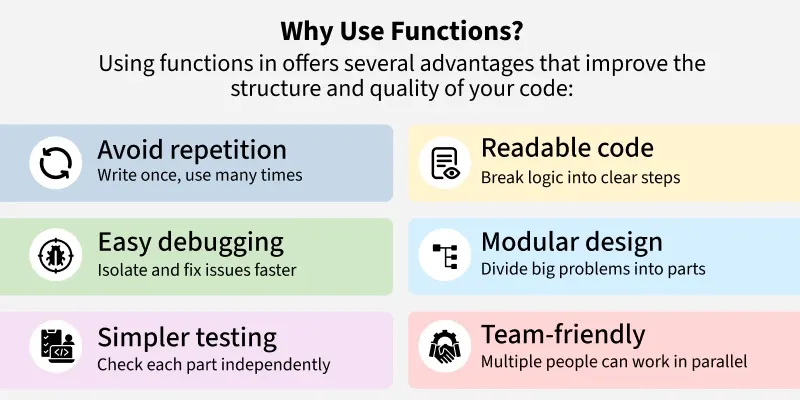
-
-
-
-> Functions can be used to reuse code.
-
-Let's say I have a function that I need to call multiple times. For example, in Word Game, there is a function called drawText() with this code:
-
-```js
-function drawText(text) {
- wordCtx.clearRect(0, 0, wordCanvas.width, wordCanvas.height);
- wordCtx.font = '24px "Times New Roman", Times, serif';
- wordCtx.fillStyle = '#dededeff';
- wordCtx.textAlign = 'center';
-
- const maxWidth = wordCanvas.width - 20; // Leave some padding
- const lineHeight = 30; // Line height for wrapped text
- const lines = wrapText(text, maxWidth);
-
- const startY = (wordCanvas.height - lines.length * lineHeight) / 2; // Center vertically
- lines.forEach((line, index) => {
- wordCtx.fillText(line, wordCanvas.width / 2, startY + index * lineHeight);
- });
-}
-```
-
-This function is called *twice* in wordgame.md: once when the game starts and once to clear the canvas after done typing.
-
-This keeps us from having to write this code twice. Instead, we can define it ONCE and call it whenever we want: if we wanted to call it 67 times for some reason, instead of copy pasting the code 67 times, we can just call drawText() whenever needed.
-
-
Functions for Abstraction & Modularity
-
-ABSTRACTION
-
-> Functions in Programming allow programmers to abstract the details of a particular operation. Instead of dealing with the entire implementation, a programmer can use a function with a clear interface, relying on its functionality without needing to understand the internal complexities. *Functions hide the details of their operation, allowing the programmer to think at a higher level.* - GeeksForGeeks
-
-MODULARITY
-
-Using word game as an example, instead of implementing the whole program, we can tackle the steps one by one. These functions are:
-
-- `drawText(text)` – Draws the prompt text centered on the canvas
-- `wrapText(text, maxWidth)` – Splits text into lines that fit within `maxWidth`
-- `drawUserText(prompt, input)` – Draws the prompt and user input, highlighting correct/incorrect chars and showing the caret
-- `updateStats(prompt, input, startTime)` – Updates WPM and accuracy stats
-- `finishGame(prompt, input, startTime)` – Handles game end, calculates mistakes, and shows finish overlay
-- `startGame()` – Starts a new game, picks a prompt, and sets up key input handling
-- `setProgress(percent)` – Updates the progress bar width and text
-- `updateProgress(prompt, input)` – Computes progress from input length and updates the bar
-- `createOptionButton(text, val)` – Creates a modal button to select string length
-- `escHandler(ev)` – Handles Escape key to close the options menu
-
-
-
-
-
-
Scope
-
-Scope is a common pitfall for those learning functions. Press the button below to run the following code snippet.
-
-
-```python
-%%html
-
-
-
-
-
-
-
-
-
-```
-
-
-
-
-
-
-
-
-
-
-
-
-
-
-
-
This is because of SCOPE!
-
-Essentially, we have things called
-- **Local** variables, and
-- **Global** variables
-
-Variables defined within a JavaScript function become LOCAL TO THAT FUNCTION.
-
-If I define a variable called `x` inside of a function, it can only be accessed within that function. Even if we use `var`, it will remain stuck inside that function. You should avoid polluting the global scope, but if you absolutely have to (which you don't), you can write something similar to the below code:
-
-```
-function makeGlobal() {
- let localVar = "I am local";
- window.globalVar = localVar; // now accessible globally
-}
-
-makeGlobal();
-console.log(globalVar); // Outputs "I am local"
-```
-
-
-
-
-
-
🍿 POPCORN HACK NO. 2 🍿
-
-Let's practice using functions!
-
-Head over to the homework notebook to do the popcorn hack.
-
-
-
-
-
-
Recursion
-
-We won't spend too much time on this, but we'll just do an overview of what recursion is.
-
-Recursion is where a function continuously calls itself. View the example below for a factorial recursion function:
-
-```js
-function factorial(n) {
- // If n is 0 or 1, the factorial is 1.
- // This condition prevents infinite recursion.
- if (n === 0 || n === 1) {
- return 1;
- }
- // Recursive case: the function calls itself with a smaller value of n.
- else {
- return n * factorial(n - 1);
- }
-}
-```
-
-If we run factorial(5), it will do:
-- factorial(5) = 5 * factorial(4), which calls:
-- factorial(4) = 4 * factorial(3)
-- factorial(3) = 3 * factorial(2)
-- factorial(2) = 2 * factorial (1)
-- factorial(1) = 1
-
-### Demo
-
-
-```python
-%%html
-
-
Factorial Recursion Demo
-
-
-
-
-
Your results will appear here.
-
-
-```
-
-
-
-
-
-
-
Factorial Rescursion Demo
-
-
-
-
-
Your results will appear here.
-
-
-
-
-
-
-
-
-
-
-
-
Arrow Functions (if time)
-
-Arrow functions are a more concise way to write functions. Use case scenario:
-
-
-
-```python
-%%html
-
-
Result
-
-
-
-
-```
-
-
-
-
Result
-
-
-
-
-
-
-
-
-
-
HOMEWORK 😈
-
-
-The homework for functions is located at `2025-09-29-functions_tinkerers_js_hw.ipynb`.
-Make sure to attempt all the challenges and turn in your notebook URL to the link on that page.
diff --git a/_notebooks/2025-09-30-algorithmic-efficiency_IPYNB_2_.md b/_notebooks/2025-09-30-algorithmic-efficiency_IPYNB_2_.md
deleted file mode 100644
index 8dae55e928..0000000000
--- a/_notebooks/2025-09-30-algorithmic-efficiency_IPYNB_2_.md
+++ /dev/null
@@ -1,83 +0,0 @@
----
-layout: post
-courses: {'csp': {'week': 1}}
-categories: ['Python', 'Algorithmic-Efficiency']
-lesson_language: Python
-lesson_topic: Algorithmic-Efficiency
-lesson_part: interactive
-lesson_type: lesson
-toc: True
-comments: False
-title: 3.17 Algorithmic Efficiency
-description: Learn about algorithms and how they can be more or less efficient
-permalink: /peppa-maze/algorithmic-efficiency
----
-
-## Computer Science Principles Lesson 3.17 - Algorithmic Efficiency
-
-We all love video games - getting to do things that you could never in real life. Some games are simple, 2D games with basic mechanics. Others have complex 3D graphics with ray-tracing, collisions, and a whole bunch of game mechanics that are hard to wrap your head around! Have you ever wondered how these games are able to do so much, so fast? While processing power is a part of it, one of the biggest factors is completely in the hands of the developer - algorithmic efficiency.
-
-### Nice Yap, but What Does "Algorithmic Efficiency" Even Mean?
-
-Okay, so this "algorithmic efficiency" thing is important, but what even is it?
-
-To put it simply, algorithmic efficiency refers to the speed and memory usage of a computer algorithm, which is important to keep track of when coding. The quicker and less memory-intensive an algorithm is, the more efficient it is considered.
-
-### What's So Important About Algorithmic Efficiency?
-
-Considering the efficiency of algorithms is important in computer science because processing power and time are limited. It is much better to have an algorithm finish quickly while using little RAM then for it to take 10 minutes and a few fire extinguishers to get the task done!
-
-### How do We Measure Algorithmic Efficiency?
-
-Algorithmic efficiency is mainly dependent on time complexity and memory usage. Time complexity can be measured using Big-O Notation. Big-O notation is a representation of the average amount of extra steps a computer has to take for input as it grows. Big-O notation does not necessarily show the exact amount of steps a computer takes to complete an algorithm, but it gives a good estimate based on the average input. Memory usage is mostly dependent on time complexity, and can be derived from an algorithm's Big-O representation. You'll see some examples of Big-O notation later on in this lesson.
-
-### Example: Designing Algorithms and Measuring Their Efficiency Using Python
-
-Let's create an algorithm and see how algorithmically efficient it is using Big-O notation.
-
-
-```python
-# Define some simple variables
-index = 0
-amount = 10
-
-# The algorithm we'll be analyzing:
-while index < amount:
- print("I love Python!")
- index += 1
-```
-
-In this example, we repeat some code while the "index" variable is less than the "amount" variable. Each time, we increment "index" by 1. How algorithmically efficient is this algorithm? Let's use Big-O notation to show it:
-
-First, let's look at the outermost loop. The loop will execute "amount" times, so the computer will have to take one extra step for every extra value of "amount". The Big-O notation for this would be O(n), because the computer needs to take n steps for every n inputs, which in this case is the value of "amount". Because "print()" and "index += 1" are things that the computer can do in one step, they have O(1) time complexity (time complexity refers to how many steps a computer takes on average to complate an algorithm, which is what Big-O notation represents). All together, this algorithm has O(n) time complexity.
-
-### Example: Designing Algorithms and Measuring Their Efficiency Using Javascript
-
-Let's create an algorithm and see how algorithmically efficient it is using Big-O notation, however this time we'll use Javascript.
-
-
-```javascript
-%%js
-// Define variables
-const amount = 8;
-let outerIndex = 0;
-let innerIndex = 0;
-let overallIndex = 0;
-
-// The algorithm we'll be analyzing:
-while (outerIndex < amount) { //Outer loop
- innerIndex = 0;
- while (innerIndex < amount) { //Inner loop
- overallIndex++;
- console.log(`Iteration #${overallIndex}`);
- innerIndex++;
- }
- outerIndex++;
-}
-```
-
-
-
-
-
-This one is a little more complicated. The outer loop runs "amount" times, but so does the inner loop. This means that the whole thing runs "amout" times, "amount" times! In terms of Big-O notation, the outer loop has a time complexity of O(n), and within this loop, another loop of O(n) time complexity runs. To figure out the time complexity of the whole algorithm, we need to multiply the inner time complexity by the outer one. What we get is O(n * n), or O(n^2). So, this algorithm's time complexity is O(n^2).
diff --git a/_notebooks/2025-09-30-lists_scratchers_lesson_IPYNB_2_.md b/_notebooks/2025-09-30-lists_scratchers_lesson_IPYNB_2_.md
deleted file mode 100644
index b5eefac11b..0000000000
--- a/_notebooks/2025-09-30-lists_scratchers_lesson_IPYNB_2_.md
+++ /dev/null
@@ -1,234 +0,0 @@
----
-layout: post
-courses: {'csp': {'week': 1}}
-categories: ['Python', 'Lists']
-lesson_language: Python
-lesson_topic: Lists
-lesson_part: interactive
-lesson_type: lesson
-toc: True
-comments: False
-title: 3.10 Lists
-description: This is the comprehensive lesson for Big Idea 3.10, Lists.
-permalink: /csp/big-idea-3/lists/p4/lesson
----
-
-# AP Computer Science Principles
-
-## Big Idea 3.10: Lists
-
-
-### What Are Lists?
-
-A list is a collection of data elements that are ordered and can be accessed by their position (index). Lists are fundamental data structures in programming that allow you to store and manipulate multiple values in a single variable.
-
-### Key Characteristics of Lists:
-
-- Ordered: Elements maintain their position
-- Indexed: Each element has a numeric position (usually starting at 0 or 1)
-- Mutable: Elements can be changed, added, or removed
-- Can contain duplicates: The same value can appear multiple times
-
-### Real-World Examples:
-
-- A shopping list: ["milk", "eggs", "bread", "butter"]
-- Test scores: [85, 92, 78, 95, 88]
-- Daily temperatures: [72, 75, 68, 71, 73, 76, 74]
-
-
-
-## Creating Lists
-
-
-
-
-```python
-# List of integers
-ages = [15, 16, 17, 15, 16]
-
-# List of strings
-colors = ["red", "blue", "green", "red"]
-
-# List of mixed types
-mixed = [42, "hello", 3.14, True]
-```
-
-
-```python
-// List (array) of integers
-let ages = [15, 16, 17, 15, 16];
-
-// List of strings
-let colors = ["red", "blue", "green", "red"];
-
-// List of mixed types
-let mixed = [42, "hello", 3.14, true];
-
-```
-
-## Accessing List Elements
-
-
-
-
-
-```python
-fruits = ["apple", "banana", "cherry", "date"]
-
-print(fruits[0]) # "apple" - first element
-print(fruits[1]) # "banana" - second element
-print(fruits[3]) # "date" - fourth element
-print(fruits[-1]) # "date" - last element (Python only)
-```
-
-## Example 1
-
-### Sum and Average
-When working with numeric lists, two common operations are finding the total sum and the average (mean).
-Concept:
-
-- Sum: Add all numbers together
-- Average: Divide the sum by how many numbers there are
-
-### Sample Problem:
-A teacher has test scores: [78, 85, 92, 88, 95]
-Find the total points and average score.
-
-
-```python
-let scores = [78, 85, 92, 88, 95];
-
-// Calculate sum
-let total = 0;
-for (let score of scores) {
- total += score;
-}
-
-console.log(`Total points: ${total}`); // 438
-
-// Calculate average
-let average = total / scores.length;
-console.log(`Average score: ${average}`); // 87.6
-```
-
-
-```python
-scores = [78, 85, 92, 88, 95]
-
-# Calculate sum
-total = 0
-for score in scores:
- total += score
-
-print(f"Total points: {total}") # 438
-
-# Calculate average
-average = total / len(scores)
-print(f"Average score: {average}") # 87.6
-```
-
-## Example 2: Counting Frequencies
-Sometimes you need to count how many times each unique item appears in a list. This is called frequency counting.
-### Concept:
-Go through each item and keep track of how many times you've seen it using a dictionary (Python) or object (JavaScript).
-### Sample Problem:
-A survey asked students their favorite season:
-["winter", "summer", "fall", "summer", "summer", "spring", "fall"]
-Count how many students chose each season.
-
-
-```python
-seasons = ["winter", "summer", "fall", "summer", "summer", "spring", "fall"]
-
-# Create empty dictionary to store counts
-frequency = {}
-
-# Count each item
-for season in seasons:
- if season in frequency:
- frequency[season] += 1
- else:
- frequency[season] = 1
-
-print(frequency)
-# Output: {'winter': 1, 'summer': 3, 'fall': 2, 'spring': 1}
-```
-
-
-```python
-let seasons = ["winter", "summer", "fall", "summer", "summer", "spring", "fall"];
-
-// Create empty object to store counts
-let frequency = {};
-
-// Count each item
-for (let season of seasons) {
- if (frequency[season]) {
- frequency[season]++;
- } else {
- frequency[season] = 1;
- }
-}
-
-console.log(frequency);
-// Output: {winter: 1, summer: 3, fall: 2, spring: 1}
-```
-
-## Example 3: Filtering Lists
-Filtering means creating a new list that contains only elements meeting certain criteria.
-### Concept:
-Check each element with a condition. If it passes, add it to the new list.
-### Sample Problem:
-A list contains ages: [12, 18, 15, 21, 17, 25, 14, 19]
-Create a new list with only ages 18 and above (adults).
-
-
-```python
-ages = [12, 18, 15, 21, 17, 25, 14, 19]
-
-# Create empty list for adults
-adults = []
-
-# Check each age
-for age in ages:
- if age >= 18:
- adults.append(age)
-
-print(adults) # [18, 21, 25, 19]
-```
-
-
-```python
-ages = [12, 18, 15, 21, 17, 25, 14, 19]
-
-# Create empty list for adults
-adults = []
-
-# Check each age
-for age in ages:
- if age >= 18:
- adults.append(age)
-
-print(adults) # [18, 21, 25, 19]
-```
-
-## Common Problems to Avoid
-
-- ❌ Off-by-one errors: Remember indexing starts at 0
-- ❌ Index out of range: Don't access list[5] if the list has only 4 elements
-- ❌ Modifying list while iterating: Can cause unexpected behavior
-- ❌ Forgetting to initialize variables: Set total = 0 before summing
-
-- ✓ Use descriptive names: student_names instead of list1
-- ✓ Check for empty lists: Before accessing elements
-- ✓ Test edge cases: Empty lists, single elements, all same values
-
-## Summary
- Lists are essential for storing and manipulating collections of data. Through them, it is easy to access, create, and filter lists of data.
-### Understanding and Mastering These Objectives is Key to Your Success in AP Computer Science Principles:
-
-- Accessing elements by index
-- Computing sum and average
-- Counting frequency of items
-- Filtering based on conditions
-- Searching for specific values
diff --git a/_notebooks/2025-10-02-Algorithms-Lesson-SyntaxTerrors_IPYNB_2_.md b/_notebooks/2025-10-02-Algorithms-Lesson-SyntaxTerrors_IPYNB_2_.md
deleted file mode 100644
index c5ce39609d..0000000000
--- a/_notebooks/2025-10-02-Algorithms-Lesson-SyntaxTerrors_IPYNB_2_.md
+++ /dev/null
@@ -1,21 +0,0 @@
----
-layout: post
-courses: {'csp': {'week': 1}}
-categories: ['Python', 'Algorithms']
-lesson_language: Python
-lesson_topic: Algorithms
-lesson_part: reference
-lesson_type: lesson
-toc: True
-comments: False
-tailwind: True
-infoGraph: algorithms
-title: 3.9 Algorithms
-description: Understanding Algorithms in Python and JavaScript
-permalink: /csp/big-idea-three/algorithms/lesson/p3/syntaxterrors
-author: Hope F
----
-
-## 3.9 Algorithms - Syntax Terrors
-
-{%- include tailwind/tabs.html -%}
diff --git a/_notebooks/2025-10-02-boolean_scratchers_py_hw_IPYNB_2_.md b/_notebooks/2025-10-02-boolean_scratchers_py_hw_IPYNB_2_.md
deleted file mode 100644
index 732d9e4c02..0000000000
--- a/_notebooks/2025-10-02-boolean_scratchers_py_hw_IPYNB_2_.md
+++ /dev/null
@@ -1,88 +0,0 @@
----
-layout: post
-courses: {'csp': {'week': 1}}
-categories: ['Python', 'Boolean-Expressions']
-lesson_language: Python
-lesson_topic: Boolean-Expressions
-lesson_part: interactive
-lesson_type: lesson
-toc: True
-comments: False
-title: 3.5 Boolean Expressions (PY)
-description: Boolean Hacks For Students To Try In Python
-permalink: /python/boolean/py
----
-
-# 🔑 Boolean Hacks in Python: A Few New Codes!
-
-This notebook has short Boolean challenges. Edit the code where it says `TODO` to make it work.
-
-## Challenge 1: Positive Number
-Fix the condition so it prints `num is positive` if the number is greater than 0.
-
-
-```python
-num = 3 # Try changing this number!
-
-# TODO: change the condition
-if num < 0: # <-- wrong, fix this
- print(num, "is positive")
-else:
- print(num, "is NOT positive")
-```
-
- 3 is NOT positive
-
-
-## Challenge 2: Is Even?
-Change the condition so it prints `num is even` when the number is divisible by 2.
-
-
-```python
-num = 7
-
-# TODO: check if num is even
-if num % 2 == 0: # <-- not correct
- print(num, "is even")
-else:
- print(num, "is odd")
-```
-
- 7 is odd
-
-
-## Challenge 3: Teenager Check
-Print `Teenager` if age is between 13 and 19 (inclusive). Otherwise print `Not Teenager`. Fix the condition.
-
-
-```python
-age = 20
-
-# TODO: fix the condition
-if age > 12 and age < 20: # <-- wrong
- print("Teenager")
-else:
- print("Not Teenager")
-```
-
- Not Teenager
-
-
-## Challenge 4: Lamp Logic
-We have two switches: `a` and `b`. The lamp should turn ON if **at least one** is True.
-
-Fix the condition.
-
-
-```python
-a, b = True, False
-
-# TODO: fix condition for at least one True
-if a or b: # <-- wrong
- print("Lamp is ON")
-else:
- print("Lamp is OFF")
-```
-
- Lamp is ON
-
diff --git a/_notebooks/2025-10-02-conditionals_constellators_lesson_IPYNB_2_.md b/_notebooks/2025-10-02-conditionals_constellators_lesson_IPYNB_2_.md
deleted file mode 100644
index fb9065cde9..0000000000
--- a/_notebooks/2025-10-02-conditionals_constellators_lesson_IPYNB_2_.md
+++ /dev/null
@@ -1,193 +0,0 @@
----
-layout: post
-courses: {'csse': {'week': 5}}
-categories: ['JavaScript', 'Conditions']
-lesson_language: JavaScript
-lesson_topic: Conditions
-lesson_part: reference
-lesson_type: lesson
-title: Conditions
-description: This is the JavaScript Conditionals Lesson, taught by the Constellators.
-permalink: /csse/javascript/constellators/conditionals-lesson
-author: Constellators - Adya S, Niharika B, Salma Z, Anika S, Sophie H
----
-
-
-
-Presented by the
-
CONSTELLATORS
-
-
-
-## **Conditionals**
-
-In JavaScript, conditionals are essential aspects of programming that are used to control the flow of code based on whether certain conditions are met. They're necessary to make decisions within game code and run different actions based on different conditions.
-
-TO FIND THIS LESSON (pages repository): Search -> "Constellators - Conditionals Lesson" -> Select the most recent one (should be 10/02/25)
-
-### What are Conditionals?
-- Allows the execution of different blocks of code based on whether a specified condition evaluates to true or false
-- This enables programs to make decisions and respond dynamically to various situations
-- Analogy: depending on the weather, you either bring outside an umbrella (rain) or a hat (sunny)
-- Types: if, if-else, else if, (+switch)
-
-
-
-### Types of Conditionals
-
-#### 1. If
-
-- Executes code if a given condition is true
-
-Example:
-```js
-if (condition) {
- // Code to execute if condition is true
-}
-```
-
-#### 2. If ... Else
-
-- Basically a true/false --> executes one thing if the condition is true, and a different thing if the condition is false
-
-Else statement:
-- Executes a block of code only if the preceding if (or else if) condition evaluates to false.
-- It must always follow an if or else if statement.
-- No condition
-
-Example:
-```js
-if (condition) {
- // Code to execute if condition is true
-} else {
- // Code to execute if condition is false
-}
-```
-
-#### 3. Else ... If
-
-- JavaScript's equivalent of elif
-- Executes a block of code if the preceding if condition (or any preceding else if conditions) evaluates to false, AND its own specified condition evaluates to true.
-- Only the first true condition's block is executed
-- Must always follow an if or another else if statement
-
-Example:
-```js
-if (condition1) {
- // Code to execute if condition1 is true
- } else if (condition2) {
- // Code to execute if condition2 is true
- } else {
- // Code to execute if none of the above conditions are true
- }
-```
-
-#### 4. Switch
-
-- Compares multiple possible outcomes
-- More complex than just true/false
-
-Example:
-```js
-switch (expression) {
- case value1:
- // Code to execute if expression matches value1
- break;
- case value2:
- // Code to execute if expression matches value2
- break;
- default:
- // Code to execute if no match is found
- }
-```
-
-#### 5. Nested If (Nested Conditionals)
-
-- An if statement within another conditional.
-- Analogy: if-else statement to determine whether it's raining. If it's raining, check if you have an umbrella.
-
-Example:
-```js
-if (condition1) {
- if (extracondition1) {
- // Code to execute if both condition 1 and extra condition are true
- }
- else {
- // Code to execute if condition 1 is true, but extra condition is false
- }
-} else {
- // Code to execute if condition 1 is false
-}
-```
-
-
-
-**Summary**
-
-“if” checks a condition
- “else if" checks another condition if the previous ones were false
- “else” runs if none of the above conditions were true.
-
-### Popcorn Hack 1
-
-Go to the HW file that you can access [here](https://github.com/AdyaShipekar/code-constellations/blob/main/_notebooks/CSSE/JavaScriptLessons/Conditionals/2025-10-02-conditionals_constellators_js_hw.ipynb). Download to your student/portfolio repository and complete Popcorn Hack 1.
-
-### Examples of Conditionals in OOP Breakout
-
-To Recap: A **conditional** in code is any statement where the program checks a condition (using `if, else, or else if ` statements) to decide what to do next. Throughout the OOP BREAKOUT game, there are many examples of conditionals and conditional expressions that help the game run smoothly.
-
-In our OOP Breakout game, you can consider the conditionals the rules of the game world! They let the code make decisions.
-
-If the ball hits a wall → it bounces back.
-If the ball hits a brick → the brick disappears.
-If the ball hits the bottom → a life is lost.
-Else (if none of those things happen) → the ball just keeps moving.
-
-**Inside the update() method for the ball:**
-
-```js
-update(canvasWidth, canvasHeight) {
-// Wall collision (left/right)
-if (this.x + this.dx > canvasWidth - this.radius || this.x + this.dx < this.radius) {
-this.dx = -this.dx;
-}
-// Top
-if (this.y + this.dy < this.radius) {
- this.dy = -this.dy;
- }
-this.x += this.dx;
-this.y += this.dy;
-}
-```
-
-**Explanation:**
-
-First conditional: ```if (this.x + this.dx > canvasWidth - this.radius || this.x + this.dx < this.radius)```
-- Checks if the ball is about to hit the left or right wall!
-- If true, the ball bounces back by flipping its horizontal direction (```this.dx = -this.dx```).
-
-Second conditional: ```if (this.y + this.dy < this.radius) ```
-- Checks if the ball is about to hit the top wall!
-- If true, it flips the vertical direction (```this.dy = -this.dy```).
-
-Without these if statements, the ball would fly off the screen forever. The conditionals keep the ball bouncing around, making the game actually playable!
-
-### Popcorn Hack 2
-
-Go to the HW file from before and complete Popcorn Hack 2.
-
-### Homework
-
-Complete the homework and submit to [this form](https://docs.google.com/forms/d/e/1FAIpQLSccjujB0DqCnCy5mOE2r4Py8cYuvzmyBk9X-gWSn8XUNQvlDw/viewform?usp=header).
-
diff --git a/_notebooks/2025-10-08-calling_procedures_remakers_lesson_IPYNB_2_.md b/_notebooks/2025-10-08-calling_procedures_remakers_lesson_IPYNB_2_.md
deleted file mode 100644
index 4f491c74b0..0000000000
--- a/_notebooks/2025-10-08-calling_procedures_remakers_lesson_IPYNB_2_.md
+++ /dev/null
@@ -1,116 +0,0 @@
----
-layout: post
-courses: {'csp': {'week': 1}}
-categories: ['Python', 'Calling-Procedures']
-lesson_language: Python
-lesson_topic: Calling-Procedures
-lesson_part: interactive
-lesson_type: lesson
-toc: True
-comments: False
-title: 3.12 Calling Procedures
-description: 3.12 Calling Procedures
-permalink: /csp/big-idea-3/calling-procedures/p4/lesson
-author: Sathwik Kintada
----
-
-## 3.12 Calling Procedures
-
-Every morning you brush your teeth, wash your face, and eat breakfast. You don’t rewrite those steps every day — you just do them. That’s what calling a procedure is: you already have the steps (the function), and you just call it whenever you need it.
-
-What is it?
-- A procedure is a reusable group of instructions.
-- Also called a function in Python or JavaScript.
-- Procedures allow you to avoid rewriting the same code.
-What does it mean?
-- Calling a procedure means telling the computer to run the instructions in that procedure.
-- You can call a procedure multiple times with different input values without rewriting it.
-- This is different from defining the procedure — defining is creating it, calling is using it.
-
-
-Python Example:
-- Use def to define a procedure
-- You can use the name of the functionand paranthesis after to call it
-
-
-```python
-# Define a procedure
-def show_message():
- print("Welcome to the program!")
-
-# Call the procedure
-show_message() # Output: Welcome to the program!
-```
-
- Welcome to the program!
-
-
-Javascript Example:
-- You use function to define a procedure
-- Just like python if you type the name of the function with parenthesis right after it, you can call the procedure
-
-
-```javascript
-%%js
-// Define a procedure
-function showMessage() {
- console.log("Welcome to the program!");
-}
-
-// Call the procedure
-showMessage(); // Output: Welcome to the program!
-```
-
-### Calling A Procedure Inside Another Procedure
-
-Why?
-- Large problems can often be broken into smaller steps (decomposition).
-- Each step can be a procedure, and one procedure can call another.
-- This makes programs easier to read, debug, and reuse.
-
-Python Example:
-- Calling the procedure format_name returns the formatted name so the other procedure can use it
-
-
-```python
-def format_name(first, last):
- return first + " " + last
-
-def greet_person(first, last):
- full_name = format_name(first, last)
- print("Hello, " + full_name + "!")
-
-greet_person("Sathwik", "Kintada") # Output: Hello, Sathwik Kintada!
-
-```
-
- Hello, Sathwik Kintada!
-
-
-JavaScript Example:
-- Calling the procedure formatName returns the formatted name so the other procedure can use it
-
-
-```javascript
-%%js
-function formatName(first, last) {
- return first + " " + last;
-}
-
-function greetPerson(first, last) {
- let fullName = formatName(first, last);
- console.log("Hello, " + fullName + "!");
-}
-
-greetPerson("Lucas", "Masterson"); // Output: Hello, Lucas Masterson!
-```
-
-
-
-
-
-### Key Takeaways
-- Helper procedures do one simple task.
-- Outer procedures call helpers to combine or display results.
-- This is decomposition — breaking a problem into smaller steps.
-- Calling procedures inside procedures makes code reusable and organized.
diff --git a/_notebooks/2025-10-09-developing-algorithms_crashers_IPYNB_2_.md b/_notebooks/2025-10-09-developing-algorithms_crashers_IPYNB_2_.md
deleted file mode 100644
index e2fd28b27b..0000000000
--- a/_notebooks/2025-10-09-developing-algorithms_crashers_IPYNB_2_.md
+++ /dev/null
@@ -1,549 +0,0 @@
----
-layout: post
-courses: {'csp': {'week': 1}}
-categories: ['Python', 'Algorithms']
-lesson_language: Python
-lesson_topic: Developing-Algorithms
-lesson_part: interactive
-lesson_type: lesson
-toc: True
-comments: False
-title: 3.9 Developing Algorithms
-tags: ['python', 'javascript', 'variables', 'assignment', 'beginner']
-description: Learn how to develop algorithms through the Peppa Pig Maze game
-permalink: /csp/developing-algorithms/crashers
----
-
-# Peppa Pig Algorithm Adventures
-
-Peppa Pig wants to reach the end of a maze! Along the way, we'll explore what **algorithms** are — step-by-step sets of instructions to solve problems — and how computers use them to make decisions and perform actions.
-
-## What Is an Algorithm?
-
-An **algorithm** is a clear, step-by-step process for solving a problem. You can think of it like a recipe: each instruction must be followed in order to reach the correct result.
-
-For example, if Peppa wants to reach her toy chest, her algorithm might be:
-
-1. Walk forward three steps
-2. Turn left
-3. Walk two steps
-4. Open the chest
-
-In programming, algorithms are written using code so that computers can follow similar logical steps automatically.
-
-## 1. Simple Algorithm Examples in Python
-
-Let's start with a basic example showing two ways to add two numbers. Both are simple algorithms that achieve the same goal differently.
-
-
-```python
-# Example 1: Two different algorithms to add two numbers
-a = 3
-b = 5
-
-# Algorithm 1: Step-by-step addition
-def add_numbers_manual(x, y):
- total = 0 # start from 0
- total += x # add first number
- total += y # add second number
- return total
-
-# Algorithm 2: Direct addition (different approach)
-def add_numbers_direct(x, y):
- return x + y # simply add them in one step
-
-print('Sum using step-by-step addition:', add_numbers_manual(a, b))
-print('Sum using direct addition:', add_numbers_direct(a, b))
-```
-
- Sum using method A: 8
- Sum using method B: 8
-
-
-Both methods produce the same result. The first shows a clear step-by-step algorithm, while the second uses a simpler Python expression.
-
-## 2. Boolean Expressions and Conditional Statements
-
-Algorithms often make decisions. A **conditional statement** tells the computer to do something *only if* a certain condition is true. This uses **Boolean logic** (true or false values).
-
-
-```python
-x = 10
-y = 5
-
-# Conditional statement algorithm
-if x > y:
- print('x is greater than y')
-else:
- print('y is greater or equal to x')
-
-# Equivalent Boolean expression
-print('x is greater than y' if x > y else 'y is greater or equal to x')
-```
-
- x is greater than y
- x is greater than y
-
-
-Here, the algorithm checks whether one number is greater than another and prints a message accordingly — just like a maze game might check whether Peppa can move in a direction before she takes a step.
-
-
-```javascript
-%%javascript
-// Boolean algorithm example in JavaScript
-function isEven(num) {
- return num % 2 === 0; // returns true or false
-}
-
-let value = 7;
-
-// Use the Boolean result in a conditional statement
-let result = isEven(value); // result is true if even, false if odd
-
-if (result) {
- console.log(value + ' is even');
-} else {
- console.log(value + ' is odd');
-}
-
-// You can also directly print the Boolean value
-console.log('Is ' + value + ' even? ' + result);
-
-```
-
-
-
-
-
-This JavaScript code defines a function called `isEven` that checks if a number is even using the modulo operator. It then uses this function to determine if the variable `value` is even or odd, printing a message to the console.
-
-## 3. Peppa Pig Maze Algorithm (JavaScript Example)
-
-Now let’s look at a JavaScript version that uses an algorithm to control Peppa’s movement through a maze. Each time you press a button, the algorithm checks whether the move is allowed (no walls or boundaries) and updates Peppa’s position.
-
-
-```python
-from IPython.display import display, HTML
-
-display(HTML("""
-
-
-
-
-
🐷 Peppa's Mini Maze Algorithm Demo
-
-
-
-
-
-
-
-
-
-
-
-
-
-
-
-
-
-"""))
-
-```
-
-
-
-
-
-
-
-
🐷 Peppa's Mini Maze Algorithm Demo
-
-
-
-
-
-
-
-
-
-
-
-
-
-
-
-
-
-
-
-
-Here, the algorithm:
-- Checks if Peppa can move (Boolean condition).
-- Updates her position if the move is valid.
-- Redraws the maze after each action.
-
-This demonstrates how logical checks and movement rules form the backbone of many game algorithms.
-
-## 4. Different Algorithms for the Same Problem (Python)
-
-Let's compare two numbers to find the larger one using two different approaches.
-
-
-```python
-a = 7
-b = 9
-
-# Algorithm 1: Using if-else
-if a > b:
- max_val = a
-else:
- max_val = b
-print('Max using if statement:', max_val)
-
-# Algorithm 2: Using Python's built-in max()
-print('Max using built-in max:', max(a, b))
-```
-
- Max using if statement: 9
- Max using built-in max: 9
-
-
-Both algorithms solve the same problem but in different ways — one step-by-step using an `if` statement, the other using a built-in function for simplicity. The built-in max() function quickly compares the values you give it and returns the largest one.
-
-## Key Takeaways
-
-- Algorithms are clear, step-by-step instructions to solve problems.
-- The same problem can be solved with different algorithms that vary in speed, clarity, or efficiency.
-- Boolean logic and conditionals let programs make smart decisions.
-- Python and JavaScript both show how algorithms control logic and visuals — from adding numbers to moving Peppa through her maze.
-- Try modifying the examples to see how algorithm changes affect behavior!
diff --git a/_notebooks/2025-10-09-developing_procedures_remakers_lesson_IPYNB_2_.md b/_notebooks/2025-10-09-developing_procedures_remakers_lesson_IPYNB_2_.md
deleted file mode 100644
index 44ba3fe985..0000000000
--- a/_notebooks/2025-10-09-developing_procedures_remakers_lesson_IPYNB_2_.md
+++ /dev/null
@@ -1,188 +0,0 @@
----
-layout: post
-courses: {'csp': {'week': 1}}
-categories: ['Python', 'Developing-Procedures']
-lesson_language: Python
-lesson_topic: Developing-Procedures
-lesson_part: interactive
-lesson_type: lesson
-toc: True
-comments: False
-title: 3.13 Developing Procedures
-description: Lesson for developing procedures.
-permalink: /csp/big-idea-3/developing-procedures/p4/introduction
-author: Krishna Visvanath, Sloane Sommers
----
-
-# Developing Procedures (Methods / Functions)
-
-Learning goals:
-- Understand what a procedure (method/function) is and why we use them.
-- See equivalent examples in Java and Python.
-- Play a short, interactive minigame that shows why good procedure names and organization matter.
-
-## What is a procedure?
-A procedure (also called a method or function) is a named block of code that does one task.
-Think of a procedure like a recipe step: it has a name, inputs (ingredients), and it produces a result or performs an action.
-
-## Story: The Dessert Robot- The Importance of Naming
-Imagine a robot chef who makes desserts. If we tell the robot `makeDessert()` it needs clear sub-steps: `measureFlour()`, `mixIngredients()`, `bake()`. Additionally, if we need to review code later, it is much easier to find the series of events responsible for `makeDessert()`. If we instead call everything `doIt()` the robot — and humans reading the code — get confused. Clear names make code easier to read, test, and reuse.
-
-### Java example (methods)
-Below is a short Java-style example showing a class with methods. This cell is explanatory only — it shows syntax and structure but the procedures aren't called.
-
-
-```python
-
-function makeDessert() {
- measureFlour();
- mixIngredients();
- bake();
-}
-
-function measureFlour() {
- console.log("Measuring 2 cups of flour.");
-}
-
-function mixIngredients() {
- console.log("Mixing flour, sugar, eggs.");
-}
-
-function bake() {
- console.log("Baking at 350°F for 25 minutes.");
-}
-
-// Run the procedure
-makeDessert()
-
-```
-
-
-
-
-
-### Python example (functions)
-Here's the same idea in Python. Functions perform small tasks and are called from a main function.
-
-
-```python
-def make_dessert():
- measure_flour()
- mix_ingredients()
- bake()
-
-def measure_flour():
- print("Measuring 2 cups of flour.")
-
-def mix_ingredients():
- print("Mixing flour, sugar, eggs.")
-
-def bake():
- print("Baking at 350°F for 25 minutes.")
-
-# Run the procedure
-if __name__ == '__main__':
- make_dessert()
-```
-
-## Mini-game: Name the Procedures
-The game below shows a list of steps the program can take, each implemented as a function. Students type a name for a new procedure and the game will call it. If your name clearly describes the steps, it's easy to understand what the game will do. If you name everything `do_step` the code is confusing. Try both and see the difference.
-The cell that follows is interactive. Run it and follow the prompts in the notebook output.
-
-
-```python
-import random
-
-def choose_ingredient():
- return random.choice(['flour', 'sugar', 'eggs', 'milk'])
-
-def mix(item):
- print(f"Mixing {item} into the bowl.")
-
-def heat():
- print('Heating the oven to a friendly temperature...')
-
-def finish():
- print('Dessert is ready!')
-
-def play_game():
- print('Mini-game: Name a procedure for choosing an ingredient, putting it into the bowl (mixing), heating/baking, finishing the dessert')
- name = input('Type a procedure name you want to create (e.g. prepare_ingredient): ').strip()
- if not name:
- print('No name entered — using default: prepare_ingredient')
- name = 'prepare_ingredient'
-
- # Create a new procedure dynamically with the given name that runs the sequence
- def dynamic_procedure():
- ingr = choose_ingredient()
- mix(ingr)
- heat()
- finish()
-
- # Bind it into globals so we can show how naming helps with readability
- globals()[name] = dynamic_procedure
-
- print(f'Created a procedure called that does multiple steps.')
- print('Now lets show two ways to look at the code:')
-
- print('Good name (readable):')
- print(f' {name}() # clearly indicates the goal is to prepare an ingredient and finish the dessert')
- print('Poor name (confusing):')
- print(' do_step() # what does this do? you must open the function to find out')
-
- run = input('Type to execute your procedure now, or anything else to cancel: ').strip().lower()
- if run == 'run':
- print('Running the procedure...')
- globals()[name]()
- else:
- print('Canceled. You can run the procedure later by calling it by name.')
-
-if __name__ == '__main__':
- play_game()
-```
-
- Mini-game: Name a procedure for choosing an ingredient, putting it into the bowl (mixing), heating/baking, finishing the dessert
- Created a procedure called that does multiple steps.
- Now lets show two ways to look at the code:
- Good name (readable):
- prepare_ingredient() # clearly indicates the goal is to prepare an ingredient and finish the dessert
- Poor name (confusing):
- do_step() # what does this do? you must open the function to find out
- Canceled. You can run the procedure later by calling it by name.
-
-
-### Demonstration of poor naming
-Below are two short examples showing the risk of vague names. It's much harder to remember `do_step()` does choosing, mixing, heating, and finishing. Good names reduce bugs and make collaboration easier.
-
-
-```python
-# Example showing bad naming
-def do_step():
- print('Choosing ingredient...')
- print('Mixing...')
- print('Heating...')
- print('Finished!')
-
-# Later a collaborator sees do_step() and doesn't know what it does without opening it
-print('Calling do_step() (confusing name):')
-do_step()
-```
-
-
-```python
-# Second example showing bad naming
-def do_step():
- print('thing1')
- print('thing2')
- print('thing3')
-
-# Later a collaborator is debugging code, and does not know what each procedure does without opening it, meaning they have to go through every line to debug
-```
-
-## Teaching tips and exercises
-- Exercise 1: Rename the functions in the Python example to be more descriptive.
-- Exercise 2: Convert the Python functions to Java methods and explain access (public/private).
-- Exercise 3: Split a long procedure into smaller ones and show how tests become easier.
-
-## How to run the mini-game
-Run the Python cells in order. When you reach the mini-game cell, you'll be prompted to type a procedure name and optionally run it. If you use the notebook server (Jupyter), the input prompt will appear under the cell output.
diff --git a/_notebooks/2026-01-07-arrays_IPYNB_2_.md b/_notebooks/2026-01-07-arrays_IPYNB_2_.md
deleted file mode 100644
index cd1fe99621..0000000000
--- a/_notebooks/2026-01-07-arrays_IPYNB_2_.md
+++ /dev/null
@@ -1,459 +0,0 @@
----
-layout: post
-courses: {'csse': {'week': 5}}
-categories: ['JavaScript', 'Arrays']
-lesson_language: JavaScript
-lesson_topic: Arrays
-lesson_part: interactive
-lesson_type: lesson
-codemirror: True
-microblog: True
-title: Arrays
-description: Learn about arrays in JavaScript, including how to create, access, and manipulate them.
-permalink: /js/arrays
-author: Sadaf, Sujay, Arjun, Joshika
----
-
-## What are Arrays?
-
-
-
-An **array** is a collection of elements (values) stored in a single variable. Each element in an array can be accessed by its **index** (position), starting from 0.
-
-Think of an array like a row of boxes, each containing a value:
-- Box 0 contains the first element
-- Box 1 contains the second element
-- Box 2 contains the third element
-- And so on...
-
-### Why Use Arrays?
-- Store multiple values in one variable
-- Easy to access values by position
-- Useful for loops (process many items at once)
-- Organize related data together
-
-
-
-{% capture challenge0 %}
-Add or remove a new value in the array and see what happens!
-{% endcapture %}
-
-{% capture code0 %}
-let fruits = ["apple", "banana", "orange", "grape"];
-
-console.log("My array of fruits:");
-console.log(fruits);
-console.log();
-
-console.log("First fruit (index 0):", fruits[0]);
-console.log("Third fruit (index 2):", fruits[2]);
-console.log();
-
-
-console.log("Number of fruits:", fruits.length);
-{% endcapture %}
-
-{% capture source0 %}
-```javascript
-%%js
-
-// CODE_RUNNER: Add or remove a new value in the array and see what happens!
-
-let fruits = ["apple", "banana", "orange", "grape"];
-
-console.log("My array of fruits:");
-console.log(fruits);
-console.log();
-
-console.log("First fruit (index 0):", fruits[0]);
-console.log("Third fruit (index 2):", fruits[2]);
-console.log();
-
-
-console.log("Number of fruits:", fruits.length);
-```
-{% endcapture %}
-
-{% include runners/code.html
- runner_id="js-arrays-0"
- language="javascript"
- challenge=challenge0
- code=code0
- source=source0
-%}
-
-
-## Modifying Arrays
-
-You can change, add, or remove elements from an array:
-
-
-
-{% capture challenge1 %}
-Practice modifying arrays by changing, adding, and removing elements!
-{% endcapture %}
-
-{% capture code1 %}
-// Start with an array
-let colors = ["red", "blue", "green"];
-console.log(colors);
-console.log();
-
-// Change an element
-colors[1] = "yellow";
-console.log(colors);
-console.log();
-
-// Add an element
-colors.push("purple");
-console.log(colors);
-console.log();
-
-// Remove an element
-colors.splice(colors.indexOf("red"), 1);
-console.log(colors);
-{% endcapture %}
-
-{% capture source1 %}
-```javascript
-%%js
-
-// CODE_RUNNER: Practice modifying arrays by changing, adding, and removing elements!
-
-// Start with an array
-let colors = ["red", "blue", "green"];
-console.log(colors);
-console.log();
-
-// Change an element
-colors[1] = "yellow";
-console.log(colors);
-console.log();
-
-// Add an element
-colors.push("purple");
-console.log(colors);
-console.log();
-
-// Remove an element
-colors.splice(colors.indexOf("red"), 1);
-console.log(colors);
-```
-{% endcapture %}
-
-{% include runners/code.html
- runner_id="js-arrays-1"
- language="javascript"
- challenge=challenge1
- code=code1
- source=source1
-%}
-
-
-## Looping Through Arrays
-
-Arrays are powerful when combined with loops. You can process each element without writing it by hand:
-
-
-
-{% capture challenge2 %}
-Modify the numbers array to see different outputs
-{% endcapture %}
-
-{% capture code2 %}
-// Using a for loop to go through each element
-let numbers = [10, 20, 30, 40, 50];
-
-console.log("Numbers in the array:");
-for (let num of numbers) {
- console.log(num);
-}
-
-console.log();
-console.log("Double each number:");
-for (let num of numbers) {
- console.log(num * 2);
-}
-
-console.log();
-console.log("Using index to access elements:");
-for (let i = 0; i < numbers.length; i++) {
- // conversion fails with template literals
- console.log(`Index ${i}: ${numbers[i]}`);
- // conversion works with concat
- console.log("Index " + i + ": " + numbers[i] );
-
-}
-{% endcapture %}
-
-{% capture source2 %}
-```javascript
-%%js
-
-// CODE_RUNNER: Modify the numbers array to see different outputs
-
-// Using a for loop to go through each element
-let numbers = [10, 20, 30, 40, 50];
-
-console.log("Numbers in the array:");
-for (let num of numbers) {
- console.log(num);
-}
-
-console.log();
-console.log("Double each number:");
-for (let num of numbers) {
- console.log(num * 2);
-}
-
-console.log();
-console.log("Using index to access elements:");
-for (let i = 0; i < numbers.length; i++) {
- // conversion fails with template literals
- console.log(`Index ${i}: ${numbers[i]}`);
- // conversion works with concat
- console.log("Index " + i + ": " + numbers[i] );
-
-}
-```
-{% endcapture %}
-
-{% include runners/code.html
- runner_id="js-arrays-2"
- language="javascript"
- challenge=challenge2
- code=code2
- source=source2
-%}
-
-
-## Real-World Example: Student Grades
-
-Let's calculate the average grade of students:
-
-
-
-{% capture challenge3 %}
-Change the student grades to yours in the array to see different results
-{% endcapture %}
-
-{% capture code3 %}
-// Array of student grades
-let grades = [85, 92, 78, 95, 88, 91];
-
-// Calculate the sum
-let total = 0;
-for (let grade of grades) {
- total = total + grade;
-}
-
-// Calculate the average
-let average = total / grades.length;
-
-console.log(`Student grades: ${grades}`);
-console.log(`Total points: ${total}`);
-console.log(`Number of students: ${grades.length}`);
-console.log(`Average grade: ${average.toFixed(1)}`);
-console.log();
-
-// Find the highest and lowest grades
-console.log(`Highest grade: ${Math.max(...grades)}`);
-console.log(`Lowest grade: ${Math.min(...grades)}`);
-{% endcapture %}
-
-{% capture source3 %}
-```javascript
-%%js
-
-// CODE_RUNNER: Change the student grades to yours in the array to see different results
-
-// Array of student grades
-let grades = [85, 92, 78, 95, 88, 91];
-
-// Calculate the sum
-let total = 0;
-for (let grade of grades) {
- total = total + grade;
-}
-
-// Calculate the average
-let average = total / grades.length;
-
-console.log(`Student grades: ${grades}`);
-console.log(`Total points: ${total}`);
-console.log(`Number of students: ${grades.length}`);
-console.log(`Average grade: ${average.toFixed(1)}`);
-console.log();
-
-// Find the highest and lowest grades
-console.log(`Highest grade: ${Math.max(...grades)}`);
-console.log(`Lowest grade: ${Math.min(...grades)}`);
-```
-{% endcapture %}
-
-{% include runners/code.html
- runner_id="js-arrays-3"
- language="javascript"
- challenge=challenge3
- code=code3
- source=source3
-%}
-
-
-## Key Takeaways
-
-✅ **Arrays** store multiple values in a single variable
-✅ **Index** starts at 0 for the first element
-✅ Access elements using `array[index]`
-✅ Use **loops** to process all elements
-✅ Common operations: append, remove, change, loop, sum, average
-
-Arrays are one of the most important data structures in programming. Master them and you'll be able to solve many problems efficiently!
-
-# Arrays Homework 🎯
-
-Welcome to the Arrays homework! These exercises will help you practice the key array concepts from the lesson: accessing elements, modifying arrays, looping through arrays, and performing calculations.
-
-Complete all exercises below. Good luck! 💪
-
----
-
-## Exercise 1: Array Basics - Access Elements
-
-Create an array with 5 different items (could be favorite movies, books, games, etc.). Then:
-1. Print the entire array
-2. Access and print the first element (index 0)
-3. Access and print the last element
-4. Print the total number of items in the array
-
-
-
-{% capture challenge4 %}
-Exercise 1 - Array Basics
-{% endcapture %}
-
-{% capture code4 %}
-// TODO: Write your code here for Exercise 1
-// Create an array with 5 items
-// Print the array
-// Print the first element
-// Print the last element
-// Print the length
-{% endcapture %}
-
-{% capture source4 %}
-```javascript
-%%js
-
-// CODE_RUNNER: Exercise 1 - Array Basics
-
-// TODO: Write your code here for Exercise 1
-// Create an array with 5 items
-// Print the array
-// Print the first element
-// Print the last element
-// Print the length
-
-```
-{% endcapture %}
-
-{% include runners/code.html
- runner_id="js-arrays-4"
- language="javascript"
- challenge=challenge4
- code=code4
- source=source4
-%}
-
-
-## Exercise 2: Modify Arrays
-
-Start with this shopping list: `["milk", "eggs", "bread", "cheese"]`
-Then perform these operations:
-1. Print the original array
-2. Change the second item to "butter"
-3. Add "yogurt" to the end using push()
-4. Remove "bread" from the array
-5. Print the final array
-
-
-
-{% capture challenge5 %}
-Exercise 2 - Arrays Manipulation
-{% endcapture %}
-
-{% capture code5 %}
-// TODO: Write your code here for Exercise 2
-// Start with the shopping list
-// Modify it as described above
-{% endcapture %}
-
-{% capture source5 %}
-```javascript
-%%js
-
-// CODE_RUNNER: Exercise 2 - Arrays Manipulation
-
-// TODO: Write your code here for Exercise 2
-// Start with the shopping list
-// Modify it as described above
-```
-{% endcapture %}
-
-{% include runners/code.html
- runner_id="js-arrays-5"
- language="javascript"
- challenge=challenge5
- code=code5
- source=source5
-%}
-
-
-## Exercise 3: Loop Through an Array
-
-Create an array with 5 numbers: `[10, 25, 30, 15, 20]`
-
-Write a loop that:
-1. Prints each number with a message (e.g., "Number: 10")
-2. Prints each number multiplied by 2
-3. Calculates and prints the sum of all numbers
-
-
-
-{% capture challenge6 %}
-Exercise 3 - Arrays Manipulation
-{% endcapture %}
-
-{% capture code6 %}
-// TODO: Write your code here for Exercise 3
-// Create the numbers array
-// Loop through and print each number
-// Print each number multiplied by 2
-// Calculate and print the sum
-{% endcapture %}
-
-{% capture source6 %}
-```javascript
-%%js
-
-// CODE_RUNNER: Exercise 3 - Arrays Manipulation
-
-// TODO: Write your code here for Exercise 3
-// Create the numbers array
-// Loop through and print each number
-// Print each number multiplied by 2
-// Calculate and print the sum
-
-```
-{% endcapture %}
-
-{% include runners/code.html
- runner_id="js-arrays-6"
- language="javascript"
- challenge=challenge6
- code=code6
- source=source6
-%}
-
-
-Google form link is here: https://forms.gle/X47CB92yKuLVRHq98
diff --git a/_notebooks/2026-01-09-data_abstraction_IPYNB_2_.md b/_notebooks/2026-01-09-data_abstraction_IPYNB_2_.md
deleted file mode 100644
index a705baa406..0000000000
--- a/_notebooks/2026-01-09-data_abstraction_IPYNB_2_.md
+++ /dev/null
@@ -1,441 +0,0 @@
----
-layout: post
-categories: ['JavaScript', 'Data-Abstraction']
-lesson_language: JavaScript
-lesson_topic: Data-Abstraction
-lesson_part: interactive
-lesson_type: lesson
-title: Data Abstraction!
-courses: {'csse': {'week': 5}}
-codemirror: True
-microblog: True
-permalink: /js/data-abstraction
-description: How Data Abstraction is used in Programming
-author: Rashi Gaurav, Rigved Reddy Gaddam, and Jasan Boparai
----
-
-## What is Data Abstraction??
- IMAGINE
-Simply driving a steering wheel without understanding how the parts inside work. This is exactly what Data Abstraction is.
-
-Data Abstraction simplifies complex systems by showing only the essential features and hiding complex details, so users can easily understand and interact with systems or apps!
-
- It focuses on *what* something does rather than *how* it does it.
-
-### Example #1: Rounding numbers
-One example is built-in functions in JavaScript, because they allow you to use one simple, clear command to run a type of function, but don't show *how* the built-in function was coded.
-
-
-
-{% capture challenge0 %}
-Try out Data Abstraction with Math.round()
-{% endcapture %}
-
-{% capture code0 %}
-// Abstraction in Action: Math.round()
-
-// The Complex Data (Input)
-const messyNumber = 7.84236;
-
-
-// We call the built-in function.
-// We don't care *how* it calculates the rounding
-
-// only that it *does* the rounding
-const roundedResult = Math.round(messyNumber);
-
-// The Simple Result (Output)
-console.log(`The original messy number was: ${messyNumber}`);
-console.log(`The simplified, rounded result is: ${roundedResult}`);
-// Expected output: 8
-{% endcapture %}
-
-{% capture source0 %}
-```javascript
-%%js
-// CODE_RUNNER: Try out Data Abstraction with Math.round()
-
-// Abstraction in Action: Math.round()
-
-// The Complex Data (Input)
-const messyNumber = 7.84236;
-
-
-// We call the built-in function.
-// We don't care *how* it calculates the rounding
-
-// only that it *does* the rounding
-const roundedResult = Math.round(messyNumber);
-
-// The Simple Result (Output)
-console.log(`The original messy number was: ${messyNumber}`);
-console.log(`The simplified, rounded result is: ${roundedResult}`);
-// Expected output: 8
-
-```
-{% endcapture %}
-
-{% include runners/code.html
- runner_id="js-data-abstraction-0"
- language="javascript"
- challenge=challenge0
- code=code0
- source=source0
-%}
-
-
-#### What's hidden:
-The internal logic the JavaScript uses to look at the decimal part (.84236), determine it's >= 0.5, and then round the integer part (7 -> 8). All of this is abstracted away!
-
-### Example #2: Adding two numbers
-The user should be able to call addNumbers(a, b) and trust it works without needing to see the math inside.
-
- YOUR JOB:
-The code below is "broken". Complete the function so that it successfully returns the sum of the two inputs.
-
- hint: use the *return* keyword inside the function
-
-
-
-{% capture challenge1 %}
-Display two numbers, and add them!
-{% endcapture %}
-
-{% capture code1 %}
-// The Abstraction (The Function)
-function addNumbers(num1, num2) {
- // Add code here
-}
-
-let a = 2
-let b = 3
-
-// Use the abstraction to get the result
-let result = addNumbers(a, b);
-
-console.log(result);
-{% endcapture %}
-
-{% capture source1 %}
-```javascript
-%%js
-// CODE_RUNNER: Display two numbers, and add them!
-
-// The Abstraction (The Function)
-function addNumbers(num1, num2) {
- // Add code here
-}
-
-let a = 2
-let b = 3
-
-// Use the abstraction to get the result
-let result = addNumbers(a, b);
-
-console.log(result);
-```
-{% endcapture %}
-
-{% include runners/code.html
- runner_id="js-data-abstraction-1"
- language="javascript"
- challenge=challenge1
- code=code1
- source=source1
-%}
-
-
-## Data Abstraction with Classes
-Secondly, Data Abstraction can be seen in Object Oriented Programming, specifically with Classes and Objects . Classes are essential tools for simplifying how we handle data.
-
-### Example #3: Checking Account Balance
-
-
-
-{% capture challenge2 %}
-Use the abstraction to deposit $200
-{% endcapture %}
-
-{% capture code2 %}
-class BankAccount {
- constructor() {
- this.balance = 500;
- }
-
- deposit(amount) {
- this.balance = this.balance + amount;
- console.log("💰 Deposited: $" + amount);
- }
-}
-
-const myAccount = new BankAccount();
-
-// Write code here
-// Hint: myAccount.______();
-
-// 3. Check the result
-console.log("Final Balance: $" + myAccount.balance);
-{% endcapture %}
-
-{% capture source2 %}
-```javascript
-%%js
-// CODE_RUNNER: Use the abstraction to deposit $200
-class BankAccount {
- constructor() {
- this.balance = 500;
- }
-
- deposit(amount) {
- this.balance = this.balance + amount;
- console.log("💰 Deposited: $" + amount);
- }
-}
-
-const myAccount = new BankAccount();
-
-// Write code here
-// Hint: myAccount.______();
-
-// 3. Check the result
-console.log("Final Balance: $" + myAccount.balance);
-```
-{% endcapture %}
-
-{% include runners/code.html
- runner_id="js-data-abstraction-2"
- language="javascript"
- challenge=challenge2
- code=code2
- source=source2
-%}
-
-
-## Inheritance
-In programming, Inheritance allows one class (called a subclass / child class) to "borrow" features (properties and methods) from another class (the adult).
-
-Real World Example: Smartphone
-
-The Parent Class: A basic phone that can make calls
-
-The Child Class: An iPhone that inherits the ability to make phone calls, but adds its own features
-
-
-
-{% capture challenge3 %}
-Use the inherited methods to make a call and take a photo
-{% endcapture %}
-
-{% capture code3 %}
-class Phone {
- makeCall() {
- console.log("Making a phone call");
- }
-}
-
-// Child class
-class SmartPhone extends Phone {
- takePhoto() {
- console.log("Taking a photo");
- }
-}
-
-const myNewPhone = new SmartPhone();
-
-// Hint: const_name.method();
-{% endcapture %}
-
-{% capture source3 %}
-```javascript
-%%js
-// CODE_RUNNER: Use the inherited methods to make a call and take a photo
-class Phone {
- makeCall() {
- console.log("Making a phone call");
- }
-}
-
-// Child class
-class SmartPhone extends Phone {
- takePhoto() {
- console.log("Taking a photo");
- }
-}
-
-const myNewPhone = new SmartPhone();
-
-// Hint: const_name.method();
-```
-{% endcapture %}
-
-{% include runners/code.html
- runner_id="js-data-abstraction-3"
- language="javascript"
- challenge=challenge3
- code=code3
- source=source3
-%}
-
-
-## HOMEWORK
-
-1. This is a code of a calculator. Please read through the code first to try and understand what it does. There are many unnecessary lines within the code. Please identify the unnecessary lines and delete them.
-
-
-
-{% capture challenge4 %}
-Homework for data abstraction
-{% endcapture %}
-
-{% capture code4 %}
-function calculator(num1, num2, operator) {
- let nothing = 0;
- let randomText = "calculator running";
- let temp = null;
-
- nothing = nothing + 0;
- nothing = nothing * 1;
-
- let result;
-
- if (randomText === "calculator running") {
- temp = "still running";
- }
-
- if (operator === "+") {
- result = num1 + num2;
- } else if (operator === "-") {
- result = num1 - num2;
- } else if (operator === "*") {
- result = num1 * num2;
- } else if (operator === "/") {
- result = num1 / num2;
- } else {
- result = "Invalid operator";
- }
-
- for (let i = 0; i < 3; i++) {
- nothing += 0;
- }
-
- result = result;
-
- return result;
-}
-
-console.log(calculator(10, 5, "+"));
-console.log(calculator(10, 5, "-"));
-console.log(calculator(10, 5, "*"));
-console.log(calculator(10, 5, "/"));
-{% endcapture %}
-
-{% capture source4 %}
-```javascript
-%%js
-// CODE_RUNNER: Homework for data abstraction
-function calculator(num1, num2, operator) {
- let nothing = 0;
- let randomText = "calculator running";
- let temp = null;
-
- nothing = nothing + 0;
- nothing = nothing * 1;
-
- let result;
-
- if (randomText === "calculator running") {
- temp = "still running";
- }
-
- if (operator === "+") {
- result = num1 + num2;
- } else if (operator === "-") {
- result = num1 - num2;
- } else if (operator === "*") {
- result = num1 * num2;
- } else if (operator === "/") {
- result = num1 / num2;
- } else {
- result = "Invalid operator";
- }
-
- for (let i = 0; i < 3; i++) {
- nothing += 0;
- }
-
- result = result;
-
- return result;
-}
-
-console.log(calculator(10, 5, "+"));
-console.log(calculator(10, 5, "-"));
-console.log(calculator(10, 5, "*"));
-console.log(calculator(10, 5, "/"));
-```
-{% endcapture %}
-
-{% include runners/code.html
- runner_id="js-data-abstraction-4"
- language="javascript"
- challenge=challenge4
- code=code4
- source=source4
-%}
-
-
-2. Below a pet class is given.
-Your Job is to add a new subclass, Dog, that inherits from the Pet Class
-
-
-
-{% capture challenge5 %}
-Add a Dog subclass
-{% endcapture %}
-
-{% capture code5 %}
-class Pet {
- eat() {
- console.log("Nom nom nom");
- }
-}
-
-// Create the Dog class that extends Pet
-
-// We would also like you to create a method like eat() but called bark() that prints "Woof woof!"
-
-// Refer back to the syntax of the classes examples such as phone and smartphone if you need help!
-
-// Write your code here
-{% endcapture %}
-
-{% capture source5 %}
-```python
-%%js
-
-// CODE_RUNNER: Add a Dog subclass
-class Pet {
- eat() {
- console.log("Nom nom nom");
- }
-}
-
-// Create the Dog class that extends Pet
-
-// We would also like you to create a method like eat() but called bark() that prints "Woof woof!"
-
-// Refer back to the syntax of the classes examples such as phone and smartphone if you need help!
-
-// Write your code here
-
-```
-{% endcapture %}
-
-{% include runners/code.html
- runner_id="js-data-abstraction-5"
- language="javascript"
- challenge=challenge5
- code=code5
- source=source5
-%}
-
diff --git a/_notebooks/2026-01-13-iterations_lesson_IPYNB_2_.md b/_notebooks/2026-01-13-iterations_lesson_IPYNB_2_.md
deleted file mode 100644
index a57833224b..0000000000
--- a/_notebooks/2026-01-13-iterations_lesson_IPYNB_2_.md
+++ /dev/null
@@ -1,317 +0,0 @@
----
-layout: post
-courses: {'csse': {'week': 5}}
-categories: ['JavaScript', 'Iteration']
-lesson_language: JavaScript
-lesson_topic: Iteration
-lesson_part: interactive
-lesson_type: lesson
-microblog: True
-codemirror: True
-title: Iterations
-description: An intro to iterations using Code Runner
-permalink: /js/iterations
-author: Rishab Shyamal, Flora Segale, Chetan Tiduwar
----
-
-## Intro to iterations
-- The basic gist of iterations are to repeat multiple actions for a desirable result
-- Used to repeat code more efficiently compared to just writing out all the functions line by line
-
-
-The syntax of a for loop consists of three main parts:
-
-
-```python
-for (initialization; condition; increment) {
- // Code to execute
-}
-```
-
-Initialization: This sets up a counter variable and runs once at the beginning of the loop.
-
-Condition: Before each iteration, the loop checks this condition. If it's true, the loop continues; if false, the loop ends.
-
-Increment: This updates the counter variable after each iteration.
-
-### For Loop with Syntax Error
-
-
-
-{% capture challenge0 %}
-Run loop, the fix the Syntax Error
-{% endcapture %}
-
-{% capture code0 %}
-for (let i = 1, i <= 5; i++) {
- console.log(i);
-}
-{% endcapture %}
-
-{% capture source0 %}
-```python
-%%js
-
-// CODE_RUNNER: Run loop, the fix the Syntax Error
-
-for (let i = 1, i <= 5; i++) {
- console.log(i);
-}
-
-```
-{% endcapture %}
-
-{% include runners/code.html
- runner_id="js-iterations-0"
- language="javascript"
- challenge=challenge0
- code=code0
- source=source0
-%}
-
-
-### Usage: Looping Through Arrays
-You can use a for loop to iterate over elements in an array.
-
-
-
-{% capture challenge1 %}
-Run loop, then add another fruit to the array and print all fruits
-{% endcapture %}
-
-{% capture code1 %}
-let fruits = ["Heart Shaped Herb", "Yami Yami no Mi", "Gomu Gomu no Mi"];
-
-for (let i = 0; i < fruits.length; i++) {
- console.log(fruits[i]);
-}
-{% endcapture %}
-
-{% capture source1 %}
-```python
-%%js
-
-// CODE_RUNNER: Run loop, then add another fruit to the array and print all fruits
-
-let fruits = ["Heart Shaped Herb", "Yami Yami no Mi", "Gomu Gomu no Mi"];
-
-for (let i = 0; i < fruits.length; i++) {
- console.log(fruits[i]);
-}
-
-```
-{% endcapture %}
-
-{% include runners/code.html
- runner_id="js-iterations-1"
- language="javascript"
- challenge=challenge1
- code=code1
- source=source1
-%}
-
-
-Add two of your own fruits and try it out!
-
-### Objects
-
-for loops can also be used to iterate **objects** over each **key** and its **value**
-
-
-
-{% capture challenge2 %}
-Run loop, then change to your Personal Info
-{% endcapture %}
-
-{% capture code2 %}
-const personInfo = { // Define an object
- name: "Rishab",
- age: 15,
- city: "San Diego",
- occupation: "High School Student"
-};
-
-for (let key in personInfo) { // Notice we are using for... in... instead of for... of...
- console.log(key + ": " + personInfo[key]);
-}
-{% endcapture %}
-
-{% capture source2 %}
-```python
-%%js
-
-// CODE_RUNNER: Run loop, then change to your Personal Info
-
-const personInfo = { // Define an object
- name: "Rishab",
- age: 15,
- city: "San Diego",
- occupation: "High School Student"
-};
-
-for (let key in personInfo) { // Notice we are using for... in... instead of for... of...
- console.log(key + ": " + personInfo[key]);
-}
-```
-{% endcapture %}
-
-{% include runners/code.html
- runner_id="js-iterations-2"
- language="javascript"
- challenge=challenge2
- code=code2
- source=source2
-%}
-
-
-# 🌿 **Understanding `while` Loops**
-
-A **`while` loop** repeats a block of code **as long as a condition is true**.
-It’s useful when you don’t know exactly how many times something should run — you just know the rule for when it should stop.
-
-A `while` loop always includes:
-
-- **A starting value**
-- **A condition** checked before each loop
-- **A change** inside the loop that eventually makes the condition false
-
-If the condition never becomes false, the loop runs forever — an **infinite loop**.
-
-# 🌱 **Simple Example**
-
-
-
-{% capture challenge3 %}
-Run loop, then change the starting value, condition, and increment
-{% endcapture %}
-
-{% capture code3 %}
-let counter = 0;
-
-while (counter < 5) {
- console.log("The counter is:", counter);
- counter += 1;
-}
-{% endcapture %}
-
-{% capture source3 %}
-```javascript
-%%js
-
-// CODE_RUNNER: Run loop, then change the starting value, condition, and increment
-let counter = 0;
-
-while (counter < 5) {
- console.log("The counter is:", counter);
- counter += 1;
-}
-```
-{% endcapture %}
-
-{% include runners/code.html
- runner_id="js-iterations-3"
- language="javascript"
- challenge=challenge3
- code=code3
- source=source3
-%}
-
-
-Try experimenting with:
-
-- Changing the starting value
-- Changing the condition
-- Changing the increment (e.g., `counter += 2`)
-- Making it count down instead of up
-
-# 🌼 **Playful Example: Growing Vine**
-
-This version is visual, fun, and great for experimenting with iteration.
-
-Try experimenting with:
-
-- Changing the maximum length
-- Make the vine shrink instead of grow
-- Replace the emoji with another symbol
-- Increase the growth rate (e.g., `length += 2`)
-
-
-
-{% capture challenge4 %}
-Run loop to see growing vine
-{% endcapture %}
-
-{% capture code4 %}
-// Growing vine using a while loop
-
-
-let length = 1;
-
-while (length <= 10) {
- console.log("🌿".repeat(length));
- length += 1;
-}
-{% endcapture %}
-
-{% capture source4 %}
-```python
-%%js
-// Growing vine using a while loop
-
-// CODE_RUNNER: Run loop to see growing vine
-
-let length = 1;
-
-while (length <= 10) {
- console.log("🌿".repeat(length));
- length += 1;
-}
-
-```
-{% endcapture %}
-
-{% include runners/code.html
- runner_id="js-iterations-4"
- language="javascript"
- challenge=challenge4
- code=code4
- source=source4
-%}
-
-
-## Challenge Iteration
-Write an iteration to calculate the sum of all numbers from 1 to n
-Test it with an input of 5
-
-Hint: use 'n' to define your condition, and replace 'n' with the number that you want to be the upper limit you are adding to your sum.
-
-
-
-{% capture challenge5 %}
-Complete function to Sum Numbers from 1 to n, and call the function with a parameter of your choice
-{% endcapture %}
-
-{% capture code5 %}
-function sumNumbers(n) {
- let sum = 0;
-{% endcapture %}
-
-{% capture source5 %}
-```python
-%%js
-
-// CODE_RUNNER: Complete function to Sum Numbers from 1 to n, and call the function with a parameter of your choice
-
-function sumNumbers(n) {
- let sum = 0;
-```
-{% endcapture %}
-
-{% include runners/code.html
- runner_id="js-iterations-5"
- language="javascript"
- challenge=challenge5
- code=code5
- source=source5
-%}
-
diff --git a/_notebooks/2026-01-16-json_lesson_IPYNB_2_.md b/_notebooks/2026-01-16-json_lesson_IPYNB_2_.md
deleted file mode 100644
index f72fe589ed..0000000000
--- a/_notebooks/2026-01-16-json_lesson_IPYNB_2_.md
+++ /dev/null
@@ -1,349 +0,0 @@
----
-layout: post
-courses: {'csse': {'week': 5}}
-categories: ['JavaScript', 'JSON']
-lesson_language: JavaScript
-lesson_topic: JSON
-lesson_part: interactive
-lesson_type: lesson
-codemirror: True
-microblog: True
-title: JSON and JavaScript Objects
-description: JSON Structures using Code Runner
-permalink: /js/json
-author: Finn Dyess, Matteo
----
-
-# JSON and JavaScript Objects
-
-## All About JSON and JavaScript Objects
-
-Let's imagine this. You're in your room, with tons of stuff laid out however you want: clothes on the bed, books stacked on a shelf, maybe a backpack open with notebooks inside. You can walk around, grab things, move them, and even use them right away.
-
-This is what a **JavaScript** object is like. It lives inside your program, and JavaScript can interact with it directly.
-
-Now imagine that you need to ship your stuff to someone else.
-
-You can't just send your entire room as-is. You have to:
-- Put everything to boxes
-- Label everything clearly
-- Follow shipping rules so nothing breaks
-
-That is what JSON is like. JSON is how we *package data* so it can be sent, stored, or shared. It is not meant to be used directly, but instead to travel.
-
-In this lesson, we will go over:
-- What JavaScript objects are
-- What JSON is
-- Why they appear similar but have different functions
-- How to convert between the two
-
-## Section 1: JavaScript Objects
-A **JavaScript object** is a collection of related information stored in one variable.
-
-JavaScript objects:
-- Live inside JavaScript code
-- Can store different types of data
-- Can include functions
-- Are flexible
-
-Here's a basic example of a JavaScript object:
-
-
-```javascript
-%%js
-
-const student = {
- name: "Alex",
- age: 16,
- enrolled: true,
- greet: function () {
- return "Hello!";
- }
-};
-```
-
-Notice a few things:
-- The keys **do not** need quotes
-- The object includes a function
-- JavaScript understands this immediately
-
-This only works because JavaScript is running the code.
-
-## Code Runner 1
-Here's what to do:
-
-Run the code below, then try changing it.
-
-
-
-{% capture challenge0 %}
-Personalize your student record JSON object
-{% endcapture %}
-
-{% capture code0 %}
-const student = {
- name: "Bartholomew",
- age: 15,
- grade: "9th"
-};
-
-
-console.log(student.name);
-console.log(student.age);
-{% endcapture %}
-
-{% capture source0 %}
-```javascript
-%%js
-
-// CODE_RUNNER: Personalize your student record JSON object
-
-const student = {
- name: "Bartholomew",
- age: 15,
- grade: "9th"
-};
-
-
-console.log(student.name);
-console.log(student.age);
-```
-{% endcapture %}
-
-{% include runners/code.html
- runner_id="js-json-0"
- language="javascript"
- challenge=challenge0
- code=code0
- source=source0
-%}
-
-
-Try the following:
-- Change the student's name to your own
-- Log the entire object
-
-Now try this:
-
-
-```python
-console.log(student.school);
-```
-
-This will print `undefined`.
-This isn't because of an error, but instead because `student.school` was never defined.
-JavaScript objects are flexible. They do not break just because a property is undefined.
-
-## Section 2: What is JSON?
-
-JSON stands for JavaScript Object Notation.
-
-Even though it has the word *JavaScript* in the name, JSON is **not JavaScript code.**
-
-JSON is:
-- A text format
-- Used to send and store data
-
-Because JSON is meant to be shared, it has **strict rules**.
-
-### JSON Rules
-JSON:
-- Required double quotes for all keys
-- Does NOT allow functions
-- Does NOT allow comments
-- Does NOT allow trailing commas
-
-If any rule is broken, then JSON will fail.
-
-## Code Runner 2
-
-
-
-
-
-{% capture challenge1 %}
-Personalize your student record again and parse it from JSON
-{% endcapture %}
-
-{% capture code1 %}
-const jsonData = `
-{
- "name": "Finn",
- "age": 15,
- "isStudent": true
-}
-`;
-
-
-const parsedData = JSON.parse(jsonData);
-console.log(parsedData);
-{% endcapture %}
-
-{% capture source1 %}
-```javascript
-%%js
-
-// CODE_RUNNER: Personalize your student record again and parse it from JSON
-
-const jsonData = `
-{
- "name": "Finn",
- "age": 15,
- "isStudent": true
-}
-`;
-
-
-const parsedData = JSON.parse(jsonData);
-console.log(parsedData);
-```
-{% endcapture %}
-
-{% include runners/code.html
- runner_id="js-json-1"
- language="javascript"
- challenge=challenge1
- code=code1
- source=source1
-%}
-
-
-Now, intentionally break it. Try these examples:
-- Remove quotes from a key
-- Add a trailing comma
-- Change `true` to `True`
-- Add a comment
-
-When JSON breaks, JavaScript returns an error.
-This is because JSON must be readable so computers can read it reliably.
-
-## Section 3: Converting Between JSON and JavaScript Objects
-
-
-
-{% capture challenge2 %}
-Converting a JavaScript object to JSON and back (with your own data)
-{% endcapture %}
-
-{% capture code2 %}
-const user = {
- username: "coder123",
- score: 42,
- premium: false
-};
-
-
-const jsonString = JSON.stringify(user);
-console.log(jsonString);
-
-
-const parsedUser = JSON.parse(jsonString);
-console.log(parsedUser);
-{% endcapture %}
-
-{% capture source2 %}
-```javascript
-%%js
-
-// CODE_RUNNER: Converting a JavaScript object to JSON and back (with your own data)
-
-const user = {
- username: "coder123",
- score: 42,
- premium: false
-};
-
-
-const jsonString = JSON.stringify(user);
-console.log(jsonString);
-
-
-const parsedUser = JSON.parse(jsonString);
-console.log(parsedUser);
-```
-{% endcapture %}
-
-{% include runners/code.html
- runner_id="js-json-2"
- language="javascript"
- challenge=challenge2
- code=code2
- source=source2
-%}
-
-
-Try the following:
-- Add a new property
-- Add an array
-- Add a nested object
-
-
-## JSON Objects Summary
-- Elements are stored in a hash table (key-value)
-- You can edit the hash table
-- Store different data types
-- You can nest objects
-- Purpose: store related data, store/organize more complex data, transfer data in JSON format
-## Homework Assignment: JSON Challenge
-Create a resume containing your personal information, skills, and education and print it as a JSON string.
-
-
-
-{% capture challenge3 %}
-Create a resume as a JavaScript Object and print to the console as JSON
-{% endcapture %}
-
-{% capture code3 %}
-// 1. Create a JavaScript object named `resume` with the following properties:
-const resume = {
- fullName: "", // Add your full name
- email: "", // Add your email
- education: "", // Add your grade
- address: { // Nested object
- city: "",
- state: "",
- country: ""
- },
- skills: [] // Array of strings
-};
-// 2. Access and display properties for full name, email, and city using dot notation. Look at section 1.
-// 3. Convert the `resume` JavaScript object into a JSON string and store it in a variable named `jsonString`, then log the JSON string to the console. Look at Section 3.
-// 4. Parse the JSON string back into a JavaScript object and store it in a variable named `parsedResume`, then log the object to the console. Look at Section 3.
-{% endcapture %}
-
-{% capture source3 %}
-```javascript
-%%js
-
-// CODE_RUNNER: Create a resume as a JavaScript Object and print to the console as JSON
-
-// 1. Create a JavaScript object named `resume` with the following properties:
-const resume = {
- fullName: "", // Add your full name
- email: "", // Add your email
- education: "", // Add your grade
- address: { // Nested object
- city: "",
- state: "",
- country: ""
- },
- skills: [] // Array of strings
-};
-// 2. Access and display properties for full name, email, and city using dot notation. Look at section 1.
-// 3. Convert the `resume` JavaScript object into a JSON string and store it in a variable named `jsonString`, then log the JSON string to the console. Look at Section 3.
-// 4. Parse the JSON string back into a JavaScript object and store it in a variable named `parsedResume`, then log the object to the console. Look at Section 3.
-
-
-```
-{% endcapture %}
-
-{% include runners/code.html
- runner_id="js-json-3"
- language="javascript"
- challenge=challenge3
- code=code3
- source=source3
-%}
-
-
-Hint: use above code runners as examples, then edit them
diff --git a/_notebooks/2026-01-20-booleans-lessons_IPYNB_2_.md b/_notebooks/2026-01-20-booleans-lessons_IPYNB_2_.md
deleted file mode 100644
index c3b4ce8d4a..0000000000
--- a/_notebooks/2026-01-20-booleans-lessons_IPYNB_2_.md
+++ /dev/null
@@ -1,158 +0,0 @@
----
-layout: post
-courses: {'csse': {'week': 5}}
-categories: ['JavaScript', 'Booleans']
-lesson_language: JavaScript
-lesson_topic: Booleans
-lesson_part: interactive
-lesson_type: lesson
-microblog: True
-codemirror: True
-title: Booleans
-description: An intro to booleans using Code Runner
-permalink: /js/booleans
-author: Ahmad, Matt, Ashi
----
-
- Booleans
-
-- Booleans are one of the most fundamental data types in programming
-- A boolean can only have two values: `true` or `false`
-- Used to make decisions in code and control the flow of programs
-
-The basic syntax of a boolean:
-```javascript
-let isStudent = true;
-let isRaining = false;
-```
-
-
-```javascript
-%%js
-
-let isActive = true;
-console.log(isActive);
-console.log("Boolean value: " + isActive);
-console.log("Boolean value: " + isActive);
-```
-
-
-
-
-
-### Usage: Boolean Comparisons
-You can use comparison operators to create boolean values.
-
-
-
-{% capture challenge0 %}
-Run code, then change to your own conditions
-{% endcapture %}
-
-{% capture code0 %}
-let hasLicense = true;
-let hasCar = false;
-let canDrive = hasLicense && hasCar;
-
-console.log("Has license: " + hasLicense);
-console.log("Has car: " + hasCar);
-console.log("Can drive: " + canDrive);
-{% endcapture %}
-
-{% capture source0 %}
-```javascript
-%%js
-
-let age = 15;
-let isAdult = age >= 18;
-let isTeenager = age >= 13 && age <= 19;
-
-console.log("Is adult: " + isAdult);
-console.log("Is teenager: " + isTeenager);
-
-// Test with different ages
-console.log(isAdult && isTeenager); // false - can't be both adult and teenager
-console.log(isAdult || isTeenager); // true - at least one is true
-
-```
-{% endcapture %}
-
-{% include runners/code.html
- runner_id="js-booleans-0"
- language="javascript"
- challenge=challenge0
- code=code0
- source=source0
-%}
-
-
-
-
-
-
-### Boolean Operators
-Booleans can be combined using **logical operators** like `&&` (and), `||` (or), and `!` (not)
-
-
-
-{% capture challenge1 %}
-Run code, then change to your own conditions
-{% endcapture %}
-
-{% capture code1 %}
-function isPositiveAndEven(num) {
- let isPositive = num > 0;
- let isEven = num % 2 === 0;
- return isPositive && isEven;
-}
-
-document.body.innerHTML += isPositiveAndEven(8); // true
-{% endcapture %}
-
-{% capture source1 %}
-```javascript
-%%js
-
-// CODE_RUNNER: Run code, then change to your own conditions
-let hasLicense = true;
-let hasCar = false;
-let canDrive = hasLicense && hasCar;
-
-console.log("Has license: " + hasLicense);
-console.log("Has car: " + hasCar);
-console.log("Can drive: " + canDrive);
-
-```
-{% endcapture %}
-
-{% include runners/code.html
- runner_id="js-booleans-1"
- language="javascript"
- challenge=challenge1
- code=code1
- source=source1
-%}
-
-
-
-## HomeWork Boolean
-Write a function that checks if a number is positive AND even
-
-Test it with an input of 8
-
-Hint: use the modulo operator (%) to check if a number is even, and comparison operators to check if it's positive.
-
-
-
-```javascript
-%%js
-//code_runner: Run code, then change to your own conditions
-function isPositiveAndEven(num) {
- let isPositive = num > 0;
- let isEven = num % 2 === 0;
- return isPositive && isEven;
-}
-
-document.body.innerHTML += isPositiveAndEven(8); // true
-
-```
diff --git a/_notebooks/2026-01-20-math-exp_IPYNB_2_.md b/_notebooks/2026-01-20-math-exp_IPYNB_2_.md
deleted file mode 100644
index 91d54210d3..0000000000
--- a/_notebooks/2026-01-20-math-exp_IPYNB_2_.md
+++ /dev/null
@@ -1,302 +0,0 @@
----
-layout: post
-courses: {'csse': {'week': 5}}
-categories: ['JavaScript', 'Mathematical-Expressions']
-lesson_language: JavaScript
-lesson_topic: Mathematical-Expressions
-lesson_part: interactive
-lesson_type: lesson
-codemirror: True
-microblog: True
-title: Mathematical Expressions
-permalink: /js/math
-author: Samaghna Deshatty, Isha Chaturvedi, Ayden Dudley
----
-
-## JS Lessons
-
-
-
-
-
-### **Introduction to Mathematical Expresions**
-
-📌 What are Mathematical Expressions?
-Mathematical expressions in coding are combintations of numbers, varibles, and operators that are used to calculate given values or solve problems in a program.
-
-For Example:
-
-`1 + 2 * 3;`
-
-> **Key Ideas:** Mathematical expressions in programming are almost idnetical to the mathematical expresions done in your math class, it is just a difference of how they are written.
-
----
-
-### **Key Mathematical Operators**
-
-| Operator | Symbol | Example | Result | Example use case |
-|------------------|--------|-------------|--------|-----------------------------|
-| Addition | `+` | `2 + 3` | `5` | `console.log(2 + 3);` |
-| Subtraction | `-` | `5 - 2` | `3` | `console.log(5 - 2);` |
-| Multiplication | `*` | `4 * 3` | `12` | `console.log(4 * 3);` |
-| Division | `/` | `10 / 2` | `5` | `console.log(10 / 2);` |
-| Modulo | `%` | `7 % 3` | `1` | `console.log(7 % 3);` |
-| Exponentiation | `**` | `2 ** 3` | `8` | `console.log(2 ** 3);` |
-
-You can also use inequality operators in if statements (>, <, ==, <=, =>)
-
----
-
-### **Variables in Expressions**
-You can use variables to store values and build expressions:
-
-`let x = 5`
-
----
-
-### **Order of Operations**
-Order of operations is used in programming just as it is used in regular math, any equation given to the cell will be done using PEMDAS
-- Parentheses
-- Exponents
-- Multiplication/Division
-- Addition/Subtraction
-
-In any equation that is inputed to the coding cell all eqaution will use order of operation to correctly solve the information given.
-
-
-
-{% capture challenge0 %}
-Identitfy the error in the following code and fix it.
-{% endcapture %}
-
-{% capture code0 %}
-let number = 5;
-
-console.log(number;);// hint: there's a syntax error here
-{% endcapture %}
-
-{% capture source0 %}
-```javascript
-%%js
-
-// CODE_RUNNER: Identitfy the error in the following code and fix it.
-
-let number = 5;
-
-console.log(number;);// hint: there's a syntax error here
-```
-{% endcapture %}
-
-{% include runners/code.html
- runner_id="js-math-0"
- language="javascript"
- challenge=challenge0
- code=code0
- source=source0
-%}
-
-
-
-
-{% capture challenge1 %}
-How does changing the value of variables affect the output? Try changing the values of x and y below and see what happens to total1 and total2.
-{% endcapture %}
-
-{% capture code1 %}
-let x = 10;
-let y = 3;
-let total1 = x + y + 2; // total = 10 + 3 + 2 = 15
-
-console.log("The total is: " + total1); // final output
-{% endcapture %}
-
-{% capture source1 %}
-```javascript
-%%js
-
-// CODE_RUNNER: How does changing the value of variables affect the output? Try changing the values of x and y below and see what happens to total1 and total2.
-
-let x = 10;
-let y = 3;
-let total1 = x + y + 2; // total = 10 + 3 + 2 = 15
-
-console.log("The total is: " + total1); // final output
-```
-{% endcapture %}
-
-{% include runners/code.html
- runner_id="js-math-1"
- language="javascript"
- challenge=challenge1
- code=code1
- source=source1
-%}
-
-
-
-
-{% capture challenge2 %}
-Modulo is used to check the divisibility of certain numbers.It can also be used to see if number are even or odd, using the code below change the values of x to see how modulo works.
-{% endcapture %}
-
-{% capture code2 %}
-let x = 17;
-let total = x % 2;
-
-console.log(x + " % 2 = " + total);
-
-if (x % 2 === 0) {
- console.log(x + " number is even");
-} else {
- console.log(x + " number is odd");
-}
-{% endcapture %}
-
-{% capture source2 %}
-```javascript
-%%js
-
-// CODE_RUNNER: Modulo is used to check the divisibility of certain numbers.It can also be used to see if number are even or odd, using the code below change the values of x to see how modulo works.
-
-let x = 17;
-let total = x % 2;
-
-console.log(x + " % 2 = " + total);
-
-if (x % 2 === 0) {
- console.log(x + " number is even");
-} else {
- console.log(x + " number is odd");
-}
-
-```
-{% endcapture %}
-
-{% include runners/code.html
- runner_id="js-math-2"
- language="javascript"
- challenge=challenge2
- code=code2
- source=source2
-%}
-
-
-## Advanced Code ( optional )
-The below code cell is built into the page. The cell shows advanced ways of building a custom runner. You must run the cell to ensure code is in page when running make or view in deployed actions. FYI, this uses most common elements you need to understand when building an interactive web page.
-
-
-- Style for text area and buttons
-- HTML Document Object Model (DOM) definitions
-- Event handling
-- Evaluation of the textarea example code
-
-
-```python
-
-
-
-
-
JavaScript - Math Challenge user conventional Style, HTML, and JS
-
Set a variable x to any number. Then calculate:
-
-
x + 5
-
x * 2
-
x % 3 (remainder when x is divided by 3)
-
-
Print all three results in a single line. Try different values of x!
-
-
-
-
-
-
-
Output:
-
-
-
-
-```
-
-## Homework Problems
-
-
-
-{% capture challenge3 %}
-Homework Problem #1. Create a program that check if a number y is divisible by 5 or not, use modulo in this!
-{% endcapture %}
-
-{% capture code3 %}
-// hint: use challenge problem #3 code above to help you!
-{% endcapture %}
-
-{% capture source3 %}
-```javascript
-%%js
-
-// CODE_RUNNER: Homework Problem #1. Create a program that check if a number y is divisible by 5 or not, use modulo in this!
-// hint: use challenge problem #3 code above to help you!
-
-```
-{% endcapture %}
-
-{% include runners/code.html
- runner_id="js-math-3"
- language="javascript"
- challenge=challenge3
- code=code3
- source=source3
-%}
-
-
-
-
-{% capture challenge4 %}
-Homework Problem #1. Create a program that has three variables, a,b,and sum, which adds them together, use console.log to print the final output.
-{% endcapture %}
-
-{% capture code4 %}
-// hint: use challenge problem #2 code above to help you!
-{% endcapture %}
-
-{% capture source4 %}
-```javascript
-%%js
-
-// CODE_RUNNER: Homework Problem #1. Create a program that has three variables, a,b,and sum, which adds them together, use console.log to print the final output.
-// hint: use challenge problem #2 code above to help you!
-```
-{% endcapture %}
-
-{% include runners/code.html
- runner_id="js-math-4"
- language="javascript"
- challenge=challenge4
- code=code4
- source=source4
-%}
-
diff --git a/_notebooks/2026-01-27-Strings_IPYNB_2_.md b/_notebooks/2026-01-27-Strings_IPYNB_2_.md
deleted file mode 100644
index 392c2730f2..0000000000
--- a/_notebooks/2026-01-27-Strings_IPYNB_2_.md
+++ /dev/null
@@ -1,183 +0,0 @@
----
-layout: post
-courses: {'csse': {'week': 5}}
-categories: ['JavaScript', 'Strings']
-lesson_language: JavaScript
-lesson_topic: Strings
-lesson_part: interactive
-lesson_type: lesson
-codemirror: True
-microblog: True
-title: Strings
-description: Strings using Code Runner
-permalink: /js/strings
-author: Seonyoo Pak, Adam Ong, Roger Wang
----
-
-## Introduction
-
-**What Exactly Are Strings?** Strings are essentially sequences of characters used to represent text in programming. They can include letters, numbers, symbols, and spaces.
-
-
-**Example Code:**
-
-~~~js
-// Add two strings together
-
-let fruit1 = "Apple";
-let fruit2 = "Banana";
-let combinedFruits = fruit1 + " and " + fruit2;
-console.log("Fruits to eat: " + combinedFruits);
-~~~
-
-In the example above, there are two variables: fruit1 and fruit2. Notice how apple and banana are in quotation marks? That indicates that they are strings. In JavaScript, strings are enclosed in single quotes (' '), double quotes (" "), or backticks (` `). The "and" in between the two fruits is also a string. When we add the strings together using the + operator, we get a new string that combines them.
-
-Now you try:
-
-
-
-{% capture challenge0 %}
-Identify and correct the error in the code.
-{% endcapture %}
-
-{% capture code0 %}
- let sport1 = "Soccer";
- let sport2 = "Basketball";
-
- console.log(The sports I play are: + sport1 + " and " + sport2);
-{% endcapture %}
-
-{% capture source0 %}
-```javascript
-%%js
-
-// CODE_RUNNER: Identify and correct the error in the code.
-
- let sport1 = "Soccer";
- let sport2 = "Basketball";
-
- console.log(The sports I play are: + sport1 + " and " + sport2);
-```
-{% endcapture %}
-
-{% include runners/code.html
- runner_id="js-strings-0"
- language="javascript"
- challenge=challenge0
- code=code0
- source=source0
-%}
-
-
-## String Length and Indexing
-
-**String Lenth:** You can find out how many characters are in a string using the `.length` property. Spaces also count as a character.
-
-**Example:**
-
-~~~js
-let message = "Hello World";
-console.log(message.length); // Will output 11 because there are 11 characters
-~~~
-
-**String Indexing:** Each character in a string has an index, starting from 0 for the first character. You can access individual characters using bracket notation.
-
-**Example:**
-
-~~~js
-let greeting = "Hello World";
-console.log(greeting[0]); // Will output "H"
-console.log(greeting[6]); // Will output "W"
-~~~
-
-
-
-{% capture challenge1 %}
-Modify this code so that the password requires at least 8 characters and the first character is equal to 3. Remember, the first character is 0, not 1.
-{% endcapture %}
-
-{% capture code1 %}
-let password = "abc";
-if (password.length < 8 || password[0] !== "3") { // FYI, "||" means OR, and "!==" means NOT EQUAL TO
- console.log("Password must be at least 8 characters and start with '3'");
-} else {
- console.log("Password is valid!");
-}
-{% endcapture %}
-
-{% capture source1 %}
-```javascript
-%%js
-
-// CODE_RUNNER: Modify this code so that the password requires at least 8 characters and the first character is equal to 3. Remember, the first character is 0, not 1.
-
-let password = "abc";
-if (password.length < 8 || password[0] !== "3") { // FYI, "||" means OR, and "!==" means NOT EQUAL TO
- console.log("Password must be at least 8 characters and start with '3'");
-} else {
- console.log("Password is valid!");
-}
-```
-{% endcapture %}
-
-{% include runners/code.html
- runner_id="js-strings-1"
- language="javascript"
- challenge=challenge1
- code=code1
- source=source1
-%}
-
-
-## String Concatenation
-
-**String Concatenation:** is simply the process of combining two or more strings together. In JavaScript, you can concatenate strings using the `+` operator.
-
-**Example:**
-
-~~~js
-let firstName = "John";
-let lastName = "Smith";
-let fullName = firstName + " " + lastName; // Those quotation marks just add a space between the words
-console.log(fullName); // Will output "John Smith"
-~~~
-
-
-
-
-{% capture challenge2 %}
-Add your own information to the constants below and use concatenation to print a sentence about yourself.
-{% endcapture %}
-
-{% capture code2 %}
-const name = "x";
-const age = y;
-const city = "z";
-
-// Your code here
-{% endcapture %}
-
-{% capture source2 %}
-```javascript
-%%js
-
-// CODE_RUNNER: Add your own information to the constants below and use concatenation to print a sentence about yourself.
-
-const name = "x";
-const age = y;
-const city = "z";
-
-// Your code here
-
-
-```
-{% endcapture %}
-
-{% include runners/code.html
- runner_id="js-strings-2"
- language="javascript"
- challenge=challenge2
- code=code2
- source=source2
-%}
-
diff --git a/_notebooks/2026-02-19-variables_IPYNB_2_.md b/_notebooks/2026-02-19-variables_IPYNB_2_.md
deleted file mode 100644
index 1ff9e3e366..0000000000
--- a/_notebooks/2026-02-19-variables_IPYNB_2_.md
+++ /dev/null
@@ -1,280 +0,0 @@
----
-layout: post
-courses: {'csse': {'week': 5}}
-categories: ['JavaScript', 'Variables']
-lesson_language: JavaScript
-lesson_topic: Variables
-lesson_part: interactive
-lesson_type: lesson
-codemirror: True
-microblog: True
-title: Variables
-description: HTML Domain and Variables lesson
-permalink: /js/variables/
-author: Aadi Saini, Daniel Livitz, Kashyap Tubati
----
-
-### What are variables?
-A variable is a container where you store stuff. Think of it like your lunchbox: `let lunchbox = "sandwich";`
-
-Meaning:
-let → When creating a new variable you use let
-
-lunchbox → the name of the variable
-
-"sandwich" → the value or info that is stored in the variable
-
-
-
-### Why are variables helpful?
-Instead of repeating the same thing again and again, you store it once and reuse it.
-
-### 1. let vs const
-
-When you create variables, you use let or const.
-
-Let is used when the value can change
-**Examples:** your points in a video game, your age
-
-`let points = 0; points = points + 1;`
-
-Const is used when the value should NOT change.
-**Examples:** your student ID, your birthday, your permanent username
-
-`const studentID = "S12345";`
-`const birthday = "2012-08-19";`
-`const username = "Daniel_the_Miner";`
- Now you go ahead and try!
-
-
-
-{% capture challenge0 %}
-Create 2 variables. One of your birthday and one of a point system that adds by 3. (Look at the reading above for help)
-{% endcapture %}
-
-{% capture code0 %}
-let // Put a variable here
-const // Put another variable here
-
-console.log(Points)
-console.log(Birthday)
-{% endcapture %}
-
-{% capture source0 %}
-```javascript
-%%js
-
-// CODE_RUNNER: Create 2 variables. One of your birthday and one of a point system that adds by 3. (Look at the reading above for help)
-
-let // Put a variable here
-const // Put another variable here
-
-console.log(Points)
-console.log(Birthday)
-```
-{% endcapture %}
-
-{% include runners/code.html
- runner_id="js-variables-0"
- language="javascript"
- challenge=challenge0
- code=code0
- source=source0
-%}
-
-
-
-### Data Types
-
-**A data type is what kind of value is stored in the variable. Here are the main ones:**
-
-
-
-`let pencils = 12;` Number → how many(quantitative)
-
-`let teacherName = "Mr. Lee";`String → text (You only need double quotes when writing strings)
-
-`let isPresent = true;` Boolean → true or false value
-
-`let homework;` Undefined → declared but not filled yet
-
-`let deskItem = null;` Null → intentionally empty
-
-### Reference Data Types (Bigger containers)
-
-**When you need to store multiple varibles together into category.**
-
-Object → a bundle of related info
-Array → a list of the same type of data
-
-**Objects**
-
-Instead of storing everything separately:
-`let name = "Ava";` `let grade = 7;` `let hasPencil = true;`
-
-You can group it into one object:
-`const student = { name: "Ava", grade: 7, hasPencil: true };`
-
-**Arrays:**
-
-Instead of storing every item separately:
-`let snack1 = "chips";` `let snack2 = "apple";` `let snack3 = "cookie";`
-
-You can group it into one array:
- `let snacks = ["chips", "apple", "cookie"];`
-
-
-
-{% capture challenge1 %}
-Make an an object of your favorite food, color and movie. (Refer above for help)
-{% endcapture %}
-
-{% capture code1 %}
-console.log(FavoriteThings)
-{% endcapture %}
-
-{% capture source1 %}
-```javascript
-%%js
-
-// CODE_RUNNER: Make an an object of your favorite food, color and movie. (Refer above for help)
-
-console.log(FavoriteThings)
-```
-{% endcapture %}
-
-{% include runners/code.html
- runner_id="js-variables-1"
- language="javascript"
- challenge=challenge1
- code=code1
- source=source1
-%}
-
-
-## HTML DOM (Document Object Model)
-
-Now, to go to HTML DOM. Imagine HTML DOM like this: It's essentially the HTML code, but with changes applied to it. Here's a better way to visualize that: You are playing the Pong Game on the `pages.opencodingsociety.com` website, and you are playing against an AI paddle. Now, imagine a score tracker on the top that counts the points that each side has. Javascript would change the HTML DOM in this scenario by changing the amount of points each side has.
-
-### So how does HTML DOM connect to variables?
-
-It's very simple actually. Taking something like the ping pong game, Javascript would store data like a variable for `player score` and then the DOM would just take the value of that variable and then output it to the rendered site.
-
-
-
-
-
-
-
-
-
-
-
-
-
-
-
-
-
-
-
-
-
-
-
-
-
-
-
-1. The first part of the code is the HTML button, text and DOM id → `
 -
-
-
-### **Introduction to Mathematical Expresions**
-
-📌 What are Mathematical Expressions?
-Mathematical expressions in coding are combintations of numbers, varibles, and operators that are used to calculate given values or solve problems in a program.
-
-For Example:
-
-`1 + 2 * 3;`
-
-> **Key Ideas:** Mathematical expressions in programming are almost idnetical to the mathematical expresions done in your math class, it is just a difference of how they are written.
-
----
-
-### **Key Mathematical Operators**
-
-| Operator | Symbol | Example | Result | Example use case |
-|------------------|--------|-------------|--------|-----------------------------|
-| Addition | `+` | `2 + 3` | `5` | `console.log(2 + 3);` |
-| Subtraction | `-` | `5 - 2` | `3` | `console.log(5 - 2);` |
-| Multiplication | `*` | `4 * 3` | `12` | `console.log(4 * 3);` |
-| Division | `/` | `10 / 2` | `5` | `console.log(10 / 2);` |
-| Modulo | `%` | `7 % 3` | `1` | `console.log(7 % 3);` |
-| Exponentiation | `**` | `2 ** 3` | `8` | `console.log(2 ** 3);` |
-
-You can also use inequality operators in if statements (>, <, ==, <=, =>)
-
----
-
-### **Variables in Expressions**
-You can use variables to store values and build expressions:
-
-`let x = 5`
-
----
-
-### **Order of Operations**
-Order of operations is used in programming just as it is used in regular math, any equation given to the cell will be done using PEMDAS
-- Parentheses
-- Exponents
-- Multiplication/Division
-- Addition/Subtraction
-
-In any equation that is inputed to the coding cell all eqaution will use order of operation to correctly solve the information given.
-
-
-
-{% capture challenge0 %}
-Identitfy the error in the following code and fix it.
-{% endcapture %}
-
-{% capture code0 %}
-let number = 5;
-
-console.log(number;);// hint: there's a syntax error here
-{% endcapture %}
-
-{% capture source0 %}
-```javascript
-%%js
-
-// CODE_RUNNER: Identitfy the error in the following code and fix it.
-
-let number = 5;
-
-console.log(number;);// hint: there's a syntax error here
-```
-{% endcapture %}
-
-{% include runners/code.html
- runner_id="js-math-0"
- language="javascript"
- challenge=challenge0
- code=code0
- source=source0
-%}
-
-
-
-
-{% capture challenge1 %}
-How does changing the value of variables affect the output? Try changing the values of x and y below and see what happens to total1 and total2.
-{% endcapture %}
-
-{% capture code1 %}
-let x = 10;
-let y = 3;
-let total1 = x + y + 2; // total = 10 + 3 + 2 = 15
-
-console.log("The total is: " + total1); // final output
-{% endcapture %}
-
-{% capture source1 %}
-```javascript
-%%js
-
-// CODE_RUNNER: How does changing the value of variables affect the output? Try changing the values of x and y below and see what happens to total1 and total2.
-
-let x = 10;
-let y = 3;
-let total1 = x + y + 2; // total = 10 + 3 + 2 = 15
-
-console.log("The total is: " + total1); // final output
-```
-{% endcapture %}
-
-{% include runners/code.html
- runner_id="js-math-1"
- language="javascript"
- challenge=challenge1
- code=code1
- source=source1
-%}
-
-
-
-
-{% capture challenge2 %}
-Modulo is used to check the divisibility of certain numbers.It can also be used to see if number are even or odd, using the code below change the values of x to see how modulo works.
-{% endcapture %}
-
-{% capture code2 %}
-let x = 17;
-let total = x % 2;
-
-console.log(x + " % 2 = " + total);
-
-if (x % 2 === 0) {
- console.log(x + " number is even");
-} else {
- console.log(x + " number is odd");
-}
-{% endcapture %}
-
-{% capture source2 %}
-```javascript
-%%js
-
-// CODE_RUNNER: Modulo is used to check the divisibility of certain numbers.It can also be used to see if number are even or odd, using the code below change the values of x to see how modulo works.
-
-let x = 17;
-let total = x % 2;
-
-console.log(x + " % 2 = " + total);
-
-if (x % 2 === 0) {
- console.log(x + " number is even");
-} else {
- console.log(x + " number is odd");
-}
-
-```
-{% endcapture %}
-
-{% include runners/code.html
- runner_id="js-math-2"
- language="javascript"
- challenge=challenge2
- code=code2
- source=source2
-%}
-
-
-## Advanced Code ( optional )
-The below code cell is built into the page. The cell shows advanced ways of building a custom runner. You must run the cell to ensure code is in page when running make or view in deployed actions. FYI, this uses most common elements you need to understand when building an interactive web page.
-
-
-- Style for text area and buttons
-- HTML Document Object Model (DOM) definitions
-- Event handling
-- Evaluation of the textarea example code
-
-
-```python
-
-
-
-
-